Embedding an ‘Eyes Wide Open’ Mindset Into HR Technology Selection
10 July 2025 - ID G00806586 - 22 min read
By Ron Hanscome, Harsh Kundulli
HR technology leaders struggle to choose the right HR solutions due to competing internal priorities and a complex vendor landscape. They should ensure proper team resource mix and use critical use cases to drive detailed requirements to overcome these challenges and select best-fit technologies.
Overview
Key Findings
- Organizations often lack a comprehensive HR technology strategy and thus respond reactively to a specific functional need, desire or crisis. As a result, project teams allocate insufficient time to gathering requirements and properly evaluating provider alternatives.
- No HR technology is perfectly suited to all industries, geographies and employee size segments, and thus trade-offs are inevitable. Unfortunately, most selection teams encounter conflicting internal priorities and struggle to gain stakeholder agreement on which functional and technical requirements are highest ranked.
- The HR technology marketplace is complex, with multiple providers competing across market segments. Standard vendor demonstrations highlight a product’s best features and differentiators, but rarely provide the level of detail end users require to determine which product will best meet their needs.
- Buyers with limited HR cloud technology experience tend to miss assessing how effectively a vendor’s customer communities deliver product knowledge and drive roadmaps.
Recommendations
HR technology leaders conducting a selection project should:
- Require that the evaluation team includes a mix of functional, technical and line of business (LOB) staff, as well as “typical” employees and managers. This resource mix is especially critical to properly assess how emerging technologies, such as applied AI, HR virtual assistants and hyperautomation, might affect solution user experience (UX) and overall employee experience (EX).
- Ensure understanding of desired outcomes by using critical use cases and business capabilities modeling to drive detailed requirements for RFI/RFP and vendor demonstration scripts.
- Take charge of the demo and include time for “test driving” by primary end-user roles. Schedule follow-up sessions (technical, implementation and support) with vendors to cover any topics not completely addressed during the primary demos.
- Review and scrutinize to what degree the solution’s customer community has influenced product direction and affected the vendor’s subsequent delivery of product enhancements.
Strategic Planning Assumption
By 2026, 75% of global midsize and large enterprises will have invested in a cloud-deployed human capital management (HCM) suite for administrative HR and talent management (TM), but will still need to use other solutions for 20% to 30% of their HR requirements.
Introduction
Selecting, implementing and managing HR technology is a complex and time-consuming endeavor. Evaluation frequency has continued over the past five years as enterprises continue to fully transition to the cloud, at times replacing their initial cloud investments with “next generation” alternatives. Picking the right solution is made even more critical by the generally high switching cost and organizational energy needed to implement and deploy HR technologies. Therefore, organizations are expecting that more flexible cloud solutions with incremental updates will help them evolve their solutions over time, incorporate emerging technologies and maintain alignment with stakeholders’ ever-shifting priorities. Unsurprisingly, with this drive toward HR technology portfolio modernization, Gartner HR technology team inquiry is focused on selection, with more than 40% of inquiries in 2024 related to the topic.
Despite the high stakes involved, many organizations find their selection and related due diligence activities don’t always achieve the desired outcome of a “best fit” solution. Recent Gartner research indicated that nearly 70% of surveyed HR leaders expressed regret about the software they have purchased.1 Gartner research gleaned from client inquiry highlights several major shortcomings, which are summarized in the Key Findings.
The first shortcoming, engaging a crisis reactively instead of with a plan, was fully addressed in previous research (see How to Create an HR Technology Strategy and Roadmap). Activities related to building a robust and current HR technology strategy and roadmap should occur annually and drive any specific selection project(s) for a given year. The remaining shortcomings manifest during the early and middle stages of a typical selection timeline (see Figure 1). These issues can dramatically reduce the project team’s ability to properly vet the proposed solutions and fully understand the pros, cons and implications of each alternative.
The decision is rarely clear-cut, since no HR technology is perfectly suitable across all geographic, industry vertical and functional segments. Therefore, project teams will often need to evaluate solutions operating in different and/or overlapping HR technology markets. For example, project teams evaluating TM and HR service management typically compare the client’s HCM suite module capabilities to several point solution providers to determine if the benefits of the suite (e.g., integration, common data model, common user experience) outweigh any feature/function gaps (see Tool: HR Technology Market Taxonomy for more details on market relationships and intersections).
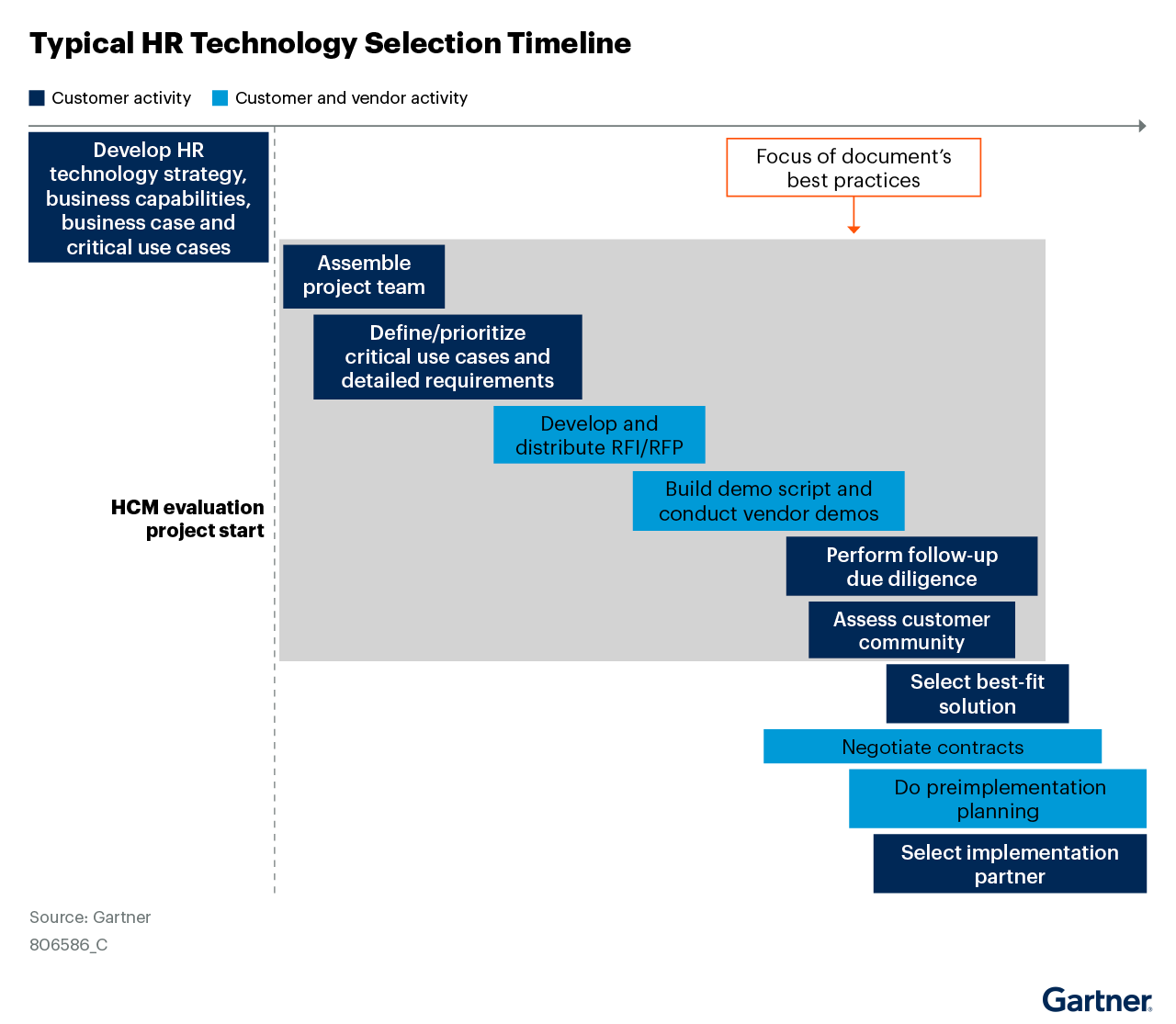
Project teams should budget standard time durations for the project steps on which this document focuses (see Table 1). HR technology leaders can overlap these steps, to shorten the total elapsed time of the project, but may take more time in some steps over others based on organizational complexity and resource availability.
Project Step Duration by Application Type
Project Step | Single-Function Point Solution | Multifunction Point Solution | Multifunction HCM Suite |
Assemble project team | 1-2 weeks | 2-4 weeks | 3-4 weeks |
Define and prioritize critical use cases and detailed requirements | 3-4 weeks | 4-6 weeks | 8-12 weeks |
Develop and distribute RFI/RFP | 2-3 weeks | 3-4 weeks | 4-6 weeks |
Build demo script and conduct vendor demos | 3-4 weeks | 4-6 weeks | 6-8 weeks |
Perform follow-up due diligence | 1-2 weeks | 2-3 weeks | 3-4 weeks |
Scrutinize vendor customer community and check references | 1-2 weeks | 2-4 weeks | 2-4 weeks |
Total range | 11-17 weeks | 17-27 weeks | 26-38 weeks |
Source: Gartner
Incorporating the following recommendations into the selection process will increase the likelihood that:
- Project team members gather all the information needed to ascertain which alternative is best-suited to their organization’s needs as quickly and effectively as possible.
- Both the project team and stakeholders fully understand the estimated costs, benefits and implications of their choice.
Analysis
Ensure Proper Team Resource Mix Across Project Phases
Most HR technology evaluation teams are charged with driving the selection process within a relatively short time period. In addition, they are usually allocated a limited set of resources with which to accomplish a long list of tasks that potentially touch every employee. As a result, HR tech buying teams have the highest number of participants amongst the main enterprise functions (Supply Chain, Finance, Sales, etc.).1 Often, team composition is weighted toward available corporate functional and technical staff over which project executives have direct control. The tendency is to keep the team as small and lean as possible to expedite results. This approach may be faster (as well as initially cheaper), but any speed advantage is often offset by the following issues:
- Requirements in support of the function’s critical use cases are not developed in enough depth to drive sufficiently detailed vendor RFI/RFP responses, or to reveal enough differentiation in solution demos.
- LOB staff (especially those dispersed geographically) are not given a consistent way to communicate local requirements variations and how a new solution will affect their daily operations. This lack of involvement often leads to resistance/lack of adoption when the solution is rolled out enterprisewide.
- HR functional leaders are polarized in their preferences for a certain solution. This conflict is especially common in larger global HCM suite selection projects, where it is difficult to gain consensus on a single solution.
- HR technologies touch most (if not all) of the workforce due to the prevalence of direct-access UX via multiple devices. Expecting the functional and technical members of the project team to “put on their employee hat” or take the perspective of a line manager is insufficient. Team members cannot simply discard their intrinsic knowledge and see things the same way as “typical” line managers and employees do.
These solutions will be broadly deployed throughout the enterprise at great expense, and thus tend to have long life spans. Project teams also tend to underestimate the time needed to gain consensus from stakeholders on which competing internal priorities are highest ranked. Therefore, Gartner clients should reject the temptation to cut corners in the evaluation phase. Instead, staff a somewhat larger team that includes representation across involved geographies and primary user roles, such as:
- HR process owner(s)
- HR system administrator
- HR business partner/generalist
- HR data specialist
- Manager
- Employee (and also contingent workers, if they are a significant part of the workforce)
Leading organizations can achieve the right level of representation without the project team becoming too unwieldy by:
- Selecting regional “leads” who directly participate in the project team. These individuals are charged with representing the needs of a certain number of locations and maintaining communication and feedback throughout the project.
- Including employees and managers representing various worker types (such as field operations, sales and corporate administration), a cross-section of the organization and a variety of on-the-job duties. Designate a smaller subset of employees as regular participants in project-team activities; the remaining “adjunct members” should receive frequent updates from the others. These adjunct members should also attend the vendor demos to provide feedback (particularly on the solution’s UX and AI-enabled features such as HR virtual assistants and AI agents). Project team leaders should resist the temptation to choose only the enthusiastic and tech savvy for team membership. Instead, they should also include laggards and skeptics, as they can become strong advocates if they are involved in the process and can freely express any reservations without recrimination.
- Assigning at least one person (more for larger deployments) to spearhead change management activities as early in the project as possible (preferably at project inception). Early involvement of change management resources enables stakeholders to understand the implications of the critical use cases and supporting detailed requirements sooner. Project teams can then develop mitigation strategies and communication plans earlier in the project, which gives more time for testing and refinement.
- Ensuring internal audit, cybersecurity and data privacy representation, which is a must-have, particularly for global implementations that may involve the transfer/use of employee data across borders. These stakeholders are also critical to helping HRIT assess the implications of emerging technologies, such as applied AI, mobile and hyperautomation, particularly if there are skills or experience gaps in HRIT in these areas. Staff should coordinate with project team regional leads to ensure that relevant work councils are consulted as part of requirements gathering and process definition.
- Allocating IT sourcing/procurement resources to the project at inception. Leading companies start preliminary negotiations with the two or three vendors selected for demo, as that presents the best opportunity for pricing competition.
Typically, the organization will augment the core project team by incorporating additional participants for the vendor demos. Tailoring demo participation represents the best opportunity for stakeholders to witness firsthand how requirements are addressed by the various offerings and provide their unique perspective on each solution (see Figure 2).
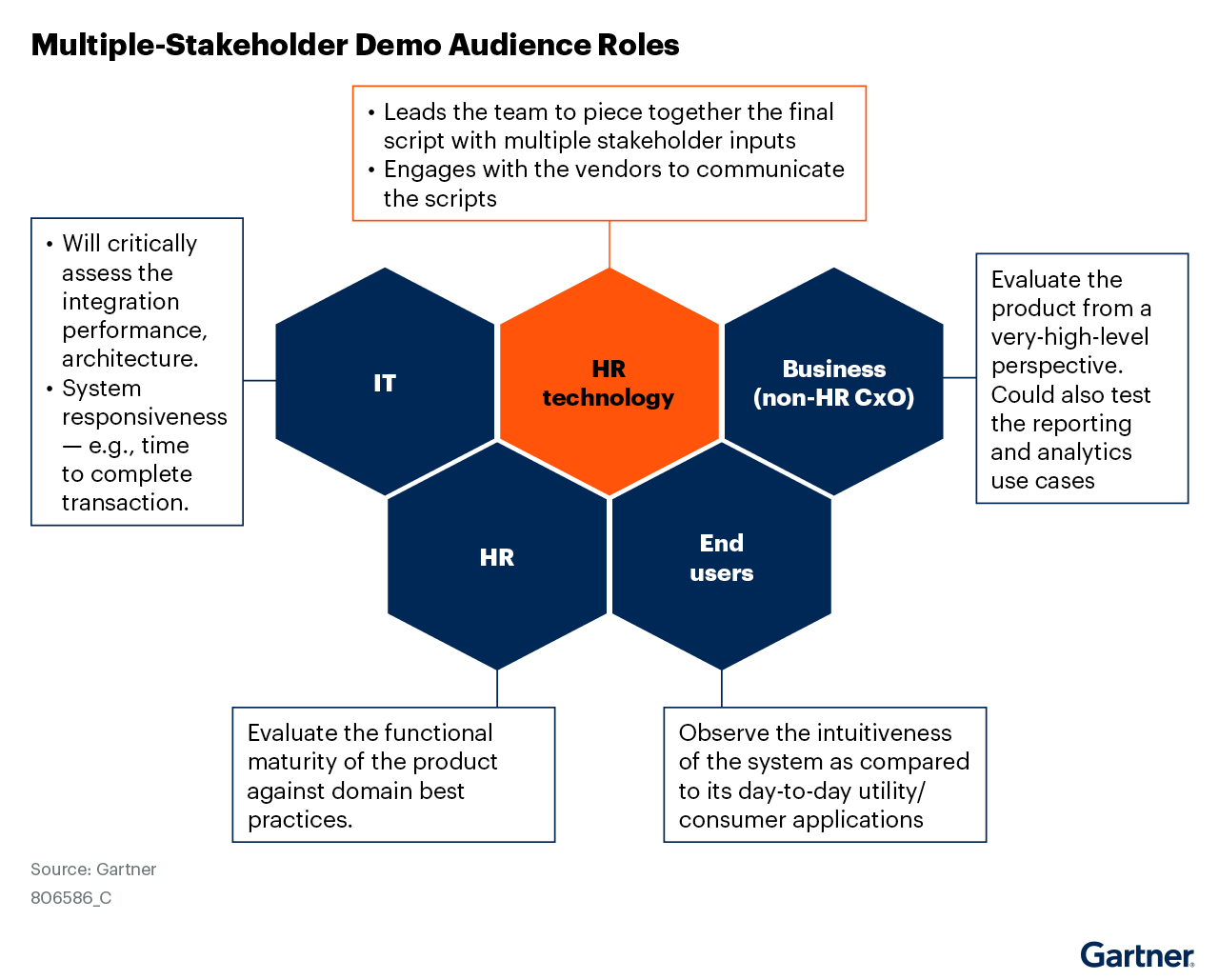
Leading practices for resource participation in vendor demos include:
- Inviting stakeholders from each key business area to attend, at a minimum, the business overview portions of the demo. This expanded access will enable them to gain a high-level understanding of how the new technology will work and benefit the organization.
- Expecting the chief human resources officer (CHRO) to be present for all but the detailed functional sections of the demo. The CHRO is typically accountable for the full HR strategy that the technology being evaluated supports.
- Including participants from other “downstream” systems and processes, including those with specialist knowledge to work through any questions relating to IT, process or data.
- Matching the length of the demo to the breadth of capabilities being assessed; two to four hours may be sufficient to review a single-function point solution, but a multifunction point solution may need six to eight hours of demo time. HCM suite demos often require 12 to 18 hours (spread over two to three days) to adequately cover the main functions desired by the organization.
Use Critical Use Cases to Drive Detailed Requirements
Project teams operating from an updated HR technology strategy should already have the project in the roadmap and documented high-level critical use cases as a part of the strategy development process. These use cases can now support a typical “funnel” that systematically eliminates vendors as the selection project progresses (see Figure 3).
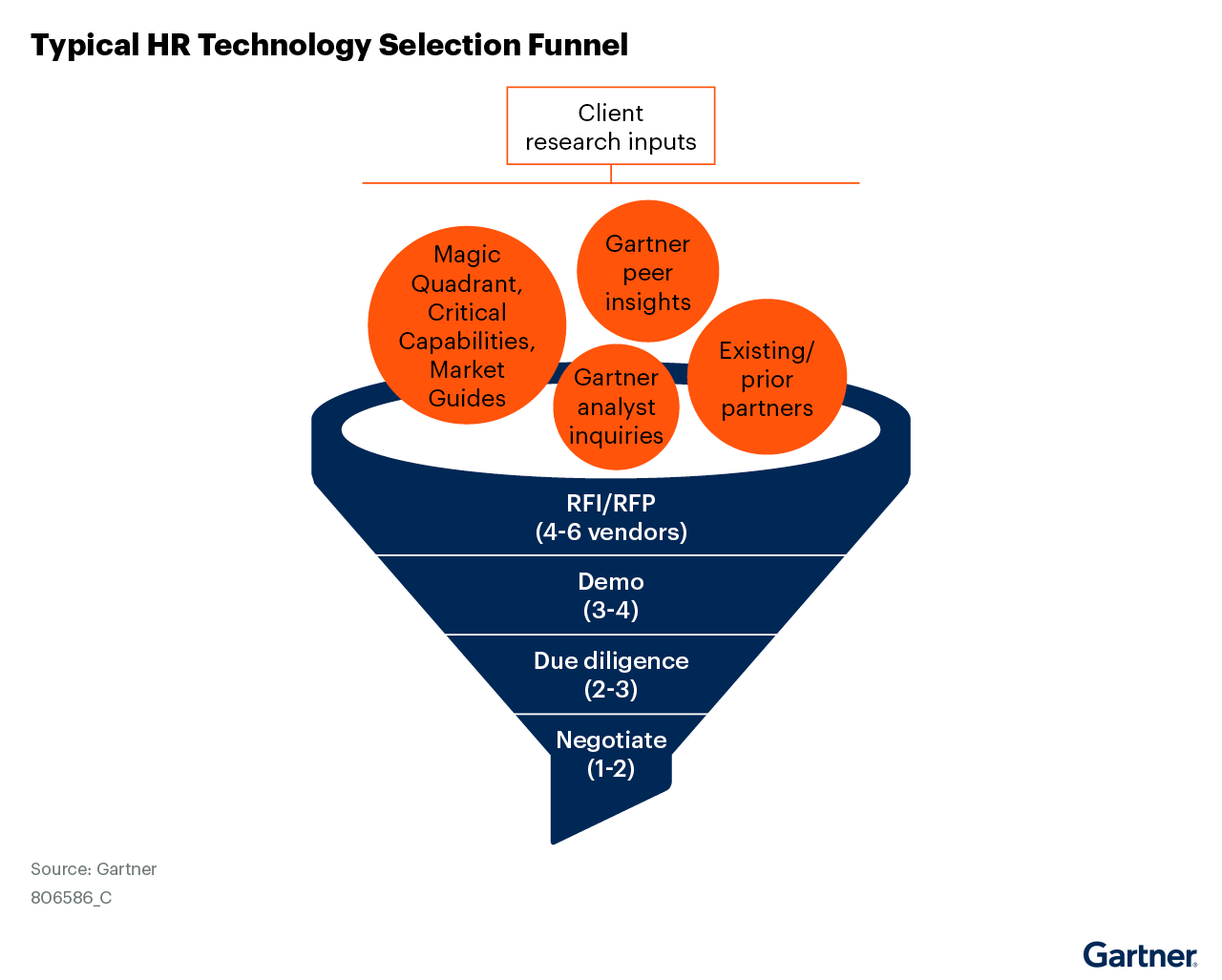
Key to properly managing this funnel is to gain (and maintain) agreement on the ranking of competing internal priorities at a strategic level before getting bogged down in the mass of detailed requirements. Organizations struggling with this issue should consider a business capabilities modeling exercise to drive prioritization (see Toolkit: HR Business Capability Modeling for Technology Strategy for details). These higher-level priorities can then be applied to the weighting of specific use cases and requirements by function (see Tool: RFI/RFP Questions for Selecting HCM Technology for one way to do this).
Clients who haven’t yet developed critical use cases should consider the following categories as options:
- High employee turnover (“churn”) situations in which the focus is on quick and efficient hiring and onboarding, as well as how to retain desired skill sets.
- Managing internal mobility in scenarios in which workers are longer tenured, stay in jobs for a long time and the focus is on promoting from within.
- Attracting and retaining expensive and specialized skill sets in competitive labor markets.
- Coping with industry-specific funding and position management requirements or collectively bargained work rules (common for public sector or heavily represented workforces).
The following two bullets include examples of a critical use case for a retail organization. The first bullet option expresses the critical use case as a challenge, and the second as a vendor demonstration scenario:
- Company X is a large general merchandise retailer with many hourly workers. The organization’s primary goal is to support more flexible scheduling and employee ownership of their schedules.
- Beth works about 25 hours per week in women’s clothing at a Dallas-area Company X, a large general merchandise retailer with locations across the western U.S. On her way to work, she gets a text that a group of friends are planning an out-of-town getaway the Saturday after next. Knowing that the next two-week schedule was posted yesterday, Beth pulls out her smartphone and quickly checks her schedule for that day. Sure enough, she’s scheduled to work from 3 p.m. to 9 p.m. She voice activates the embedded scheduling assistant of her work-schedule app, directing it to send a request to those working a similar shift on the Friday before or Monday after asking for a trade. She knows the assistant will only offer the trade to those workers who have the training and hours available to replace her. Beth crosses her fingers, hoping to get a response within the next few hours so she can RSVP her friends. In the meantime, she enters the store just in time to begin her shift, which triggers a phone notification asking if she is ready to “punch in.” She presses the big “Yes” button, puts her phone in her pocket and gets to work.
The critical use-case concept improves the overall selection process’ effectiveness by:
- Ensuring the project team and stakeholders understand the link between the HCM technology strategy and the selection project.
- Providing a narrative explanation of the processes and functions that are of the highest importance, which helps the vendor become familiar with the organization. Remember that the vendor is also using the RFI/RFP and other documentation to qualify you as a prospect. Therefore, it makes sense to deliver as much information as possible (including requirements priority) to help both sides determine “best fit.”
- Serving as a basis for the development of more detailed requirements to be included in the RFI/RFP and vendor demonstration script.
- Acting as a grouping mechanism to help the project team prioritize functional requirements, as well as serve as a focal point for demo script development and scoring.
The project team should drive the construction of six to 10 critical use cases for each functional area of the solution being evaluated, and use them as follows:
- Build a set of detailed requirements for each critical use case to include in the RFI/RFP distributed to the vendors. Note that some detailed requirements will not fall neatly under any of the defined critical use cases; organize these requirements by function at the project team’s discretion.
- Include the critical use cases themselves in the RFI/RFP as a form of narrative requirement (usually as a top-level or “header” requirement). Then, invite the vendor to respond in narrative form as to how its solution will help you satisfy the use case.
- Make the critical use cases fundamental building blocks of the demo script. This approach is helpful because the vendor must show how its solution satisfies both the functional and UX requirements of each use case.
To reiterate, no one vendor provides best-in-class process support across all HR functions, and project teams may need to evaluate offerings from multiple HR software submarkets. In most cases, organizations will need to make some trade-offs by determining which capabilities need to be excellent versus others that can be “good enough.” Properly categorizing and prioritizing requirements in advance will make the process of gaining consensus easier (see Figure 4 for a high-level example).
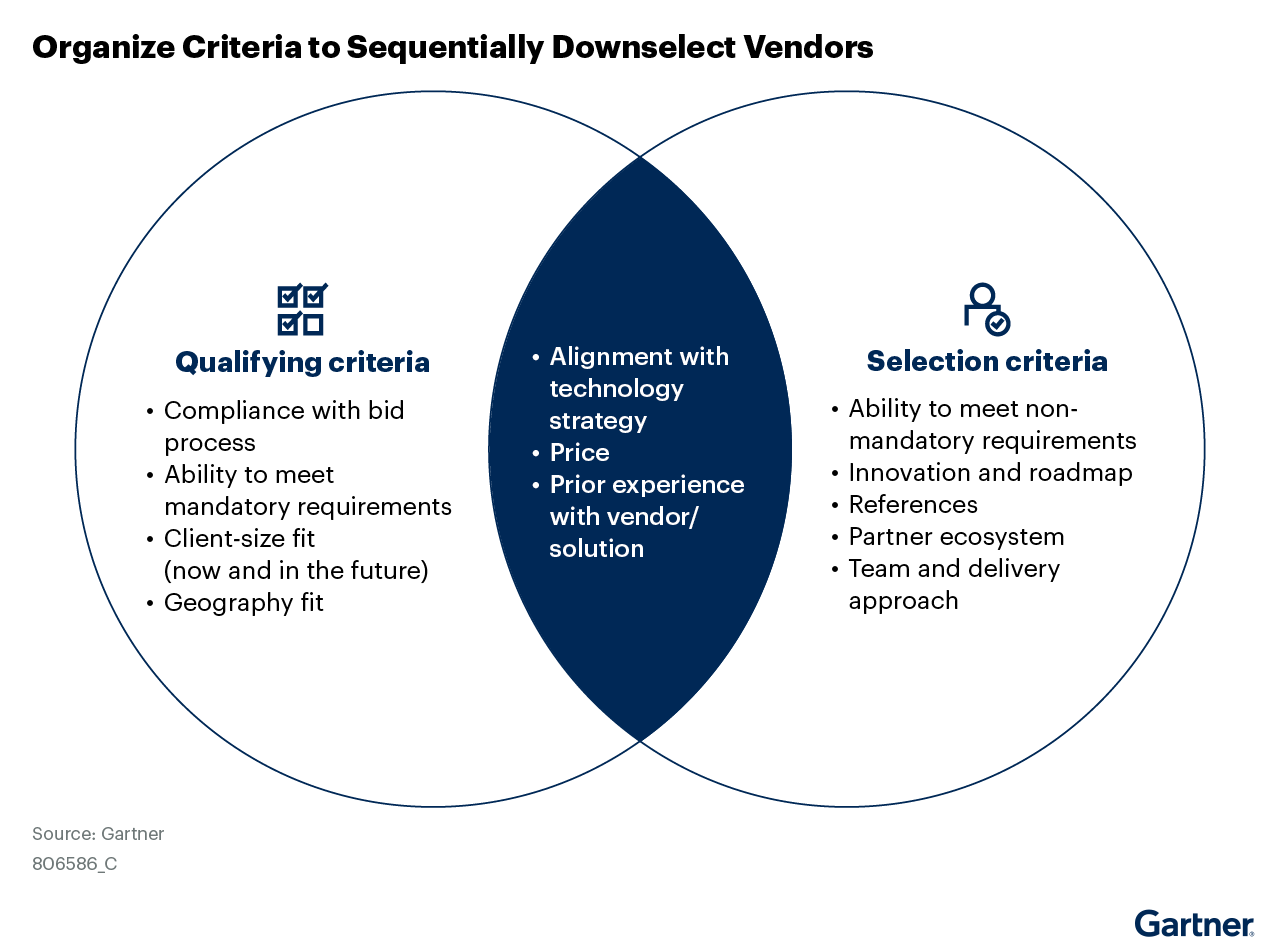
Gartner recommends disclosing requirement priorities to vendors throughout the evaluation process. The more the vendor knows about the prospect’s needs, the better it can effectively qualify the likelihood of making them a happy customer. Project teams should always ask the vendors to highlight and clarify any parts of the demo that have been custom-configured from “as delivered” in any way. They should also clearly understand which vendor solutions (and underlying integrations) are being shown to satisfy a given critical use case. They should repeat these requests for clarification throughout the demo to fully understand the purchase and implementation implications of what they are seeing.
Take Charge of the Demo and Follow-Up Due Diligence Activities
Project teams will typically analyze four to six RFI/RFP responses to pare down to two to four vendors they will invite to demonstrate their solutions. While demo time allocation will always vary by functional scope and organizational scale, project teams almost never have enough time to see every product capability. Therefore, building a focused agenda primarily based on critical use cases is key, as it enables the project team to:
- Ensure the demo addresses your organization’s objectives while keeping it on track, on time and relevant.
- Allocate some time (an hour at most) for the vendor team to highlight its solution’s differentiators. This task is best done in the introduction/overview section early in the demo, so executive stakeholders who may not be present at later sessions can digest this information.
- Build a detailed script for each section of the demo to share with both vendors and attendees, and use as the basis for consistent, apples-to-apples comparisons.
- Include a clear outline of each use case and functionality vendors must demonstrate, grouped by functional area.
- One or more use cases may include organization-specific data the project team wants to see within the context of the vendor application. Send this data, along with the script, at least two weeks prior to the demo date to ensure the vendor has adequate time to prepare.
- Demo attendees charged with evaluating the solutions should receive a separate script version that includes a scoring “checklist” to facilitate an accurate and complete assessment.
Another key to a successful demo process is allocating time for various user roles to “test drive” the application at some point during the evaluation. Options employed by leading organizations include:
- Planning a dedicated session directly after the on-site vendor demo, based on predetermined scenarios and with vendor staff available to answer questions and provide guidance.
- Utilizing a “sandbox” tenant using the sample data provided to the vendor prior to the demo for users to work through scripted scenarios at their own pace. Project teams should lobby for the sandbox to be open for at least two weeks following the demo, with up to 30 days preferred.
- Scheduling a combination of guided and unguided sandbox time.
Regardless of which approach the organization takes, the project team should ensure that all test-drivers provide feedback in the standard scoring format included with the scenarios to ensure evaluation consistency.
The final key to success for demos is to realize there is never enough time allocated during the on-site demo to answer every question. In fact, a demo of the second or third vendor may surface questions not considered during the first vendor demo, thus requiring follow-up. The following notes may be of interest to a subset of the project team, as some vendor resources likely cannot attend the in-person demo:
- Technical reviews of system architecture, configuration tools and extensibility options (particularly if the project team is not familiar with cloud architectures).
- Implementation methodology, timelines and typical resource commitments from vendor, customer and implementation partner (if part of the proposal).
- Customer resources required for ongoing operations and updates. This assessment holds value because project teams often underestimate the number and type of resources needed to maintain SaaS applications compared with traditional on-premises software (see HCM Technology Governance Essentials: Realism, Collaboration and Planning).
Therefore, the conclusion of each vendor demo should include a debrief with the attendees during which the project team can collect initial impressions, questions and discussion items for follow-up. Be sure the project plan includes at least a week (two or more may be needed) to execute these follow-up sessions. Project team leaders will find it wise to preschedule two or three, 60-minute time slots with each vendor to minimize scheduling issues. They should encourage all those participating in these sessions to continue to ask questions if the initial response from the vendor seems incomplete or opaque. Detailed follow-ups are important because a question sometimes needs to be asked “five levels deep” in order to get a sufficiently granular answer for the prospect’s specific situation.
Scrutinize the Prospective Solution’s Customer Community
Most project teams require prospective vendors to provide customer references as part of the selection process. This critical step enables the project team to validate the fit of the solution with (ideally) customers with a similar scope, industry and geographic footprint. It also enables discussion of critical use cases with “real world” reference customers. However, the final piece of the selection puzzle goes beyond individual references to evaluate the effectiveness of the application’s customer community. This evaluation is often undervalued by Gartner clients, particularly those who have had limited experience with cloud HR technologies. Unlike on-premises HR applications where environments can be highly customized, the more standardized nature of cloud solutions means that customers can leverage shared knowledge. Customer communities offer customers a centralized product information/interaction hub to help strengthen product knowledge, maximize usage and (optimally) influence product direction. When considering a cloud HR solution, customer community effectiveness should definitely be included in your selection criteria and assessed as part of the evaluation process.
A robust customer community is a win-win for both customers and vendors by delivering the following value:
- Vendors gain cost and efficiency benefits by not having to address repetitive customer service queries and enhancement requests on a one-off basis.
- Vendors can aggregate data to deliver alerts and recommendations to customers based on their use of specific modules and functions.
- Customers can review product/service documentation, share problems and workarounds, ask questions, and find answers, tricks and tips (either from other customers or vendor support teams).
- Customers can collaborate with peer users to share knowledge, make recommendations, participate in discussion boards and gain insight.
- Customers can provide feedback that drives new features (innovation on demand), and in many cases can “vote” to influence the priority of a given enhancement.
Many customers have technically “joined” the solution’s community, but organizations may find it difficult to assess the full value it delivers to the customer base. Leading organizations evaluate a customer community’s effectiveness by requesting the following in the RFI/RFP:
- Data from the vendor that outlines the number of online community customers, the trajectory at which it is growing and the extent of regular/ongoing usage.
- Metrics that disclose the number and regularity of documents the vendor uploads to the community (often called an online library).
- An outline of the vendor’s methodology for receiving and categorizing customer input on product fixes and enhancements. This information should include a general sense of how many customers need to support an idea for it to become part of the product in a future update.
- A summary of at least the past three years of product updates, which indicates how many enhancement suggestions were posted by customers, percentage considered by product management, percentage voted on by customers and percentage of feature enhancements influenced by community feedback.
- Existing customer references you can contact directly for an unbiased assessment of the customer community, and any user groups they may participate in. This option can be especially powerful when done in concert with an invitation to the vendor’s user conference, which enables in-person “live” interaction with many customers.
- Description of other opportunities to influence product design, such as focus/feedback groups at user conferences, UX testing and product advisory boards.
Incorporating these leading practices into the project team’s plan will significantly increase the likelihood that the project team has done its proper due diligence. Teams are much more likely to have a clear and objective view of the pros, cons and implications of each solution they evaluate. Organizations know it is difficult (if not impossible) to eliminate all bias from a solution selection. However, the project team will have the right data to proceed with weighing trade-offs and building stakeholder consensus on which solution is the best fit for the organization.
1 2025 Gartner Business Buyer Survey. This survey sought to understand how functional business units (customer service, finance, human resources, marketing, sales and supply chain management) within organizations approach large-scale software purchases to support their business function. The survey was conducted online from October through December 2024 among 3,068 respondents from organizations with annual revenue of at least $50 million or equivalent from North America (36%), Western Europe (32%), Asia/Pacific (19%) and Southern Europe (13%). Industries surveyed include education providers, energy, financial services, government, healthcare, health payer, technology, telecom, insurance, manufacturing, natural resources, retail, transportation and utilities. Qualified respondents were at manager level or higher, and had been actively involved in the purchasing process for the most impactful software capabilities for their respective functional business units during 2023 or 2024. Software purchases were either new, replacement or expansion purchases. Disclaimer: The results of this survey do not represent global findings or the market as a whole, but reflect the sentiments of the respondents and companies surveyed.
This analysis is based on analyst experience while working with Gartner clients and other innovative organizations. It is also based on analyst discussions and numerous dialogues with major industry participants.