3 Steps to Manage Exposure for Oracle Java SE Licensing
21 January 2025 - ID G00825742 - 40 min read
By Anne Thomas, Melanie Alexander, and 2 more
Oracle requires a commercial subscription to obtain critical updates for Oracle JDK 8, 11 and 17, exposing many organizations to substantial annual fees. This research will help sourcing, procurement and vendor management leaders identify the best way to mitigate costs and risks.
Overview
Key Findings
- Oracle uses different licensing models for its Java Platform, Standard Edition (Java SE) products, and many users are confused about whether they can use Java free of charge or need to purchase an Oracle Java SE subscription.
- Oracle revised its default subscription model in January 2023 to use an employee-based metric. Users question whether they will be required to use the new model versus the legacy model and how to prepare for negotiations.
- Most organizations could use less costly third-party Java SE products instead of Oracle Java SE. However, doing so may require renegotiation of support agreements with application vendors.
Recommendations
Sourcing, procurement and vendor management (SPVM) leaders contracting for Oracle Java SE software products should:
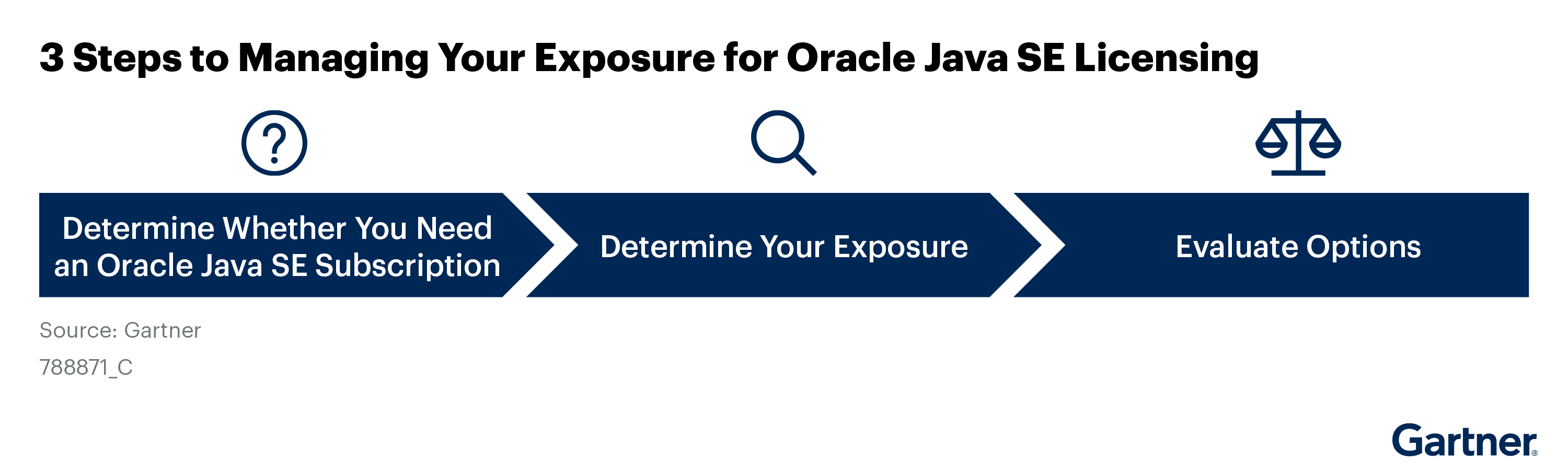
- Establish whether they must purchase an Oracle Java SE subscription by defining all scenarios that require it.
- Determine the exposure level and prepare detailed documentation to support the licensing negotiations by working with application and operations leaders to inventory past, current and planned use of Oracle Java SE.
- Evaluate available options by assessing the organization’s appetite to move Java workloads to Oracle Cloud Infrastructure, migrate to Java 21 or switch to a third-party Java product.
Strategic Planning Assumptions
By 2026, more than 20% of organizations using Java applications will be audited by Oracle, leading to unbudgeted noncompliance fees.
By 2026, more than 30% of organizations using Java applications won’t be compliant with their Oracle contracts.
By October 2026, fewer than 3% of commercial Java applications will run on Java 25, which will be the only free, long-term support (LTS) release supported by Oracle.
By 2026, fewer than 20% of Java applications will still require Java 8, down from 30% in 2024.
By 2026, more than 90% of Java applications will be deployed on third-party Java runtimes, up from 80% in 2024.
Introduction
Oracle has made three licensing changes since 2019 for its commercial Java Platform, Standard Edition (Java SE) products:
- The first licensing change became effective in April 2019, requiring users to purchase an annual subscription to obtain critical security patches for all versions of Oracle’s commercial Java SE products used for production workloads.1 At that time, the subscription requirement applied to the Java runtime environment (JRE) for Java 7, 8 and 11. Oracle stopped producing updates for Java 7 in 2022.
- The second licensing change was introduced in September 2021, when Oracle released Java 17. Oracle now offers a no-fee terms and conditions (NFTC) license with free quarterly updates for three years — but only for the latest long-term support (LTS) release, which is currently Java 21. The next LTS release will be Java 25, scheduled for September 2025. The NFTC license does not apply to previous LTS releases — that is, Java 8 and 11, and it no longer applies to Java 17.2
- The third licensing change became effective in January 2023, when Oracle changed its Java SE subscription licensing metrics from Named User Plus (NUP) and Processor to a single Employee metric.3 This metric change often generates a significantly higher annual fee for large organizations, which should expect annual subscription fees of well over $1 million.
Since Oracle began aggressively encouraging customers to sign up for the subscription, many customers have opted to replace Oracle Java with one of the free third-party alternatives. The NFTC license has some clients contemplating upgrading all applications to Java 21 instead — although this option involves a significant amount of work and often isn’t feasible for commercial applications.
Gartner has fielded hundreds of client inquiries since 2019 regarding these licensing changes. Questions that were raised include:
- Is a subscription required?
- How much will it cost?
- Is a shift to the new Employee metric required?
- How can we manage the exposure?
- What are the alternatives?
- Can we avoid the annual subscription fees by upgrading to Java 21?
For the near future, the answer to that last question is almost certainly “no.” Very few organizations are in a position to migrate all their applications to Java 21. Also, continued use of the NFTC license would require another significant migration to move all applications to Java 25 by September 2026 or lose access to updates.
In this research, we provide a three-step framework to help sourcing, procurement and vendor management (SPVM) leaders determine whether they need an Oracle Java SE subscription. We then help them prepare to negotiate a contract with Oracle for the subscription (see Figure 1). Also, this research provides insights to answer the questions raised in Gartner inquiries.
Analysis
Establish Scenarios That Require an Oracle Java SE Subscription
The first step in managing your exposure is to determine what scenarios require an Oracle Java SE subscription. The practical output to the “what is required” question for any given organization depends on which Java products you use. However, you must begin by establishing how relevant products are licensed, which can later be reconciled against which products have been downloaded and deployed into your environment.
If anyone in your organization has downloaded any Oracle Java SE updates since April 2019, you probably need a subscription — and you may have a compliance risk. You may determine that you want an Oracle Java SE subscription if you want a commercial support agreement, particularly if you are using a very old or new release of Java, such as Java 7 or 21.
If you use Oracle Java SE runtimes, you probably need an Oracle Java SE subscription.
Oracle’s commercial Java SE products are called Oracle JDK, which distinguishes the commercial products from the open-source reference implementation, OpenJDK (see Note 1). OpenJDK is free, but updates from Oracle are available only for the latest release. Oracle JDK typically requires a support subscription for production workloads. Oracle provides quarterly updates for the current and long-term support (LTS) releases, including Java 8, 11, 17 and 21.
The Oracle JDK products include the Java development kit (JDK) and the Java runtime environment (JRE). The subscription licensing requirement applies to the runtime environment. You are not required to purchase a subscription for development, testing and demonstration activities. However, developers often use production development tooling as part of their work and, therefore, typically must be licensed.
Oracle has different licensing requirements for different releases of Oracle JDK. See Note 2 for more specific information about these releases and their licensing requirements.
Java 17 and Later Releases
Starting in September 2021 with the release of Oracle JDK 17, Oracle began licensing new releases under the NFTC license.4 Oracle allows free use of these releases and will provide free updates for LTS releases until one year after the next LTS release. New LTS releases are published every two years. For example, Oracle provided free updates for Oracle JDK 17 until September 2024 and will provide free updates for Oracle JDK 21 until September 2026.5
Future Java 17 Updates, Java 11 and Java 8 Updates Since April 2019
The NFTC license has expired for Oracle JDK 17, and all releases starting with Oracle JDK 17.0.12, released in October 2024, are licensed under the Oracle Technology Network (OTN) license agreement for Java SE. Oracle also licenses Oracle JDK 11 and all quarterly updates for Oracle JDK 8 that have been released since April 2019 under the OTN license. The OTN allows free use for development and testing but requires the purchase of an Oracle Java SE subscription for production workloads.6 The first Oracle JDK 8 update that requires a subscription is JDK 8u211. All releases of Oracle JDK 11 require a subscription.
Java 8 Updates Before April 2019
Oracle previously licensed Oracle JDK 8 under the Oracle Binary Code License (BCL) agreement, which was free to use, with some exceptions.7 Oracle provided free quarterly updates until January 2019. The last free Oracle JDK 8 update was JDK 8u202, released in January 2019.
As of October 2024, Oracle has released 213 security patches since the last free update.8
Bundled Oracle JDK Licenses
Oracle includes a restricted-use license to use Oracle JDK with all licensed Oracle applications and middleware that require Java — although that license applies exclusively to Oracle applications. The bundled license applies to applications running on Oracle Fusion Middleware and Oracle’s stand-alone middleware products. Oracle also includes a restricted-use license for all releases of Oracle JDK for software deployed on Oracle Cloud Infrastructure (OCI) and a restricted-use license for Oracle JDK 8 for software deployed on Oracle Private Cloud Appliance (PCA). A handful of third-party vendors have redistribution agreements with Oracle and provide a restricted-use license to use Oracle JDK exclusively with their products.9,10
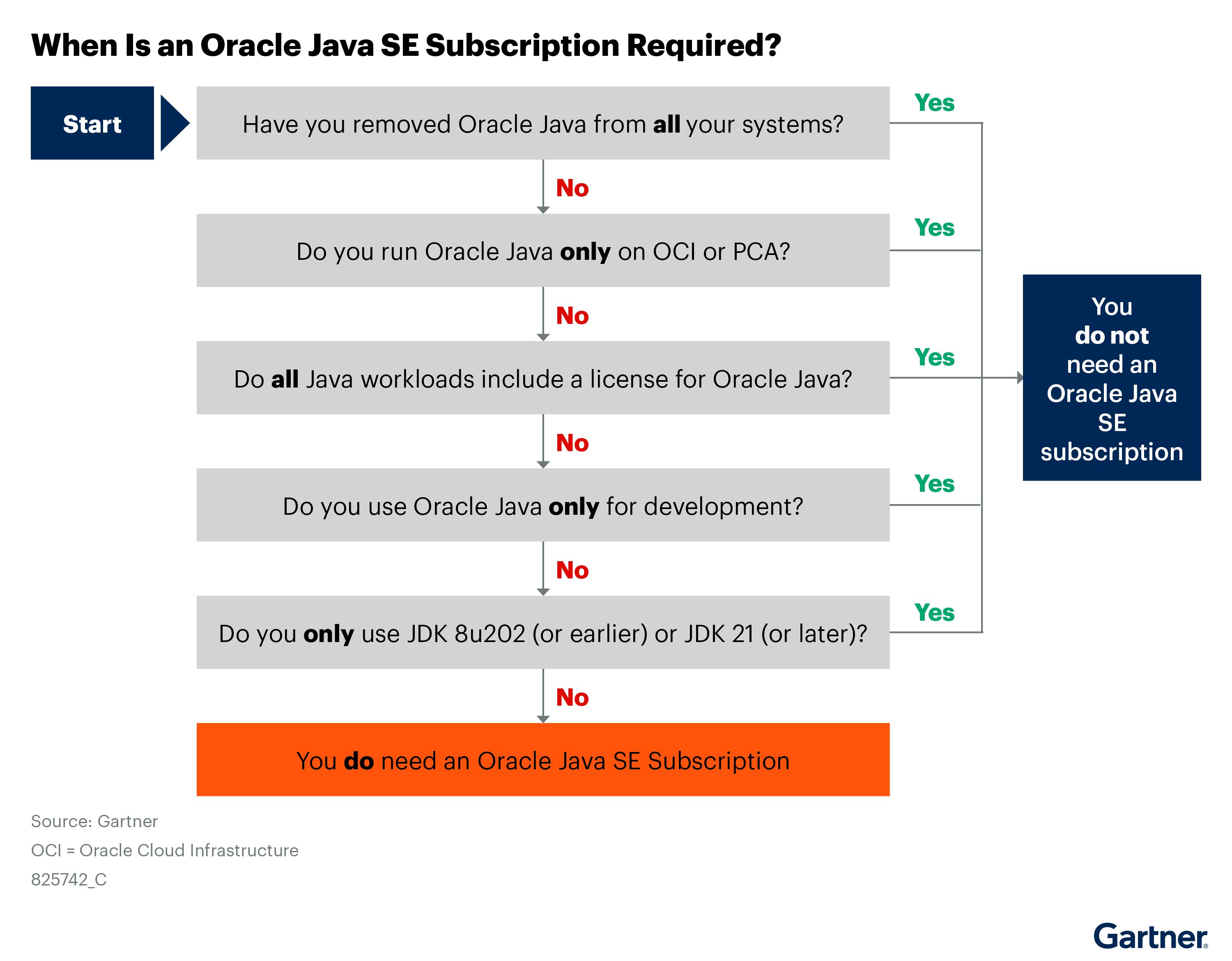
The best way to eliminate your need to purchase an Oracle Java SE subscription is not to use Oracle JDK. If you use Oracle JDK (even if you have bundled licenses) or if anyone in your organization has downloaded a Java update since April 2019, Oracle will pressure you to purchase a subscription. The exceptions that allow free use of Oracle JDK include:
- Running Java workloads on OCI or PCA
- Running Java applications that include a bundled license to use Oracle JDK
- Using Oracle JDK for development use only
- Using Oracle JDK 8 versions released before April 2019 — JDK 8u202 or an earlier version
- Using Oracle JDK 17 versions released before October 2024
- Using Oracle JDK 21 or a later release
If you have any Java applications that use Oracle JDK and aren’t included in this exceptions list, then Oracle requires you to purchase an Oracle Java SE subscription.
Figure 2 provides a decision tree to help you determine when an Oracle Java SE subscription is required.
Inventory Oracle Java SE to Determine Your Exposure
Start your preparation for negotiations by creating an inventory of your current usage (see Figure 3). To determine your exposure, you must understand where you have Oracle JDK deployed, which applications are using it, which versions of Oracle JDK those applications are using and whether you are using Oracle JDK for development or production use.
Work with your software asset management (SAM) function, applications and operations leaders to create this inventory. If possible, your documentation should show evidence of when the software was deployed or removed. Don’t regard this inventory process as a single-point-in-time exercise. You will need to regularly maintain the inventory to ensure compliance.
If you currently have an Oracle Java SE subscription, you can use the Oracle Java Management Service (JMS) to create your inventory. Oracle states that it does not have access to the data collected by this service. If you don’t have a current subscription, you can identify where Java is deployed by using a SAM tool, SAM managed services provider or an endpoint management tool.
For more information regarding these tools, see Market Guide for Software Asset Management Tools, Magic Quadrant for Software Asset Management Managed Services and Magic Quadrant for Unified Endpoint Management Tools.
You can also analyze your application and server configurations. If you don’t have SAM tooling, you may need to identify Java installations by searching for filenames. There’s no definitive method to identify the applications that use Oracle JDK without the Oracle JMS.
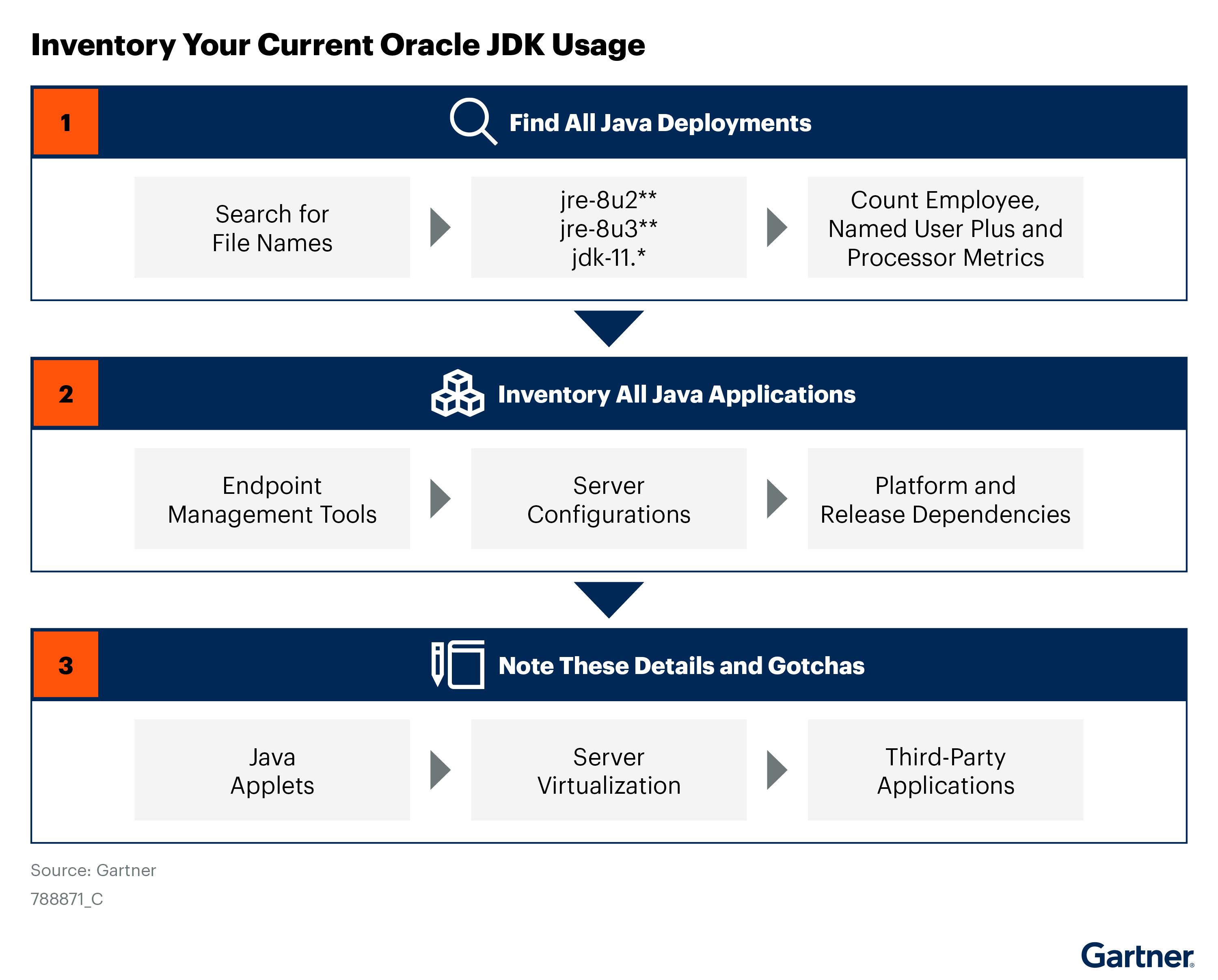
Capture specific details about your Java applications:
- Java applets: Do you have any web applications that contain Java applets? The Java Plug-In that supports applets is proprietary software in Oracle JDK 8, and it’s not included in the open-source OpenJDK codebase. You must deploy Oracle JDK on each desktop that accesses an applet application. Note that applets can run only in Microsoft Edge in Internet Explorer mode. You should prioritize the modernization of these applications.
- Server virtualization: Do you use a virtualization system other than Oracle Linux Virtualization Manager? If so, Oracle typically requires you to count every physical core in the virtualization estate to calculate the Processor license count, regardless of the number of virtual cores running Oracle JDK or the number of applications using Java.11
- Third-party applications: In the past, many application vendors would bundle Oracle JDK with their products. The 2019 licensing change prohibits third parties from distributing Oracle JDK 8 and 11 unless they obtain a redistribution agreement. The NFTC license allows redistribution of Oracle JDK in free software, but for-fee software vendors must also obtain a redistribution agreement. Only a handful of vendors have secured this type of redistribution agreement. Some application vendors now distribute one of the third-party OpenJDK products, while others make Java the SPVM leader’s responsibility. Check with your application vendors to determine what their Java licensing position is. You may need to renegotiate your support agreements to ensure support for a third-party Java product.
If you are running Oracle JDK, it is your responsibility to ensure that you are properly licensed, even if the product was installed via a third-party application.
Calculate Your Annual Subscription Fees
Oracle revised its subscription model in January 2023. The current Oracle Java SE Universal Subscription is sold under an Employee metric, which requires licensing all employees in an organization, regardless of whether they are using Oracle JDK. Employees are defined as full-time, part-time and temporary, including all agents, contractors, outsourcers and consultants that support your internal business operations. See Note 3 for Oracle’s definition of the Employee metric and the legacy licensing metrics: Processor and NUP.
The list price for an Employee license is $15 per month, with published tiered discount pricing rates.12 Oracle prefers to offer the subscription in annual increments and often offers better terms for multiyear contracts (see Note 4). The subscription covers usage across desktops, servers, containers and third-party cloud deployments — although it imposes a limit of 50,000 licensed processors (see Note 3). Desktops and laptops are excluded from the processor calculation. Organizations that exceed that limit must obtain supplemental Processor licenses. Oracle does not publish a price list for these supplemental Processor licenses.
Before January 2023, Oracle offered two separate Oracle Java SE subscriptions — one for desktops and the other for servers. Subscribers were required to purchase both subscriptions if they deployed Oracle JDK on desktops and servers. Although Oracle no longer offers the legacy subscription model to new customers, existing customers can renew under the legacy terms. Oracle no longer publishes the price list for the legacy model, and prices may vary (see Note 5):
- The Oracle Java SE Desktop Subscription was sold under the NUP metric (see Note 3). It requires licensing all users permitted to access a physical desktop or Amazon WorkSpace with Oracle JDK installed. Virtual desktops are licensed via the server subscription. The list price for an NUP license was $2.50 per month, with defined tiered discount pricing rates.
- The Oracle Java SE Subscription was sold under the Processor metric (see Note 3). It requires licensing all physical cores where Oracle JDK is or may be installed or executed. Using server virtualization typically requires licensing every physical core of the physical hosts in your virtualization estate. The list price for a Processor license was $25 per month, with defined tiered discount pricing rates. The discount rates for the Oracle Java SE Desktop Subscription and the Oracle Java SE Subscription were calculated separately.
When preparing for a negotiation, you should calculate the subscription cost using both the old and new metrics.
The legacy subscription model required clients to conduct extensive inventories to determine where Oracle JDK was deployed and to count all desktop NUPs and server processors. The new subscription model is supposedly simpler because you only need to count employees. However, counting agents, contractors, outsourcers and consultants can also be a burden. Large organizations will still need to calculate Processor license requirements because of the processor cap.
Many clients are not happy with the simplicity-versus-price trade-off. Organizations with few employees will benefit from the new subscription model. However, most clients that Gartner has spoken to since the subscription model change indicate that the new subscription model is two to five times more expensive than the legacy model.13 Regardless of which subscription model you choose, you should prepare detailed documentation about where and how you use Oracle JDK.
If you use server virtualization, you may be able to reduce your processor count by creating an isolated cluster partition that doesn’t share any compute, storage or networking with other clusters. This partitioning can reduce subscription fees for organizations purchasing the legacy Oracle Java SE subscription or those purchasing the Oracle Java SE Universal subscription if they have more than 50,000 Processors (see Note 6). Oracle approves partitioning on a case-by-case basis. Most clients tell Gartner the isolation requirements are untenable. Also, the approval becomes invalid and must be renegotiated if any changes are made to the documented environment.13
Oracle Vigorously Pursues License Compliance
According to Gartner client interactions, Oracle actively targets organizations on Java compliance — with existing Oracle customers and companies without other Oracle products — and deploys its global Java licensing team to enforce compliance.14 However, most of this activity is in the form of compliance tactics and threats versus official audits. For example, Oracle may notify clients of Java licensing changes or compliance issues and request time to discuss the matter.
Under the legacy Oracle Java SE subscription, clients may be asked to provide Java deployment information, run Oracle scripts or provide hypervisor environment specifics. Under the Oracle Java SE Universal Subscription, Oracle may assert compliance issues based on publicly available employee counts.14 Oracle has emphasized strong growth rates in Java, which could be an incentive for continued monetization of Java compliance.15,16 If no official audit or compliance review letter has been provided, validate your information-sharing obligations in the applicable Oracle agreement. Treat soft audits as you would an official audit. If Oracle has contacted you about Java, see Avoid These Licensing and Pricing Pitfalls When Negotiating Oracle Deals.
Evaluate Your Options
Now that you have a sense of what an Oracle Java SE subscription will cost, you need to decide what to do. Your options are:
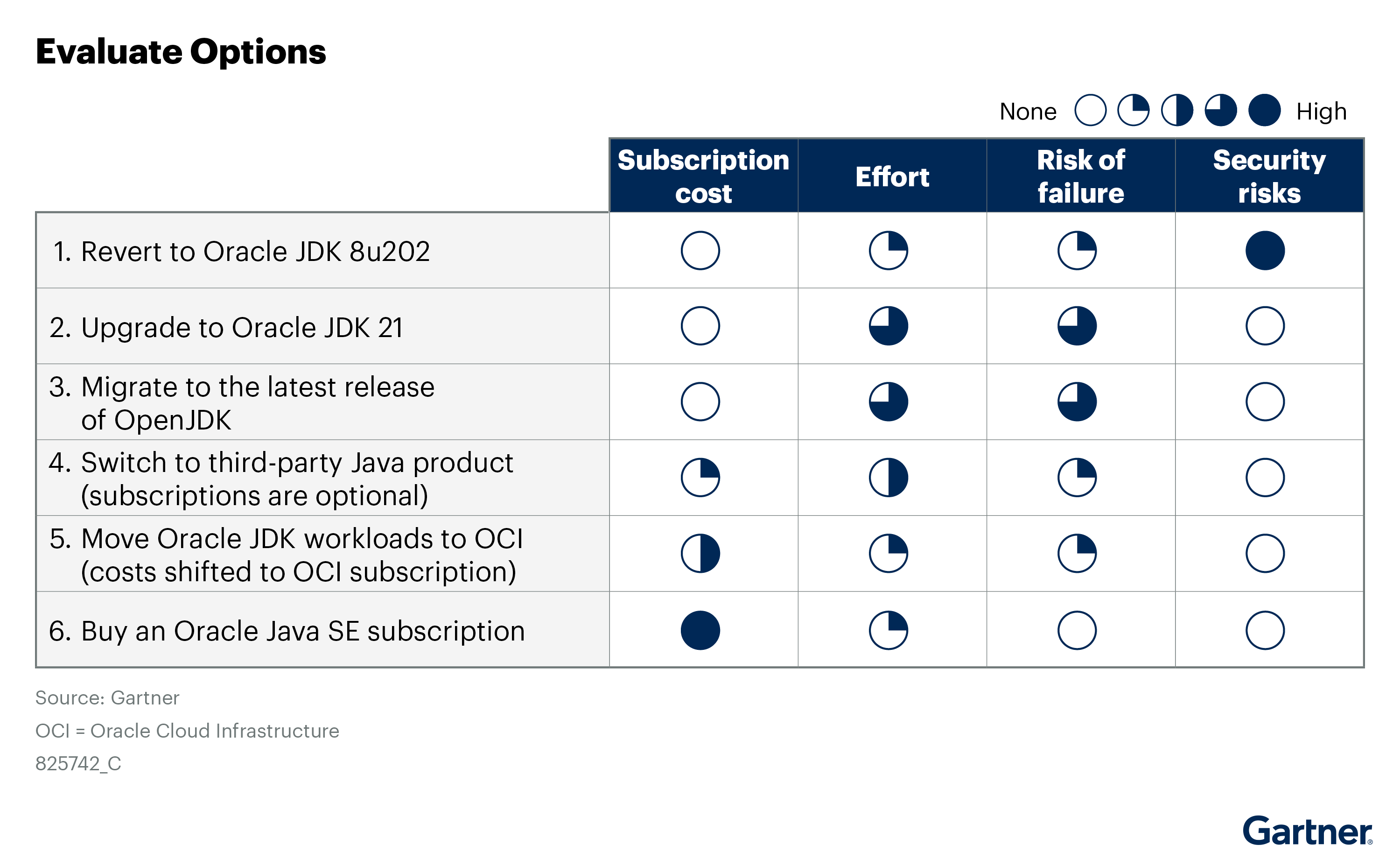
- Revert to the last free update — that is, JDK 8u202. This option is simple, inexpensive and very risky.
- Upgrade to free-to-use Oracle JDK 21. This option requires a significant amount of software engineering work, and it’s unlikely that you will be able to upgrade all your applications.
- Upgrade and migrate to the latest release of OpenJDK. This option requires a significant amount of software engineering work, and it’s unlikely that you will be able to upgrade all your applications.
- Switch to a third-party Java product. This option requires a bit of testing but, generally, no reprogramming, and it is quite viable.
- Move all your Oracle JDK workloads to OCI or PCA. This option requires porting, configuration and testing. Still, it is quite viable.
- Purchase an Oracle Java SE subscription. This option is simple but expensive.
You can implement a combination of these options. For example, you can switch most workloads to a third-party Java product and move all remaining workloads to OCI. However, to avoid purchasing an Oracle Java SE subscription, you must ensure that you have removed all unlicensed Oracle JDK workloads from non-OCI or PCA systems.
Suppose you have a mix of licensed Oracle JDK workloads and other Java applications using a third-party OpenJDK running in the same virtualization estate. In that case, Oracle may assert that other Java applications could use Oracle JDK — and, therefore, must be licensed. If you are in this situation, you will either need to fully isolate the Oracle JDK cluster from other applications or deploy all Oracle JDK workloads to OCI to avoid purchasing an Oracle Java SE subscription (see Note 6).
If you have just one unlicensed application using Oracle JDK, you must purchase an Oracle Java SE subscription.
Figure 4 illustrates critical criteria for the available options.
Option 1: Reverting to the Last Free Update
This option is very risky. It has no subscription fees and requires modest effort by the organization to remove all deployments of Oracle JDK after JDK 8u202. However, your chief information security officer (CISO) should veto this option. As of the October 2024 update, the OpenJDK project has fixed 213 critical bugs and security vulnerabilities since JDK 8u202, which was released in January 2019. Nearly all these vulnerabilities can be exploited over a network without authentication. Also, there’s a risk that some application vendors won’t support their products on this vulnerable release.
This option should be used only as a short-term solution while implementing an alternative solution. To mitigate the risk, consider deploying a virtual patching system. However, virtual patching will impact performance.
Option 2: Upgrading to Free-to-Use Oracle JDK 21
Upgrading to Oracle JDK 21 could eliminate the requirement to purchase an Oracle Java SE subscription, but it requires a significant amount of time and effort to upgrade your applications so they can run on JDK 21. You will probably need to purchase an Oracle Java SE subscription while you implement the upgrades. The amount of effort depends on how many applications you have, which versions those applications use now and whether those applications are homegrown or purchased. An upgrade from JDK 8 to JDK 21 requires source code modifications and comprehensive testing. If you have purchased applications, your vendors will probably require you to upgrade them to the latest versions to get support for JDK 21. Also, there’s a risk that some application vendors don’t yet support their products on JDK 21.
Also, this option requires frequent future upgrades. You will need to upgrade to Java 25 by October 2026 to continue to get free quarterly updates. You may discover that you will need to upgrade to JDK 25 before you’ve completed the upgrade to JDK 21.
Upgrading to free-to-use Oracle JDK 21 requires significant software engineering work and probably isn’t a viable option for eliminating the requirement for an Oracle Java SE subscription in the short term. It may be a reasonable long-term solution if you are prepared to implement a continuous upgrade practice.
Option 3: Upgrading and Migrating to the Latest Release of OpenJDK
Upgrading your applications to the latest release of Java (currently JDK 23) and then migrating to OpenJDK could eliminate the requirement to purchase an Oracle Java SE subscription, but it requires even more time and effort than Option 2. In addition to upgrading all applications so they can run on JDK 23, you will need to remove all copies of Oracle JDK from your environment and replace them with the OpenJDK distribution. You will probably need to purchase an Oracle Java SE subscription while you implement the upgrades and migrations.
As with Option 2, the effort required to implement the upgrades depends on how many applications you have, which versions those applications use now, and whether those applications are homegrown or purchased. This option is less viable than Option 2 if you use purchased applications, because application vendors rarely support their application on short-term releases of Java.
This option also requires frequent future upgrades. You will need to upgrade to the next release of Java every six months. (OpenJDK 24 will be released in March 2025.)
Upgrading and migrating to the latest release of OpenJDK requires significant software engineering work, and it probably isn’t a viable option for eliminating the requirement for an Oracle Java SE subscription in the short term. This option is only viable if you have only homegrown applications and have implemented a continuous upgrade practice.
Option 4: Switching to a Third-Party Java Product
One popular alternative to purchasing an Oracle Java SE subscription is switching to a third-party Java product. It’s highly unlikely that you would be able to migrate all your Java applications to Java 21, but it’s relatively easy to switch to a third-party Java product of the same release. You must remove Oracle JDK from all your desktops and servers and replace it with a third-party Java product to avoid buying an Oracle Java SE subscription. Individual applications can use different JDKs.
Third-party Java products are based on the same source code as Oracle JDK — that is, OpenJDK. For the most part, these third-party Java products are drop-in replacements for Oracle JDK — although you should test your applications before making the switch. Most OpenJDK vendors support Java 8, 11, 17 and 21. Azul Platform also supports Java 6 and 7. All third-party OpenJDK products and quarterly updates are free. Some vendors also offer paid support subscription services (see Note 7). For more information about switching to third-party Java products, see Choosing a Java Runtime.
Two restrictions may limit your ability to use a third-party OpenJDK product:
- One or more of your Java application vendors may stipulate that you must use Oracle JDK to conform to their support agreement. You may need to renegotiate your support contracts to ensure support for third-party Java products.
- OpenJDK products do not support Java applets. If you have web applications that use applets, these applications require Oracle JDK on the desktop. Note that browser support for applets ended in June 2022. Applet applications can be converted into Java Web Start desktop applications, and most third-party Java products include a compatible implementation of Java Web Start. Applets can also be converted into WebAssembly components that run natively in a browser. Because applets are no longer supported, you should schedule those applications to be converted or modernized as soon as possible.
Free third-party Java products include:
- Azul Platform — Commercial support subscriptions are available.
- Eclipse Adoptium Temurin — Commercial support subscriptions are available from multiple vendors.
- IBM Semeru Runtimes — Commercial support subscriptions are available.
- Microsoft Build of OpenJDK — Commercial support subscriptions are available to Microsoft Azure customers with active Azure support plans.
- OpenLogic Build of OpenJDK — Commercial support subscriptions are available.
- Red Hat build of OpenJDK — Available only to Red Hat customers. Red Hat includes a commercial support subscription for the Red Hat Enterprise Linux (RHEL) OpenJDK distribution with an RHEL subscription. Also, Red Hat includes a commercial support subscription for its Windows OpenJDK distribution with Red Hat middleware products. For use with non-Red Hat products, Red Hat requires a separate commercial subscription for Windows distribution.
All these products can support third-party and homegrown applications. The most popular third-party Java products are Eclipse Temurin, Amazon Corretto and Azul Platform.17, 18, 19, 20 IBM Semeru Runtimes and Red Hat build of OpenJDK are good alternatives if you use their OS, middleware or applications. Azul Platform, Eclipse Temurin and IBM Semeru Runtimes are good options if you intend to embed the JDK in an application for redistribution. Azul provides support for Java 6 and 7 with a paid subscription.
Option 5: Migrating All Oracle JDK Workloads to OCI or PCA
If migrating all your Java applications to Java 21 or a third-party Java product isn’t feasible, you can avoid purchasing an Oracle Java SE subscription by moving all unlicensed Oracle JDK workloads to OCI or PCA. OCI includes license and support for Oracle JDK for all workloads running on OCI infrastructure as a service (IaaS) and platform as a service (PaaS) solutions.10 Desktop applications can also be deployed in OCI using Oracle Virtual Desktop Infrastructure (VDI) or Kasm Workspaces for Oracle. PCA includes license and support for Oracle JDK 8 for all workloads running on the appliance.
If you have a mix of Oracle and non-Oracle applications running in a virtualized environment, you may need to move all Oracle JDK workloads to OCI or PCA to avoid a subscription.
For more information about OCI costs and negotiation strategies, see Infographic: Compare AWS, Azure, GCP and OCI Commercials to Optimize Negotiations and Toolkit: Critical Terms to Negotiate in Oracle Licensing Contracts.
Option 6: Purchasing an Oracle Java SE Subscription
Purchasing an Oracle Java SE subscription is the simplest option, but it will greatly impact your budget. Gartner has seen annual subscription fees typically top $1 million — and sometimes significantly more.13 Although purchasing an Oracle Java SE subscription will require you to inventory your use of Java, it’s much less work than Options 2, 3 or 4. The benefits that come with an Oracle Java SE subscription include:
- License to use all releases of all commercial Oracle JDK products.
- License to use Oracle GraalVM Enterprise Edition, a high-performance Java Virtual Machine.
- License to use the Java SE Subscription Enterprise Performance Pack (EPP), which boosts Java 8 performance.
- Quarterly updates for all Oracle JDK LTS releases — that is, Oracle JDK 8, 11, 17 and 21 — and the latest release.
- Technical support for all Oracle JDK and GraalVM products.
- License to use the Oracle JMS.
- License to use the Java Advanced Management Console (AMC).
- License to use the Microsoft System Installers (MSI) Enterprise JRE Installer.
If you plan to purchase a subscription, prepare detailed documentation to support your negotiations. Calculate and compare the subscription price based on new and legacy subscription models. Oracle rarely strays from its published tiered discount rates, and Oracle typically does not combine Java subscriptions with other product negotiations. Oracle asserts that clients with counts that exceed the published volume discount range — that is, more than 50,000 employees or 50,000 processors — have an opportunity for negotiation. However, Oracle rarely negotiates on the per-unit cost. Oracle will say what discount it will offer based on the number of employees and processors you need to license. Take it or leave it.
Prepare detailed documentation about your past, current and planned use of Oracle JDK before meeting with Oracle.
New Subscriptions
If you have not previously purchased a subscription, Oracle will pressure you to purchase the Oracle Java SE Universal Subscription, based on the Employee metric at the published tiered discount rate. If negotiations with Oracle took place before the 23 January 2023 metric change, insist on a quote under the legacy model if you determine that the legacy subscription is a better value. Even if you weren’t conducting negotiations at that time, request a quote under the legacy model — although the Java account executive will need authorization to offer that quote. Oracle reports to Gartner that the legacy subscription is not available to new customers.
If you have been using Oracle JDK without a subscription, expect Oracle to demand past usage fees based on the Employee metric dating back to April 2019. You can push back against these fees but may need to commit to multiple years to reduce or eliminate them.
Oracle offers annual and multiyear subscriptions. If you sign up for a multiyear subscription or port your Java workloads to OCI, Oracle may forgive a portion of your past use license liability and may be willing to offer higher discounts. You may be able to negotiate the start and end date of the subscription to gain an extra month or two, especially if you are signing up for a multiyear subscription.
Renewals
If you have previously purchased legacy subscriptions, Oracle should allow you to renew them based on the legacy metrics — that is, NUP and processor. However, Oracle has not specified how long these renewals will be permitted, nor what the renewal fees will be. According to Gartner client interactions, Oracle may state that any renewal of a legacy subscription requires an Oracle validation of your licensing requirements.13 Review the terms of your current subscription to validate renewal requirements. If your subscription lapses, Oracle will require past usage fees, although Gartner has no reports that Oracle charges additional penalties or reinstatement fees. Expect the account executive to resist offering a renewal based on the legacy metrics if your subscription has lapsed.
Oracle’s last published price list for the legacy subscriptions — the Oracle Java SE Subscription Global Price List, dated 2 August 2018 — is no longer available on Oracle’s site (see Note 5). Oracle has not specified the cost impact of legacy subscription modifications, such as increases or decreases in subscription quantities.
According to Gartner client interactions, Oracle is insisting on migration to the Oracle Java SE Universal Subscription for customers requiring additional legacy subscription quantities and customers with perpetual licenses for older Java products. For example, Java SE Advanced or Java SE Suite.13 If you are trying to reduce the number of NUPs or Processors in your subscription, carefully consider the impact this reduction may have on your negotiations in light of Oracle’s lack of detail on the cost impact. Also, expect Oracle to demand evidence to support that reduction. Before finalizing the quote, negotiate price holds, caps and renewals for the legacy model to optimize costs.
To reduce the NUP count, you must show evidence that some of your users have no access to desktops that have Oracle JDK installed. Remove Oracle JDK from as many desktops as possible before you start negotiations.
Server Virtualization
Server virtualization is a licensing consideration when negotiating the processor count for either the legacy Processor metric or the new Employee metric when the processor count exceeds 50,000. If you use server virtualization, Oracle requires you to count all processors in the entire virtualization estate. You may convince Oracle to allow you to partition the estate to reduce the number of processor licenses that must be purchased.
Oracle approves partitioning requests on a case-by-case basis. All requests must supply an isolation process document that is examined and approved by Oracle’s license management services (LMS) specialists. See Note 6 for the required information in an isolation process document. Alternatively, deploy all applications that use Oracle JDK on bare metal servers or OCI (see Avoid These Licensing and Pricing Pitfalls When Negotiating Oracle Deals).
1 Oracle Java SE Licensing FAQ, Oracle.
2 Oracle Releases Java 17, Oracle.
3 Oracle Java SE Universal Subscription, Oracle.
4 Oracle No-Fee Terms and Conditions (NFTC), Oracle.
5 Oracle Java SE Support Roadmap, Oracle.
10 Support for Oracle Java SE Now Included With Oracle Cloud Infrastructure, Oracle Developers Blog, May 2019.
11 Oracle Partitioning Policy, Oracle.
13 This analysis is drawn from extensive qualitative inquiries and interviews with more than 1,500 sourcing, procurement and vendor (SPVM) and software engineering leaders globally regarding their Java SE licensing discussions with Oracle since Oracle revised its licensing model in 2019.
14 Based on data in the Gartner interactions database, in the 12-month period leading up to 31 December 2024, 81% of Gartner’s client inquiries related to Oracle software compliance and audits focused on Oracle Java. The data show a steady increase in Java-focused compliant and audit requests with 64% in 2023 and 52% in 2022.
15 Oracle Corporation (ORCL) 1Q23 Earnings Call Transcript, The Motley Fool.
16 Oracle Corporation (ORCL) 2Q23 Earnings Call Transcript, The Motley Fool.
17 The State of Developer Ecosystem 2023 (Java Detail), JetBrains. This was a public survey of more than 26,000 developers, of which 49% use Java, conducted from May through July 2023. JetBrains makes the IntelliJ IDEA integrated development environment.
18 2024 Java Developer Productivity Report, JRebel by Perforce. This was a public survey of more than 400 Java developers conducted from November 2023 through January 2024 by the JRebel team at Perforce Software, which makes Java optimization tools.
19 2024 State of the Java Ecosystem, New Relic. Data for this report was gathered in 1Q24 from applications reporting to NewRelic, a Java observability platform.
20 Sizing Programming Language Communities, SlashData. This was a public survey of more than 13,000 developers conducted in 1Q24.
Note 1: Oracle Java SE Products and Releases
The current Oracle Java SE products, which are licensed via an annual subscription:
- Oracle JDK. Supported versions include:
- Long-term support (LTS) releases: Java 8, 11, 17 and 21.
- Latest short-term release: Java 23, as of September 2024.
- Oracle GraalVM Enterprise Edition is an optimized Java product designed for cloud, container and function platforms.
- Oracle Java SE Subscription Enterprise Performance Pack is an optimized Java 8 runtime enabling Java 17 performance levels.
The legacy Oracle Java SE products are licensed via a perpetual license:
- Oracle Java SE Advanced.
- Oracle Java SE Advanced Desktop.
- Oracle Java SE Suite.
- Oracle Java Embedded.
The OpenJDK products are licensed via an open-source license:
- OpenJDK Reference Implementation, which provides updates only for the latest release.
- Products from third-party vendors that provide OpenJDK distributions for Java 8, 11, 17 and 21.
Note 2: Oracle Java SE LTS Releases and Their Licensing Requirements
Oracle Java SE LTS Releases and Their Licensing Requirements
Java Product/Release | License | Terms |
Oracle JDK 21 — all versions | No-fee terms and conditions license (NFTC) | Free for production use. Includes free quarterly updates for three years. The last free quarterly update for Oracle JDK 21 will be released on 2026-07. Free distribution is allowed within free products. |
Oracle JDK 17.0.12 + 2024-10 or later versions | Oracle Technology Network License Agreement for Java SE (OTN) | Free for development use. An Oracle Java SE subscription is required for production deployments and to obtain quarterly updates. |
Oracle JDK 17.0.11 — 2024-07 or earlier versions | NFTC | Free for production use. Free quarterly updates were available until 2024-09. Updates are no longer available without an Oracle Java SE subscription. |
Oracle JDK 11 — all versions | OTN | Free for development, test and demonstration activities. An Oracle Java SE subscription is required for production deployments and updates. |
Oracle JDK 8u211 or later versions | OTN | Free for development, test and demonstration activities. An Oracle Java SE subscription is required for production deployments and updates. |
Oracle JDK 8u202 or earlier versions | Binary Code License (BCL) | Free for production use in general-purpose systems. Updates are no longer available without an Oracle Java SE subscription. As of October 2024, 213 vulnerabilities have been patched since the release of JDK 8u202. |
Oracle JDK 7u85 or later versions | Oracle Java SE 7 license | Oracle perpetual license or an Oracle Java SE subscription is required for all uses. Updates are no longer available. |
Oracle JDK 7u80 or earlier versions | BCL | Free for production use in general-purpose systems. Updates are no longer available. |
OpenJDK — all releases, available from multiple providers | GNU General Public License (GPL), version 2, with the classpath exception (GPLv2+ce) | Free for all uses under an open-source license. New releases are published every six months. Quarterly updates from Oracle are available only for the latest release. Other providers publish quarterly updates for JDK 8, 11, 17 and 21. |
Source: Gartner (January 2025)
Note 3: Oracle Contractual Metric Definitions
The Oracle Java SE Universal Subscription is sold under the Employee metric. In the Oracle Java SE Universal Subscription Price List,12 Oracle defines this metric as such:
“Employee: Is defined as (i) all of Your full-time, part-time, temporary Employees, and (ii) all of the full-time Employees, part-time Employees and temporary Employees of Your agents, contractors, outsourcers, and consultants that support Your internal business operations. The quantity of the licenses required is determined by the number of Employees and not just the actual number of Employees that use the Programs. For these Java SE Universal Subscription licenses, the licensed quantity purchased must, at a minimum, be equal to the number of Employees as of the effective date of your order. Under this Employee metric for Java SE Universal Subscription Programs(s), you may only install and/or run the Java SE Universal Subscription program(s) on up to 50,000 processors. If Your use exceeds 50,000 processors, exclusive of processors installed and/or running on desktop and laptop computers, you must obtain an additional license from Oracle.”
The previous Oracle Java SE subscription was sold under the Processor metric. This metric is also used to measure the number of Processors that must be licensed in the Oracle Java SE Universal Subscription. In the Oracle Java SE Universal Subscription Price List,12 Oracle defines this metric as such.
“Processor: Shall be defined as all processors where the Oracle Programs are installed and/or running. Programs licensed on a processor basis may be accessed by your internal users (including agents and contractors) and by your third-party users. The number of required licenses shall be determined by multiplying the total number of cores of the processor by a core processor licensing factor specified on the Oracle Processor Core Factor Table. All cores on all multicore chips for each licensed program are to be aggregated before multiplying by the appropriate core processor licensing factor and all fractions of a number are to be rounded up to the next whole number.”
The previous Oracle Java SE Desktop Subscription was sold under the Named User Plus (NUP) metric. In the Oracle Java SE Subscription Global Price List dated 2 August 2018 (which is no longer published on Oracle’s site), Oracle defined this metric as such:
“Named User Plus (NUP): Is defined as an individual authorized by You to use the Programs which are installed on a single server or multiple servers regardless of whether the individual is actively using the Programs at any given time. A nonhuman operated device will be counted as a NUP in addition to all individuals authorized to use the Programs if such devices can access the Programs. If multiplexing hardware or software (e.g., a TP monitor or a web server product) is used, this number must be measured at the multiplexing front end. Automated batching of data from computer to computer is permitted. You are responsible for ensuring that the NUP per processor minimums are maintained for the Programs contained in the user minimum table in the licensing rules section. The minimums table provides for the minimum number of Named Users Plus required and all actual users must be licensed.”
Note 4: Oracle Java SE Universal Subscription Pricing
Oracle’s Published Tiered Volume Discount Rates for Java SE Universal Subscription (in USD)
Employee Volume Tier | Discount Rate | Price per Month | Price per Year |
1 to 999 | Full price | $15.00 | $180 |
1,000 to 2,999 | 20% | $12.00 | $144 |
3,000 to 9,999 | 30% | $10.50 | $126 |
10,000 to 19,999 | 45% | $8.25 | $99 |
20,000 to 29,999 | 55% | $6.75 | $81 |
30,000 to 39,999 | 62% | $5.70 | $68.40 |
40,000 to 49,999 | 65% | $5.25 | $63 |
50,000+ | Contact Oracle | ||
Source: Gartner (January 2025)
Note 5: Legacy Oracle Java SE Subscription Price Lists
Oracle’s Legacy Tiered Volume Discount Rates for Java SE Desktop Subscription (in USD)
Named User Plus Volume Tier | Discount Rate | Price per Month | Price per Year |
1 to 999 | Full price | $2.50 | $30 |
1,000 to 2,999 | 20% | $2.00 | $24 |
3,000 to 9,999 | 30% | $1.75 | $21 |
10,000 to 19,999 | 40% | $1.50 | $18 |
20,000 to 49,999 | 50% | $1.25 | $18 |
50,000+ | Contact Oracle | ||
Source: Gartner (January 2025)
Oracle’s Legacy Tiered Volume Discount Rates for Java SE Subscription (in USD)
Processor Volume Tier | Discount Rate | Price per Month | Price per Year |
1 to 99 | Full price | $25 | $300 |
100 to 249 | 5% | $23.75 | $285 |
250 to 499 | 10% | $22.50 | $270 |
500 to 999 | 20% | $20.00 | $240 |
1,000 to 2,999 | 30% | $17.50 | $210 |
3,000 to 9,999 | 40% | $15.00 | $180 |
10,000 to 19,999 | 50% | $12.50 | $150 |
20,000+ | Contact Oracle | ||
Source: Gartner (January 2025)
Note 6: Partitioning a Server Virtualization Estate
Oracle’s licensing model allows users to limit the number of licenses required for a virtualization estate by “hard” partitioning the estate into isolated segments. Hard partitioning physically segments a server by taking a single large server and separating it into distinct smaller systems. Each separated system acts as a physically independent, self-contained server, typically with its own CPUs, OS, separate boot area, memory, input/output subsystem and network resources.
Oracle typically does not allow users to segment the estate using “soft” partitioning. Soft partitioning segments the operating system using OS resource managers. The operating system limits the number of CPUs where programs can run by creating areas where CPU resources are allocated to applications within the same OS. This is a flexible way of managing data processing resources since the CPU capacity can be changed fairly easily as additional resources are needed. Oracle classifies cluster segmentation in VMware as “soft” partitioning.
Oracle may approve “soft” partitioning requests on a case-by-case basis if the partition is completely isolated with no shared compute, network or storage. All such requests must supply an isolation process document that is examined by Oracle’s license management services (LMS) specialists. Each request must comply with the predetermined requirements (presuming VMware):
- The isolation must be at the cluster level. That is, you cannot isolate within clusters — for example, in a cluster of 10 hosts, LMS will not approve isolating five of them.
- The isolation must be at the network level, outside of VMware and any operating system within VMware virtual machine (VM), typically implemented via a vLAN that separates all vMotion traffic for the hosts you want to isolate. Ensure that the VMs can move only within that vLAN set of hosts. All hosts must be in the same cluster.
- The storage must be isolated in a logical unit number (LUN) or similar so no other servers can see the programs’ location.
Note 7: Summary of Third-Party Java Products
Summary of Third-Party Java Products
Java Product | Versions Supported | Operating Systems Supported | Support Options |
8, 11 and 21 | Linux and Windows | Free community support includes quarterly updates. | |
8, 11, 17 and 21 | Linux, macOS and Windows | Free quarterly updates. | |
6, 7, 8, 11, 17 and 21 | Linux, macOS, Solaris and Windows | Free community support includes quarterly updates for JDK 8 and higher. Also, it offers commercial support and optional extended support for JDK 6 and 7. | |
8, 11, 17 and 21 | AIX, Linux, macOS and Windows | ||
8, 11, 17 and 21 | AIX, Linux, macOS, Windows and z/OS | Free community support, including quarterly updates. Commercial support is available via IBM Runtimes for Business. | |
11, 17 and 21 | Linux, macOS and Windows | Free community support includes quarterly updates. Commercial support is available via Azure Support Plan. | |
8, 11, 17 and 21 | Linux, macOS and Windows | Free community support includes quarterly updates. Commercial technical support subscriptions are available for OpenLogic Build of OpenJDK, OpenJ9 and Oracle JDK. | |
8, 11, 17 and 21 | Red Hat Enterprise Linux and Windows | Commercial support with quarterly updates for OpenJDK are included with Red Hat Enterprise Linux, Red Hat Middleware and Red Hat Runtimes. Quarterly updates and commercial support for Windows are sold separately. | |
11, 17 and 21 | Linux, macOS and Windows | Free community support includes quarterly updates. | |
Source: Gartner (January 2025)