Critical Capabilities for Endpoint Protection
27 May 2026 - ID G00839029 - 38 min read
By Nikul Patel, Evgeny Mirolyubov, and 1 more
Endpoint protection solutions offer capabilities to combat threats across endpoint devices. This research assists cybersecurity leaders in evaluating products for three primary use cases — core endpoint protection, workspace security, and on-premises endpoint protection management.
Overview
Key Findings
- Endpoint protection buyers focus on core endpoint protection capabilities to prioritize products with proven prevention and protection, minimal system performance impact, robust endpoint detection and response (EDR) functionality, and proven cloud-based management.
- Endpoint protection buyers rationalizing their tool stacks seek auxiliary, preintegrated workspace security capabilities, such as protection for employee browsers, identity, data, and email, in addition to endpoint protection, to streamline deployment, configuration, and incident management.
- Endpoint protection buyers seeking greater control over their data and operations, especially amid global geopolitical tensions, prioritize solutions that support on-premises endpoint protection management options, including deployment in fully air-gapped environments.
Recommendations
- Select endpoint protection products based on their ability to provide strong prevention, protection, and detection and response capabilities, while minimizing system performance impact, supporting required operating systems, and offering necessary customization and third-party integration.
- Choose endpoint protection products that offer auxiliary workspace security products and provide out-of-the-box integration with native or third-party auxiliary workspace security controls. Include emerging requirements for AI discovery and usage control in your vendor selection criteria.
- Evaluate endpoint protection products for on-premises or air-gapped endpoint protection management to ensure control over data residency and regulatory requirements by comparing their feature parity with cloud offerings and assessing long-term effectiveness.
What You Need to Know
This Critical Capabilities research provides buyers of endpoint protection products with vendor rankings for three common use cases — core endpoint protection, workspace security, and on-premises endpoint protection management — based on relevant evaluation criteria. Buyers can view vendor rankings for each use case.
Analysis
Critical Capabilities Use-Case Graphics
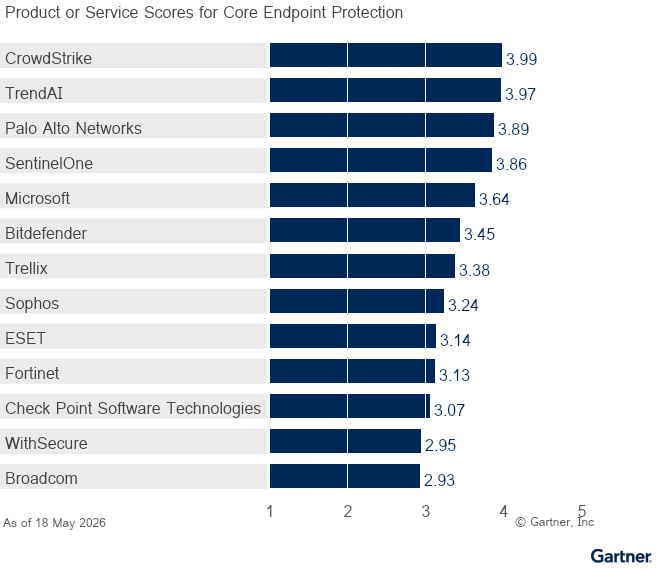
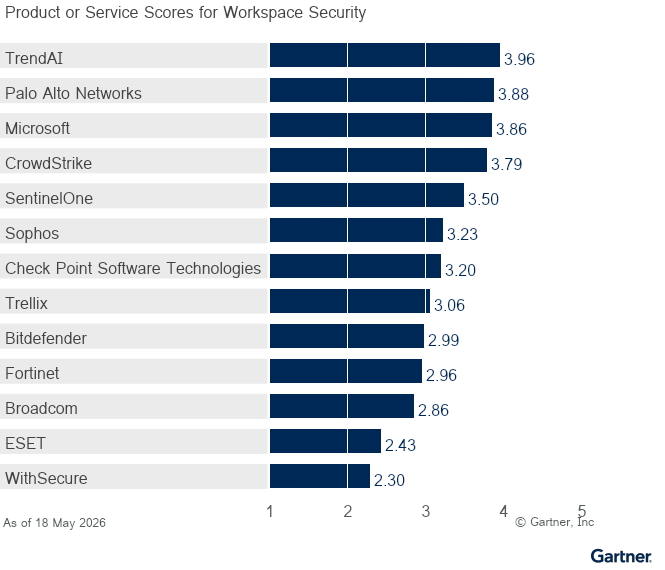
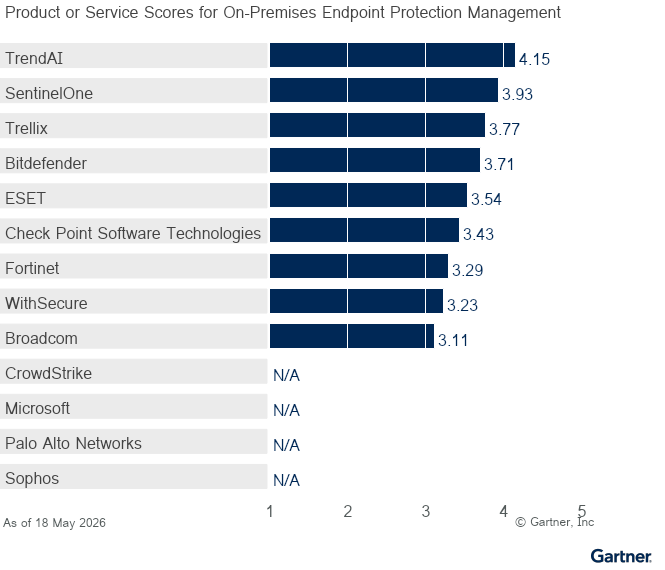
Vendors
Bitdefender
See verified user reviews and ratings for Bitdefender on Peer Insights.
Bitdefender’s core endpoint protection product is Bitdefender GravityZone. Endpoint security configuration management and security operations tasks are handled in its main cloud-based management console, while most third-party integrations require accessing a separate data lake console. GravityZone provides strong prevention, protection, and detection and response capabilities, but endpoint data loss prevention (DLP) and AI usage control are limited.
Use-case summary:
- Core endpoint protection — The product dashboard is intuitive for administrative and security operations tasks. All agents support anti-malware features. Additionally, the Windows agent supports firewall management, device control, application control, exploit prevention, and proactive hardening and attack surface reduction (PHASR). The macOS agent supports firewall management and device control, while the Linux agent primarily supports exploit prevention. Endpoint telemetry collection customization offers good granularity. System resource requirements are average relative to other vendors.
- Workspace security — In addition to endpoint protection, Bitdefender offers email security as an auxiliary workspace security control. Browser security, endpoint DLP, and identity protection remain immature relative to other providers. Bitdefender’s recent introduction of a security data lake improves third-party telemetry ingestion and correlation. AI discovery and usage control are handled by the existing endpoint agent and its deep packet inspection engine, providing visibility but limited control over prompts and agentic interactions.
- On-premises endpoint protection management — The on-premises product supports deployment in both internet-connected and air-gapped environments. Detection, response, vulnerability assessment, and patch management are limited compared to the SaaS version.
Recommendation: Organizations seeking strong endpoint protection with effective threat prevention, ease of use, dynamic attack surface reduction, and on-premises management (including support for air-gapped environments) should consider Bitdefender GravityZone.
Broadcom
Broadcom offers two endpoint protection products: Symantec Endpoint Security (SES) Complete and Carbon Black Cloud. This research evaluates SES Complete. Endpoint security configuration management and security operations tasks are handled in the main cloud-based management console, while the Carbon Black product requires a separate console for administration tasks. SES Complete provides strong prevention and protection features. However, it lacks mature detection and response capabilities, endpoint DLP features, and AI usage control in this product.
Use-case summary:
- Core endpoint protection — The product dashboard is intuitive for deployment and onboarding, but less so for security operations tasks. All agents support anti-malware features. The Windows agent supports a range of prevention capabilities, including firewall management, device control, exploit prevention, application control, intrusion prevention, and application containment with tuning recommendations. The macOS agent supports firewall management, device control, intrusion prevention, and browser security, while the Linux agent primarily supports exploit prevention. Endpoint telemetry collection customization and detection and response features are lacking. System resource requirements are average relative to other vendors.
- Workspace security — In addition to endpoint protection, auxiliary workspace security capabilities include email security, browser security, endpoint DLP, and identity protection. Apart from the recently released unified security agent, which combines endpoint protection, web security, and secure access capabilities, both native and third-party integrations are limited.
- On-premises endpoint protection management — The on-premises product supports deployment in both internet-connected and air-gapped environments. Notable gaps include detection and response capabilities, which are available through a different Broadcom product.
Recommendation: Organizations seeking endpoint protection products focused on prevention and application containment or support for on-premises endpoint protection management (including support for air-gapped environments) should further evaluate the suitability of Broadcom SES Complete.
Check Point Software Technologies
See verified user reviews and ratings for Check Point Software Technologies on Peer Insights.
Check Point’s core endpoint protection product is Harmony Endpoint. Endpoint security configuration management and security operations tasks are handled in its main cloud management console (Infinity Portal). But products from recent AI security and exposure assessment acquisitions currently use separate consoles. Harmony Endpoint offers broad prevention and endpoint DLP capabilities. However, detection and response functionality has notable gaps.
Use-case summary:
- Core endpoint protection — The product dashboard is intuitive for deployment and onboarding, but less so for security operations tasks. All agents support anti-malware features. Key features of the Windows agent include disk encryption, device control, firewall management, application control, URL filtering, browser security, and DNS inspection. The macOS agent supports disk encryption, device control, firewall management, and application control. The Linux agent primarily supports exploit protection. Endpoint telemetry collection customization and detection and response features, such as interactive remote shell, are lacking. System resource requirements are high compared to other vendors.
- Workspace security — In addition to endpoint protection, auxiliary workspace security capabilities include email security, browser security, enterprise DLP, and identity protection. Browser security is supported only through an extension, not a full-stack browser. Check Point offers some native and third-party integrations focused on telemetry and intelligence ingestion, as well as cross-portfolio integration on the endpoint agent and product console levels. Some security operations integrations, such as threat hunting, are limited or rely on the Infinity Playblocks capability.
- On-premises endpoint protection management — The on-premises product supports deployment in both internet-connected and air-gapped environments. Notable feature gaps in the on-premises product, compared with the SaaS version, include threat hunting and browser-based DLP.
Recommendation: Organizations seeking a broad set of prevention capabilities, endpoint DLP, a suite of workspace security controls from the same vendor, or on-premises management should assess Check Point Harmony Endpoint.
CrowdStrike
See verified user reviews and ratings for CrowdStrike on Peer Insights.
CrowdStrike’s core endpoint protection product is CrowdStrike Falcon. Configuration management and security operations tasks are handled through its main cloud-based management console, which offers granular role-based access control. However, products from recent AI security acquisitions are still being integrated. CrowdStrike Falcon provides strong prevention, protection, and detection and response capabilities. However, its DLP features are still maturing, particularly on macOS.
Use-case summary:
- Core endpoint protection — The product dashboard is intuitive for administrative and security operations tasks. All agents support anti-malware features. Key features of the Windows agent include firewall management, device control, exploit protection, and application control. On macOS, device control, firewall management, and exploit protection are supported. Falcon’s features for Linux primarily focus on firewall management and exploit protection. Customization of endpoint telemetry collection and detection and response features are mature. System resource requirements are low compared with other vendors.
- Workspace security — In addition to endpoint protection, auxiliary workspace security capabilities include endpoint DLP, browser security, and identity protection, but lack native email security. Identity threat protection features are mature. Endpoint DLP is strong on Windows but still maturing on macOS, with notable gaps such as limited egress support for Bluetooth, AirDrop, and printers. Browser security and AI discovery and usage control features are robust but not yet fully integrated. CrowdStrike’s third-party integration library is extensive and primarily accessed through CrowdStrike Falcon Next-Gen SIEM.
- On-premises endpoint protection management — CrowdStrike does not offer an on-premises endpoint protection management option. However, Falcon can be configured so that protected endpoints without direct internet connectivity can communicate with its cloud-based management via a proxy, enabling software and content updates.
Recommendation: Organizations seeking cloud-delivered endpoint protection with mature detection and response, good prevention and integrated DLP features, along with auxiliary workspace security capabilities like browser security and identity protection, should consider CrowdStrike Falcon.
ESET
See verified user reviews and ratings for ESET on Peer Insights.
ESET’s core endpoint protection product is ESET PROTECT. Configuration management and security operations tasks are handled through its main cloud-based management console, which offers granular role-based access control. ESET PROTECT provides strong prevention and protection capabilities, along with good detection and response. However, endpoint DLP, AI discovery, and usage control features for corporate endpoints are currently not available directly from ESET.
Use-case summary:
- Core endpoint protection — The product dashboard is intuitive for deployment and onboarding, but less so for security operations tasks. All agents support anti-malware features. Key features of the Windows agent include firewall management, intrusion detection, device control, and exploit protection. On macOS, device control and firewall management are supported. Linux primarily supports device control and exploit protection. Full disk encryption is available either directly in ESET PROTECT or through a separate ESET product. Customization of endpoint telemetry collection is granular in the on-premises version, but not in the cloud-based version. System resource requirements are average compared to other vendors.
- Workspace security — In addition to endpoint protection, auxiliary workspace security capabilities include email security and protection for Microsoft 365 and Google Workspace apps. ESET does not provide endpoint DLP or runtime browser security. Basic browser memory protection and keylogger protection are included with the main endpoint agent. Identity protection capabilities are nascent, primarily focused on ingesting identity signals from Microsoft Entra ID and Microsoft Active Directory. ESET’s native and third-party integrations, as well as AI discovery and usage control capabilities, are limited compared with other vendors.
- On-premises endpoint protection management — The on-premises product supports deployment in both internet-connected and air-gapped environments. Notable feature gaps in the on-premises product, compared with the SaaS version, include vulnerability assessment, patch management, and third-party integration.
Recommendation: Organizations seeking strong endpoint protection with ease of deployment, onboarding, and administration, or requiring support for on-premises management, including support for air-gapped environments, should consider ESET PROTECT.
Fortinet
See verified user reviews and ratings for Fortinet on Peer Insights.
Fortinet’s core endpoint protection product is FortiEndpoint. Endpoint security configuration management and security operations tasks are handled through two sections within the FortiEndpoint console: FortiEndpoint EMS and FortiEndpoint EDR. Some functions require additional consoles. For example, reporting is managed via FortiAnalyzer, while third-party integration and custom detection tuning for nonendpoint telemetry require FortiSIEM. FortiEndpoint offers strong prevention features, but lacks mature detection and response capabilities. It does not currently provide AI discovery or usage control features, and its endpoint DLP is less advanced than competing solutions.
Use-case summary:
- Core endpoint protection — FortiEndpoint’s management dashboards differ in usability and are less intuitive for security operations tasks. All agents support anti-malware features. The Windows agent supports a comprehensive set of prevention capabilities, including host firewall, disk encryption, device control, and exploit protection. The macOS and Linux agents lack host firewall management. Endpoint telemetry collection settings provide good granularity. Protection and EDR functionality are average compared with other vendors, and granular customization for detection is lacking. The agent is lightweight, resulting in minimal impact on endpoint performance.
- Workspace security — In addition to endpoint protection, Fortinet offers auxiliary workspace security capabilities such as email and browser security, while identity protection remains immature relative to other providers. The solution offers an endpoint DLP feature. Fortinet’s third-party integration library is primarily accessed through its FortiSIEM product.
- On-premises endpoint protection management — The on-premises product supports deployment in both internet-connected and air-gapped environments. Feature parity with cloud-based offering is solid with near feature parity for protection and EDR capabilities.
Recommendation: Organizations invested in the Fortinet technology ecosystem and seeking compelling options for threat prevention or requiring on-premises management should consider FortiEndpoint.
Microsoft
See verified user reviews and ratings for Microsoft on Peer Insights.
Microsoft’s core endpoint protection product is Defender for Endpoint. Endpoint security configuration management and security operations tasks are handled in the Defender XDR console. However, some features, such as device control and application control, are still configured via Intune. Third-party telemetry integration requires Sentinel SIEM. Defender for Endpoint provides good prevention and protection capabilities along with solid detection and response capabilities. Microsoft does not currently offer robust AI discovery and usage control; these capabilities remain on Microsoft’s roadmap. Microsoft’s endpoint DLP features are well-developed.
Use-case summary:
- Core endpoint protection — The Defender for Endpoint product console may be less intuitive for new users, as it presents a busy, text-heavy view, especially during security operations tasks. All agents support anti-malware features. Prevention and protection functionality is above average, while EDR capabilities are robust. The Windows agent supports a broad range of prevention and protection capabilities, including host firewall management, device control, exploit protection, web content filtering, and attack surface reduction. The macOS and Linux agents lack host firewall management, attack surface reduction, and file response capabilities, and device control is not available on Linux. Endpoint telemetry collection settings provide rich granularity. System resource requirements are average compared with other vendors.
- Workspace security — In addition to endpoint protection, Microsoft Defender and Purview Suites offer auxiliary workspace security capabilities such as email, browser, data, and identity protection. Endpoint DLP capabilities are solid and supported through the Purview product bundle. For threat detection, investigation, and response (TDIR) functionality, Defender for Endpoint integrates tightly with the native Microsoft ecosystem, while integration with third-party products heavily relies on Sentinel SIEM.
- On-premises endpoint protection management — Microsoft does not offer an on-premises endpoint protection management option. However, Defender for Endpoint can be configured so that protected endpoints without direct internet connectivity can communicate with Defender for Endpoint cloud-based management through a proxy to download software and content updates.
Recommendation: Organizations seeking endpoint protection, primarily for modern Windows environments, with auxiliary workspace security, effective attack surface reduction, and strong detection and response capabilities delivered through cloud-based management should consider Microsoft Defender for Endpoint.
Palo Alto Networks
See verified user reviews and ratings for Palo Alto Networks on Peer Insights.
Palo Alto Networks’ core endpoint protection product is Cortex XDR. Endpoint security configuration management and security operations tasks are handled in its main cloud-based management console. Cortex XDR provides strong prevention, protection, and detection and response capabilities, with robust feature parity across operating systems. Endpoint DLP capabilities are maturing, and most AI discovery and usage control features are available through a separate, recently acquired product (Koi Security) and the broader Palo Alto Networks portfolio (Prisma Browser), both of which currently require separate administration consoles.
Use-case summary:
- Core endpoint protection — The product dashboard is feature-rich with extensive configuration options and customization, which makes it less intuitive for new users across most tasks. All agents support anti-malware features. The Windows agent supports a comprehensive range of prevention and protection capabilities, including host firewall management, device control, application control, and exploit protection. Disk encryption and file integrity monitoring (FIM) are supported on both Windows and macOS, and endpoint DLP capabilities are available on these platforms as well. However, Linux lacks device control and firewall management. Endpoint telemetry collection is robust, and the system resource requirements are low compared with other vendors.
- Workspace security — In addition to endpoint protection, auxiliary workspace security capabilities include browser security, endpoint DLP, and identity protection. Browser security is supported through both an extension and a full-stack browser (Prisma Browser) administered through a separate product console. Palo Alto Networks offers strong native and third-party integrations for TDIR.
- On-premises endpoint protection management — Palo Alto Networks does not offer an on-premises endpoint protection management option. However, it can be configured so that protected endpoints without direct internet connectivity can communicate with the cloud-based management console through a broker virtual machine (VM). This is done for the purpose of downloading software and content updates and collecting log data for analysis.
Recommendation: Mature cybersecurity organizations seeking cloud-delivered endpoint protection with robust protection and EDR features, AI discovery, and usage control — as well as auxiliary workspace security capabilities such as browser security and identity protection — should consider Palo Alto’s Cortex XDR.
SentinelOne
See verified user reviews and ratings for SentinelOne on Peer Insights.
SentinelOne’s core endpoint protection product is Singularity Endpoint. Endpoint security configuration, management, and security operations tasks are conducted through the Singularity cloud-based management console. The product delivers robust prevention, protection, and detection and response capabilities, with good feature parity across major operating systems. SentinelOne’s AI-driven discovery and usage control functionalities are provided through separate, recently acquired products (e.g., Prompt Security), which currently require either a browser extension or a separate endpoint agent (or both) and a separate administrative console. SentinelOne does not currently offer endpoint DLP.
Use-case summary:
- Core endpoint protection — The product dashboard is streamlined and intuitive for most administrative and security operations tasks. All agents support anti-malware features. The Windows agent supports a range of prevention features, including host firewall, device control, and exploit prevention. However, application allowlisting is not currently supported. The macOS agent supports host firewall management and device control, while the Linux agent primarily supports firewall management, anti-malware, and exploit prevention. SentinelOne offers robust EDR functionality, with granular EDR telemetry customization across major modern operating systems. System resource requirements are low compared with other vendors.
- Workspace security — In addition to endpoint protection, auxiliary workspace security features include mature identity protection and strong third-party integrations for TDIR. However, runtime browser security, email security, and endpoint DLP are not offered by SentinelOne directly. AI discovery and usage control features are robust, but not yet fully integrated into the Singularity product following SentinelOne’s recent acquisition of Prompt Security. Most non-native third-party integrations are handled through the Singularity AI SIEM offering.
- On-premises endpoint protection management — The on-premises product supports deployment in both internet-connected and air-gapped environments. However, certain features, such as EDR and vulnerability assessment capabilities, are limited compared with the SaaS version.
Recommendation: Organizations seeking strong endpoint protection with effective threat prevention, ease of use, robust EDR capabilities, AI discovery, and usage control features — or on-premises management, including support for air-gapped environments — should consider SentinelOne Singularity Endpoint.
Sophos
See verified user reviews and ratings for Sophos on Peer Insights.
Sophos’ core endpoint protection product is Sophos Endpoint. Endpoint security configuration management tasks, including prevention and protection, are handled in Sophos Endpoint, its main cloud-based management console. Security operations tasks — such as vulnerability and exposure management, as well as threat investigation, hunting, and incident response — are performed using a separate console (Taegis XDR). There are some functional gaps on Linux in terms of feature parity. Despite recent additions of enterprise browser capabilities, AI discovery and usage control on corporate endpoints along with endpoint DLP are limited.
Use-case summary:
- Core endpoint protection — The product dashboard is intuitive for deployment and onboarding. All agents support anti-malware features. The Windows agent supports a range of prevention features, including host firewall, device control, application control, and exploit prevention. The macOS agent supports device control, application control, and exploit protection, while the Linux agent primarily supports anti-malware and exploit prevention only. Endpoint telemetry collection customization offers good granularity. System resource requirements are average compared with other vendors.
- Workspace security — In addition to endpoint protection, auxiliary workspace security capabilities include browser security, email security, and network security. Identity protection capabilities are currently nascent and have limited telemetry ingestion support. Endpoint DLP features are immature. Sophos’ introduction of broader TDIR capabilities via its Secureworks acquisitions improves third-party telemetry ingestion and correlation, as well as automated workflow creation. Limited AI discovery and usage control are handled by the existing application and content control features. However, Sophos does not offer control over agentic AI interactions.
- On-premises endpoint protection management — Sophos does not offer an on-premises endpoint protection management option. However, Sophos can be configured so that protected endpoints without direct internet connectivity can communicate with its cloud-based management via a proxy or through cloud-connected endpoints designated as “update caches,” enabling software and content updates.
Recommendation: Organizations seeking strong endpoint protection with effective threat prevention, and detection and response with automated workflow capabilities — along with auxiliary workspace security capabilities including email security and browser protection — should consider Sophos Endpoint.
Trellix
Trellix’s core endpoint protection product is Trellix Endpoint Security Solutions. Endpoint configuration management and agent onboarding are handled through the ePolicy Orchestrator (ePO) console. However, detection and response capabilities are delivered through separate user interface consoles (e.g., Trellix EDR and Trellix XDR, which are linked via single sign-on [SSO]). Trellix Endpoint Security Solutions provides strong prevention and protection capabilities, although there are some functional gaps on macOS and Linux in terms of feature parity. Trellix offers good endpoint DLP capabilities to reduce the risk of sensitive data loss. However, AI discovery and usage control are handled by the existing application control and DLP features, which are not designed to protect agentic AI interactions.
Use-case summary:
- Core endpoint protection — The product dashboard is less intuitive, as users must work across multiple consoles for configuration management and security operations. All agents support anti-malware features. The Windows agent supports a range of prevention features, including firewall management, device control, application control, exploit prevention, and web control. The macOS agent supports firewall management and device control, while the Linux agent primarily supports exploit prevention, host firewall, and application control, including allowlisting. Additionally, endpoint telemetry collection customization offers limited granularity. System resource requirements are average relative to other vendors.
- Workspace security — In addition to endpoint protection, auxiliary workspace security capabilities include email security and data security, but do not include identity protection or browser security. Trellix offers some native integration with its endpoint protection product portfolio. However, third-party integration is mainly available via Trellix’s HyperAutomation product.
- On-premises endpoint protection management — The on-premises product supports deployment in internet-connected, air-gapped, and hybrid environments. However, in fully air-gapped deployments, certain features such as AI Assistance are not available, and adaptive protection is limited compared with hybrid and SaaS deployments.
Recommendation: Organizations seeking strong endpoint prevention and protection with good detection and response — especially with on-premises management options, including support for air-gapped environments — should assess the suitability of Trellix Endpoint Security Solutions.
TrendAI
TrendAI’s core endpoint protection product is TrendAI Vision One Endpoint Security. All configuration management and security operations tasks are handled in its main cloud-based management console. TrendAI Vision One Endpoint Security provides strong prevention, protection, and detection and response capabilities with good feature parity across supported OS support. Endpoint DLP features include notable gaps on macOS. Most of TrendAI’s AI discovery and usage control features are limited and available for Windows only.
Use-case summary:
- Core endpoint protection — The product dashboard is streamlined and intuitive for most administrative and security operations tasks. All agents support anti-malware features. The Windows agent supports a range of prevention features, including host firewall, device control, intrusion prevention, integrity monitoring, and application control and allowlisting. The macOS agent supports host firewall and device control, while the Linux agent supports host firewall, intrusion prevention, and application control. TrendAI Vision One offers robust EDR functionality with granular EDR telemetry customization and a relatively complete set of response actions. System resource requirements are average relative to other vendors. TrendAI Deep Security, a specialized workload security product, supports legacy operating systems.
- Workspace security — In addition to endpoint protection, auxiliary workspace security capabilities include integrated email security and identity protection. DLP is good on Windows but has notable gaps on macOS. TrendAI Vision One offers strong native integrations and an extensive list of third-party integrations, primarily accessed through the TrendAI Vision One console. Limited AI discovery and usage controls are supported through data security features and application control. However, TrendAI does not provide controls for agentic AI interactions.
- On-premises endpoint protection management — The on-premises product supports deployment in both internet-connected and air-gapped environments. Notable feature gaps in the on-premises product, compared with the SaaS version, include vulnerability assessment, patch management, and third-party integration. TrendAI offers two on-premises products, TrendAI Apex One for workstations and TrendAI Deep Security for servers.
Recommendation: Organizations seeking strong endpoint prevention and protection with good detection and response, broad OS coverage, and auxiliary workspace security capabilities — such as email security and identity protection or on-premises management, including support for air-gapped environments for workstation and workload — should consider TrendAI Vision One Endpoint Security.
WithSecure
See verified user reviews and ratings for WithSecure on Peer Insights.
WithSecure’s core endpoint protection product is WithSecure Elements XDR. All configuration management and security operations tasks are handled in the cloud-based management console. WithSecure Elements XDR provides strong prevention and protection features, with relatively weaker detection and response. There are some notable functional gaps on macOS and Linux. Endpoint DLP and AI discovery and usage control features for corporate endpoints are not available directly from WithSecure.
Use-case summary:
- Core endpoint protection — The product dashboard is intuitive for deployment and onboarding, but less so for security operations tasks. WithSecure supports identifying unmanaged endpoints via AD sync. However, there is no option to push agents from the management console. All agents support anti-malware features. The Windows agent supports a range of prevention features, including host firewall, device control, application control, and exploit prevention. The macOS agent supports host firewall and exploit protection, while the Linux agent primarily supports basic exploit prevention. Endpoint telemetry collection customization offers good granularity. System resource requirements are average compared with other vendors.
- Workspace security — In addition to endpoint protection, auxiliary workspace security capabilities include email security and identity security. Its identity protection capabilities are nascent and primarily focused on ingesting identity signals from Microsoft EntraID. WithSecure does not provide endpoint DLP or runtime browser security. However basic browser protection for web threats is available using a browser extension. WithSecure’s out-of-the-box third-party integrations are limited, and the platform does not include AI discovery or usage controls.
- On-premises endpoint protection management — The on-premises product supports deployment in both internet-connected and air-gapped environments. Notable feature gaps in the on-premises product, compared with the SaaS version, include vulnerability assessment, patch management, and third-party integration. The vendor announced end-of-life for its on-premises product WithSecure Business Suite.
Recommendation: Organizations seeking good endpoint prevention and protection along with detection and response capabilities, simplified deployment and onboarding, and ease of use should consider WithSecure Elements XDR.
Context
Corporate-managed endpoints represent one of the largest attack surfaces and serve as the main gateway to sensitive organizational data, making them a prime target for threat actors. The growing adoption of various third-party AI services is leading to a rapid increase in unsanctioned and shadow AI usage, accelerating the risk of sensitive data exposure. Therefore, securing enterprise endpoints remains a top priority for most organizations.
Organizations use endpoint protection as a key element of their defense-in-depth strategy to minimize risks associated with endpoints. These solutions offer behavioral analysis and detection and response capabilities, helping to safeguard devices against malware threats. Increasingly, vendors have been adding endpoint AI discovery and usage control features to improve identification of locally installed AI agents, assistants, plug-ins, models, and Model Context Protocol (MCP) servers.
Organizations that require greater control over their data or face network connectivity constraints often implement on-premises or air-gapped hybrid endpoint protection management solutions.
Market Definition
Gartner defines endpoint protection as security software that protects managed endpoints — including desktop PCs, laptop PCs, virtual desktops, mobile devices and, in some cases, servers — against known and unknown malicious attacks. Endpoint protection equips security teams with the tools necessary to investigate and remediate incidents that evade prevention controls. Endpoint protection products are delivered as software agents deployed to endpoints and connected to centralized security analytics and management consoles.
Endpoint protection provides a defensive security control that protects end-user endpoints against known and unknown malware and fileless attacks using a combination of security techniques, such as static and behavioral analysis. It also uses attack surface reduction capabilities, such as device control, host firewall management and application control to limit exposure to threats. Organizations deploy endpoint protection as part of a defense-in-depth strategy to reduce the endpoint attack surface and minimize the risk of compromise. Its detection and response capabilities help uncover, investigate and remediate threats that evade prevention controls, often as part of broader threat detection, investigation and response (TDIR) products.
Mandatory Features
- Protect endpoints against malware through real-time scanning and anti-malware techniques.
- Reduce the endpoint attack surface with capabilities such as device control, host based firewall management, exploit protection or application control for various operating systems.
- Detects and blocks endpoint threats using behavioral analysis of endpoint, application and end-user activity.
Optional Features
- Integrate endpoint detection and response (EDR) capabilities that enable real-time telemetry collection, customizable detection, postincident investigation and response.
- Assess endpoints for software and operating system vulnerabilities and misconfigurations, and support built-in or integrated patch management and virtual patching for various operating systems.
- Provide integrated endpoint data loss prevention to identify and prevent sensitive data exfiltration through removable media, printing, Bluetooth and browser.
- Deliver continuous assessment and optimization of endpoint protection policies and settings against configuration best practices and emerging threats.
- Integrate with workspace security platforms, including email security, security service edge, identity protection, data security controls, endpoint management tools and secure enterprise browsers.
- Integrate with native and third-party TDIR products to enable telemetry collection, correlation, investigation and remediation across multiple security controls.
- Support extended protection for end-of-life, uncommon operating systems or legacy server workloads.
- Include an embedded cybersecurity AI assistant for alert summarization, content creation and response guidance.
Product/Service Trends
The endpoint protection market is evolving as vendors respond to evolving threats, regulatory demands, and client expectations. The following trends are actively reshaping endpoint protection offerings and strategies:
- Generative and agentic AI are changing the management interface of endpoint protection solutions.
- The increased adoption of AI tools and agents heightens shadow AI risks, prompting vendors to enhance visibility, governance, and control over AI usage on corporate-managed endpoints and beyond.
- Organizations prioritize unified prevention and detection and response, driving endpoint protection to expand into broader security operations platforms with automated investigation and remediation.
- Cybersecurity tool rationalization efforts are prompting buyers to consolidate endpoint protection technologies with auxiliary tools for protecting end-user interactions across identity, browser, email, data, and identity.
- Emerging technological sovereignty requirements are prompting organizations to reduce reliance on foreign cybersecurity providers and leading global endpoint protection vendors to introduce “sovereign-enough” deployment options using regional cloud infrastructure providers.
- As the focus shifts to proactive cybersecurity, most endpoint protection providers are increasing investment in building a comprehensive exposure assessment platform, with endpoint vulnerability assessment, prioritization, and remediation as the core features.
Critical Capabilities Definition
Deployment and Onboarding
The initial deployment and onboarding of the solution, including agent deployment, initial policy configuration, and solution tuning.
Ease of Use
The ease of use of the administration console — based on peer review, interface intuitiveness, and auxiliary productivity features.
Performance Impact
The impact of the solution on endpoint performance, including memory footprint, disk space requirements, and system utilization.
OS Support
The ability to protect a broad range of endpoint OS, including Windows, macOS, Linux, iOS, Android, and Chromebook, as well as legacy and rare OS distributions.
Prevention
The range and quality of endpoint attack surface reduction technology and agent antitampering capabilities.
Protection
The quality and efficacy of protection techniques such as real-time scanning and anti-malware, behavioral protection, and vulnerability mitigation.
EDR Functionality
The ability to record and automatically collect endpoint telemetry in real time (or near real time) to detect suspicious events, investigate and block malicious activity, and remediate affected systems.
Data Security
The ability to identify and prevent sensitive data exfiltration through removable media, printing, Bluetooth, the browser, and common AI services.
Workspace Security Suite
The ability of the vendor to satisfy a broad range of functional workspace security requirements by offering auxiliary vendor-owned workspace security controls.
Workspace Security Integration
The ability of the vendor to integrate with vendor-owned and third-party workspace security controls, such as email security, security service edge, identity protection, and data security.
TDIR Product Integration
The ability of the vendor to integrate with native and third-party TDIR-capable products to enable telemetry collection and correlation, as well as investigation and response across security controls.
Geographic Support
This capability refers to product localization, including international points of presence, language support, and regional data storage.
Cloud-Based Management
This capability refers to the vendor’s cloud-based, SaaS-style management infrastructure, data retention options, multitenancy, role-based access controls, and APIs.
On-Premises Management
The ability to deploy on-premises endpoint protection management infrastructure in network-constrained, air-gapped, or highly regulated environments without requiring cloud-based management connectivity.
Use Cases
Core Endpoint Protection
This use case reflects core cloud-delivered endpoint protection functionality, including real-time protection, attack surface reduction, and detection and response.
It is a suitable use case for well-staffed security teams that can deploy, administer, operate, and integrate endpoint protection solutions in-house.
Workspace Security
This use case reflects an integrated cloud-delivered endpoint protection product as part of a broader workspace security offering.
It is suitable for security teams seeking a minimum effective toolset for securing employee interactions across protected end-user endpoints, browsers, email, identity, and data.
On-Premises Endpoint Protection Management
This use case reflects endpoint protection management deployments in network-constrained environments and protection capabilities for legacy and rare operating systems.
It is suitable for organizations that must satisfy regulatory, sovereignty, or other on-premises management needs.
Vendors Added and Dropped
We review and adjust our inclusion criteria for Critical Capabilities as markets change. As a result of these adjustments, the mix of vendors in any Critical Capability may change over time. A vendor’s appearance in a Critical Capability one year and not the next does not necessarily indicate that we have changed our opinion of that vendor. It may be a reflection of a change in the market and, therefore, changed inclusion criteria, or of a change of focus by that vendor.
Added
- No vendors were added to this Critical Capabilities research.
Dropped
- Cisco
- LevelBlue (Cybereason)
Inclusion Criteria
Gartner did not define any exclusion criteria for this research.
To qualify for inclusion in this Critical Capabilities, providers had to meet the definition of the endpoint protection market and satisfy all inclusion criteria using their core endpoint protection product as of the start of Gartner’s research and survey process (on 9 February 2026). Products and capabilities had to be generally available to be considered for the evaluation. Requirements included:
- The solution supports at least Windows, macOS, and Linux operating systems.
- The solution combines prevention, protection, and detection and response functionality in a single agent.
- The solution enforces protection using a combination of endpoint security techniques and attack surface reduction controls, as well as operating system and endpoint application vulnerability assessment.
- The solution embeds endpoint detection and response functionality, including real-time (or near real-time) automated endpoint telemetry collection, as well as detection customization, postincident investigation, and response capabilities.
- The solution provides a severity rating, a process tree, and a mapping of events and alerts to MITRE ATT&CK to aid root cause analysis and remediation.
- The solution provides a cloud-based, SaaS-style, multitenant security analytics and management infrastructure that the endpoint protection vendors maintain.
- The solution integrates with native or third-party TDIR-capable products, enabling telemetry collection, correlation, investigation, and response across multiple security controls.
- The solution offers tight coupling with partner- or vendor-delivered service wrappers, such as managed detection and response or co-managed security monitoring.
- A vendor must sell stand-alone endpoint protection software and licensing independently of other products or services.
- A vendor must design, own, and maintain most of its detection content and threat intelligence in-house. OEM augmentation is acceptable if the OEM is not the primary protection method.
- A vendor must have participated in at least two enterprise-focused, well-known public tests (for example, MITRE Engenuity, AV-Comparatives, AV-TEST, SE Labs, or MRG Effitas) for security efficacy within 24 months before 9 February 2026.
- A vendor must have over 10 million endpoints protected and actively under management in production using its endpoint protection product as of 9 February 2026, excluding seats sold via OEM agreements. More than 500,000 seats must be active production installations with accounts larger than 500 seats. The proportion of enterprise customers in a single region outside North America or Europe must not exceed 60% of the total.
Weighting for Critical Capabilities in Use Cases
| Critical Capabilities | Core Endpoint Protection | Workspace Security | On-Premises Endpoint Protection Management |
|---|---|---|---|
Deployment and Onboarding | 5% | 5% | 5% |
Ease of Use | 10% | 10% | 0% |
Performance Impact | 15% | 5% | 5% |
OS Support | 10% | 0% | 15% |
Prevention | 15% | 10% | 15% |
Protection | 10% | 10% | 10% |
EDR Functionality | 15% | 5% | 5% |
Data Security | 5% | 5% | 0% |
Workspace Security Suite | 0% | 25% | 0% |
Workspace Security Integration | 0% | 15% | 0% |
TDIR Product Integration | 0% | 5% | 5% |
Geographic Support | 5% | 0% | 0% |
Cloud-Based Management | 10% | 5% | 0% |
On-Premises Management | 0% | 0% | 40% |
As of 18 May 2026 | |||
Source: Gartner (May 2026)
This methodology requires analysts to identify the critical capabilities for a class of products/services. Each capability is then weighted in terms of its relative importance for specific product/service use cases.
Critical Capabilities Rating
Each of the products/services that meet our inclusion criteria has been evaluated on the critical capabilities on a scale from 1.0 to 5.0.
Product/Service Rating on Critical Capabilities
| Critical Capabilities | Bitdefender | Broadcom | Check Point Software Technologies | CrowdStrike | ESET | Fortinet | Microsoft | Palo Alto Networks | SentinelOne | Sophos | Trellix | TrendAI | WithSecure |
|---|---|---|---|---|---|---|---|---|---|---|---|---|---|
Deployment and Onboarding | 3.5 | 2.6 | 2.3 | 4.1 | 3.0 | 2.4 | 3.5 | 3.8 | 3.7 | 3.5 | 3.6 | 3.9 | 2.7 |
Ease of Use | 3.9 | 3.3 | 2.9 | 4.2 | 3.2 | 3.0 | 3.2 | 3.9 | 4.3 | 3.8 | 2.4 | 4.2 | 3.3 |
Performance Impact | 2.6 | 2.7 | 2.1 | 4.2 | 2.7 | 3.8 | 3.4 | 3.7 | 3.8 | 2.9 | 2.6 | 3.3 | 3.0 |
OS Support | 3.9 | 3.3 | 3.3 | 3.9 | 3.4 | 3.1 | 3.3 | 3.9 | 3.9 | 3.3 | 3.8 | 4.2 | 3.3 |
Prevention | 3.5 | 2.9 | 3.6 | 3.5 | 3.8 | 3.0 | 3.3 | 3.6 | 3.9 | 2.9 | 3.9 | 4.5 | 2.8 |
Protection | 4.0 | 2.9 | 3.6 | 4.0 | 3.5 | 2.6 | 3.6 | 4.0 | 3.9 | 3.5 | 3.5 | 4.0 | 3.3 |
EDR Functionality | 3.7 | 3.1 | 2.7 | 4.5 | 2.9 | 3.3 | 4.2 | 4.4 | 4.3 | 3.3 | 3.6 | 4.1 | 2.5 |
Data Security | 1.8 | 1.0 | 3.3 | 3.8 | 1.0 | 2.4 | 3.8 | 3.0 | 2.3 | 1.7 | 2.6 | 3.1 | 1.3 |
Workspace Security Suite | 2.7 | 3.4 | 3.7 | 2.8 | 1.6 | 3.3 | 4.2 | 4.0 | 2.5 | 3.3 | 2.9 | 3.8 | 1.4 |
Workspace Security Integration | 1.8 | 2.3 | 3.0 | 4.3 | 1.4 | 2.6 | 4.2 | 3.7 | 3.5 | 3.0 | 2.5 | 4.1 | 1.5 |
TDIR Product Integration | 2.9 | 2.2 | 2.3 | 4.5 | 2.3 | 2.4 | 4.3 | 4.4 | 4.3 | 3.6 | 3.4 | 3.9 | 2.6 |
Geographic Support | 3.5 | 2.9 | 3.9 | 2.5 | 3.5 | 3.5 | 4.4 | 4.0 | 2.4 | 3.7 | 4.0 | 3.7 | 3.3 |
Cloud-Based Management | 3.6 | 3.5 | 3.5 | 4.3 | 3.4 | 3.3 | 4.1 | 4.1 | 4.3 | 3.7 | 3.8 | 4.1 | 3.5 |
On-Premises Management | 3.9 | 3.4 | 3.9 | 1.0 | 3.9 | 3.8 | 1.0 | 1.0 | 3.9 | 1.0 | 4.0 | 4.2 | 3.6 |
As of 18 May 2026 | |||||||||||||
Source: Gartner (May 2026)
Table 3 shows the product/service scores for each use case. The scores, which are generated by multiplying the use-case weightings by the product/service ratings, summarize how well the critical capabilities are met for each use case.
Product Score in Use Cases
| Use Cases | Bitdefender | Broadcom | Check Point Software Technologies | CrowdStrike | ESET | Fortinet | Microsoft | Palo Alto Networks | SentinelOne | Sophos | Trellix | TrendAI | WithSecure |
|---|---|---|---|---|---|---|---|---|---|---|---|---|---|
Core Endpoint Protection | 3.45 | 2.93 | 3.07 | 3.99 | 3.14 | 3.13 | 3.64 | 3.89 | 3.86 | 3.24 | 3.38 | 3.97 | 2.95 |
Workspace Security | 2.99 | 2.86 | 3.20 | 3.79 | 2.43 | 2.96 | 3.86 | 3.88 | 3.50 | 3.23 | 3.06 | 3.96 | 2.30 |
On-Premises Endpoint Protection Management | 3.71 | 3.11 | 3.43 | N/A | 3.54 | 3.29 | N/A | N/A | 3.93 | N/A | 3.77 | 4.15 | 3.23 |
As of 18 May 2026 | |||||||||||||
Source: Gartner (May 2026)
To determine an overall score for each product/service in the use cases, multiply the ratings in Table 2 by the weightings shown in Table 1.
Acronym Key and Glossary Terms
| Application programming interface (API) | A set of routines, protocols, and tools for building software applications, enabling integration and automation between products. |
| Data loss prevention (DLP) | A set of tools and processes used to ensure that sensitive data is not lost, misused, or accessed by unauthorized users. |
| Endpoint detection and response (EDR) | A security solution focused on detecting, investigating, and responding to suspicious activities on endpoints (such as laptops, desktops, and servers). |
| Extended detection and response (XDR) | A unified security solution approach that integrates detection and response across multiple security layers such as endpoint, network, and cloud. |
| Operating system (OS) | System software that manages hardware and software resources on computers and devices. |
| Original equipment manufacturer (OEM) | A company that produces parts or equipment that may be marketed by another manufacturer. |
| Software as a service (SaaS) | A software distribution model in which applications are hosted by a third-party provider and made available to customers over the internet. |
| Threat detection, investigation, and response (TDIR) | A security process and set of capabilities that enable organizations to identify, analyze, and respond to threats on endpoints and across IT environments, often as part of an integrated security operations platform. |
| Workspace security suite | A bundled set of security tools designed to protect user workspaces, typically including endpoint, identity, email, web, and data protection capabilities, while considering the user a key asset. |
Gartner’s Magic Quadrant team used data from the following sources:
- More than 2,000 Gartner client inquiries since July 2025
- More than 4,000 Gartner Peer Insights reviews on gartner.com
- Vendor responses to a Magic Quadrant survey, with over 100 questions about product and vendor enhancements through 2Q26, as well as 90-minute live product demos by each vendor
Critical Capabilities Methodology
This methodology requires analysts to identify the critical capabilities for a class of products or services. Each capability is then weighted in terms of its relative importance for specific product or service use cases. Next, products/services are rated in terms of how well they achieve each of the critical capabilities. A score that summarizes how well they meet the critical capabilities for each use case is then calculated for each product/service.
"Critical capabilities" are attributes that differentiate products/services in a class in terms of their quality and performance. Gartner recommends that users consider the set of critical capabilities as some of the most important criteria for acquisition decisions.
In defining the product/service category for evaluation, the analyst first identifies the leading uses for the products/services in this market. What needs are end-users looking to fulfill, when considering products/services in this market? Use cases should match common client deployment scenarios. These distinct client scenarios define the Use Cases.
The analyst then identifies the critical capabilities. These capabilities are generalized groups of features commonly required by this class of products/services. Each capability is assigned a level of importance in fulfilling that particular need; some sets of features are more important than others, depending on the use case being evaluated.
Each vendor’s product or service is evaluated in terms of how well it delivers each capability, on a five-point scale. These ratings are displayed side-by-side for all vendors, allowing easy comparisons between the different sets of features.
Ratings and summary scores range from 1.0 to 5.0:
1 = Poor or Absent: most or all defined requirements for a capability are not achieved
2 = Fair: some requirements are not achieved
3 = Good: meets requirements
4 = Excellent: meets or exceeds some requirements
5 = Outstanding: significantly exceeds requirements
To determine an overall score for each product in the use cases, the product ratings are multiplied by the weightings to come up with the product score in use cases.
The critical capabilities Gartner has selected do not represent all capabilities for any product; therefore, may not represent those most important for a specific use situation or business objective. Clients should use a critical capabilities analysis as one of several sources of input about a product before making a product/service decision.