
4 Steps to Implement a Perimeterless Digital Workplace
Digital business expects an agile workforce independent of location and device. I&O leaders must drive employee agility by creating a perimeterless digital workplace to enhance customer responsiveness and employee engagement, and yet minimize security risks.
Key Challenges
- Digital business requirements accelerate the adoption of cloud services and increase workforce mobility. Mobile access to those services requires new security and access policies.
- Cloud office management and endpoint operations are performed by different teams, which increasingly have many interdependencies.
- I&O leaders are not able to proactively respond to expectations of a seamless experience when users transition between devices, networks and applications.
- Organizations with a heavy dependence on Windows applications find it difficult to optimize business processes for mobile use.
Recommendations
To implement a perimeterless digital workplace in support of digital business initiatives, I&O leaders responsible for mobile, endpoint and wearable computing should:
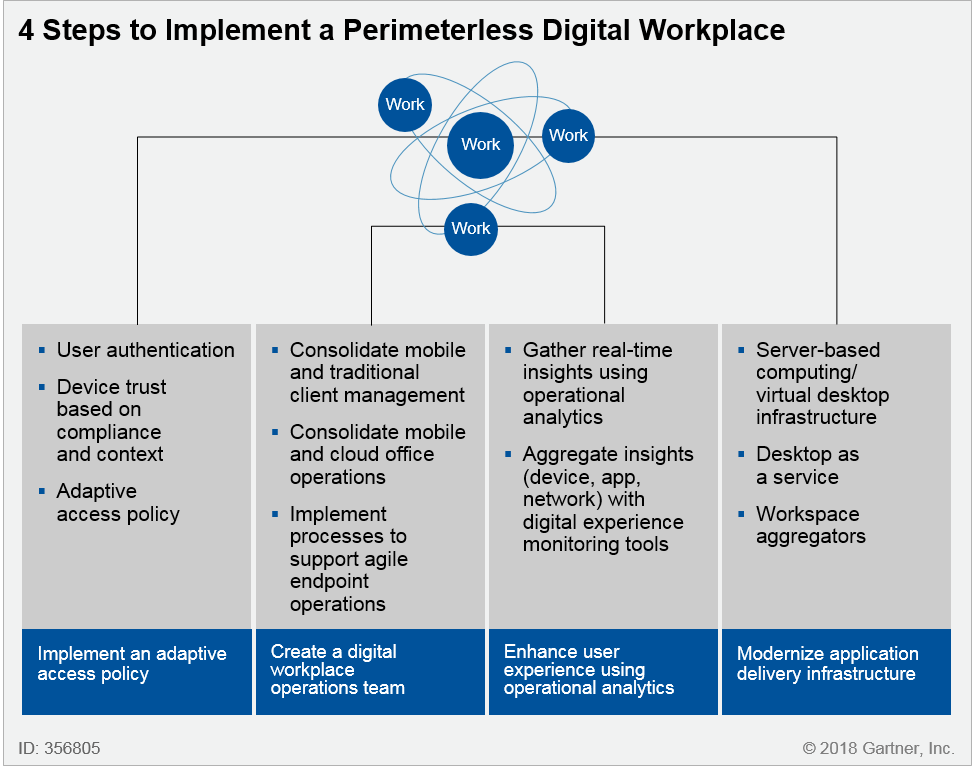
- Implement an adaptive access policy by using integrated identity and access management (IAM) and endpoint management and security tools that continuously evaluate risk based on user identity and device trust.
- Create a digital workplace operations team by combining the PC, mobile and cloud office teams to consolidate skills, preserve service quality and coordinate change management.
- Enhance user experience by measuring application response times from the vantage point of the end user with endpoint-based operational analytics tools.
- Deliver legacy Windows applications to a broad range of devices by using server-based computing (SBC), virtual desktop infrastructure (VDI) or desktop as a service (DaaS) based on user locations and data localization. Use workspace aggregation tools to deliver unified workspaces by enabling a single point of access for Windows, mobile and web apps.
Strategic Planning Assumption
By 2021, 40% of organizations will balance security and usability by enforcing adaptive access to SaaS applications, up from less than 20% today.
Introduction
The assumption that users will be limited to a PC is no longer accurate as they use devices that are best-suited in a particular circumstance. Knowledge workers may use a laptop while in the office, switch to smartphones during a commute and use a tablet in an airplane. Frontline workers may switch between a shared kiosk, smartphones and a wearable. In all cases, users should not have to know where applications and data are hosted. This changing work style marks a shift to a perimeterless digital workplace.
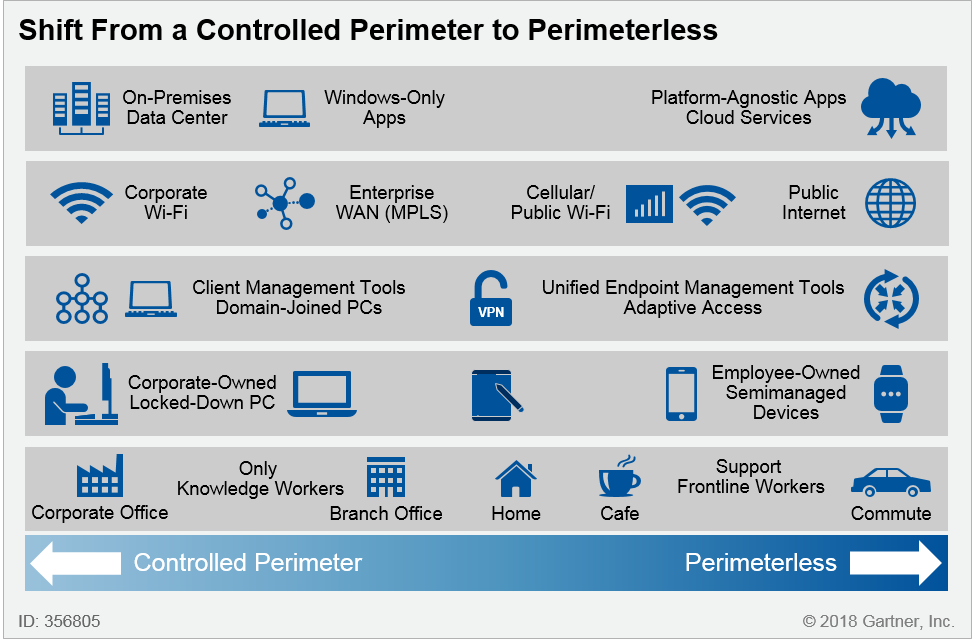
Digital business creates new requirements that drive the need for a perimeterless workplace. These requirements (see Figure 1) include:
- Support for increased workforce mobility
- Flexibility in the choice of devices and ability to switch between them
- A desire for experiences similar to the experience provided by consumer apps
- Enhanced frontline and knowledge worker productivity
Figure 1. Factors Driving the Shift From a Controlled Perimeter to Perimeterless Work Environment
Source: Gartner (August 2018)
The shift from a controlled perimeter to perimeterless work environment dissolves the traditional notion of a corporate perimeter, but numerous challenges persist:
- Heavy dependence on Windows-only and on-premises applications
- Access decisions that depend on a controlled network perimeter
- Reliance on corporate-owned PCs that are locked down to meet stringent security needs
The transition from a "controlled perimeter" to a perimeterless workplace involves:
- Migration from on-premises software to cloud services to enable new ways of working (see Note 1)
- Providing access to legacy applications as they continue to be mission-critical
- Remote management of devices without the need to join a domain
- Providing access to services without requiring users to be on a local network or VPN
I&O leaders must enable employees to transition to a perimeterless way of working by focusing on four key priorities (see Figure 2).
Figure 2. Four Steps to Implement a Perimeterless Digital Workplace
Source: Gartner (August 2018)
Analysis
Step 1. Implement an Adaptive Access Policy
One of the central principles in establishing a perimeterless digital workplace is that the network alone does not determine which services users can access. Unlike the perimeter-based security model, the decision to grant or deny access is not tightly bound to a physical location, IP address or the use of a virtual private network (VPN). Instead, user, device and other contextual data, such as threat signals, dynamically determine the appropriate access policy, which may trigger the need for multifactor authentication, access denial or other trust elevation techniques.
User and contextual trust should be appropriate to the level of risk associated with the resource being accessed. This is best-illustrated with an example of a user accessing sensitive data. Sometimes, the access to sensitive data (for example, company financials) might require that the user is a full-time employee using a fully managed device. However, it is possible that the user credentials and/or device are compromised (as in the case of zero-day and targeted attacks, credential theft, and insider threats). Therefore, a one-time block/allow security assessment for access and protection is not enough (see "Use a CARTA Strategic Approach to Embrace Digital Business Opportunities in an Era of Advanced Threats").
One of the key tenets in implementing a perimeterless digital workplace is that access is not decided by a static rule that says, "Only trust the internal network" or "only trust corporate-owned devices."
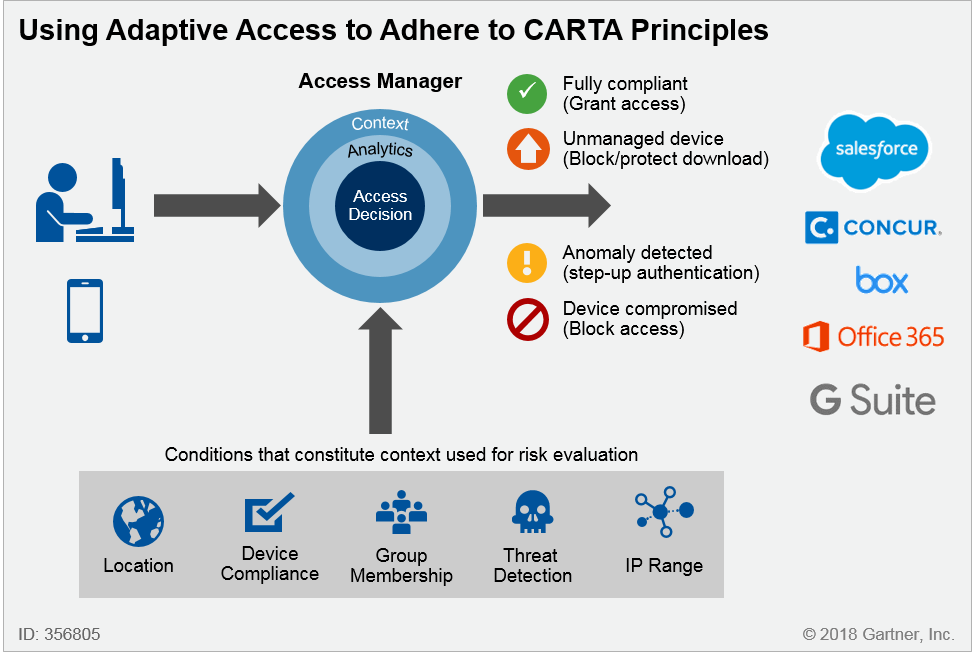
Users can be allowed the same access externally as they enjoy internally, but only if trust matches or exceeds the risk. This calls for adaptive access using a combination of an authenticated user identity and device-level trust. Access management tools that typically provided authentication, authorization and single sign-on (SSO) as core capabilities have now expanded to include more intelligent adaptive access controls. These capabilities apply analytics to contextual data and trigger adaptive access policy decisions that allow or deny access; or can require trust elevation, such as requiring additional user authentication methods. (See "Magic Quadrant for Access Management, Worldwide.")
Device-level trust is foundational because without it one cannot ascertain whether the device is compromised. To enable continuous risk assessment on the endpoint, unified endpoint management (UEM) tools integrate with adjacent security tools such as endpoint detection and response (EDR), mobile threat defense (MTD), and security information and event management (SIEM)/user and entity behavior analytics (UEBA). As such, access management tools increasingly leverage UEM solutions as a single orchestration point to enable reliable and remote device attestation (see Table 1).
Table 1. Examples of Adaptive Access Controls Through Product Integrations
| Sample Vendors | Examples of Integration | Adaptive Access Use Cases |
| Microsoft Azure AD with third-party UEM (e.g., VMware, MobileIron, IBM, BlackBerry) | Using UEM tools that integrate with Microsoft Graph API to set device compliance in Azure AD (requires Microsoft Intune license as appropriate) | Ensuring device integrity before an access decision is made |
| Okta Device Trust makes use of VMware Workspace ONE and MobileIron | Okta using mobile device management (MDM)-based device trust to make an access decision1 | Ensuring only managed iOS devices can access SAML and Web Services Federation cloud apps |
Integrated UEM and identity proxy vendors include:
|
|
|
| Microsoft Enterprise Mobility + Security (EMS) E5 (single bundle that includes IAM, UEM and cloud access security broker [CASB] capabilities) | Conditional Access App Control using integration between Azure AD, Intune and Microsoft Cloud App Security (MCAS) | Block or protect the download of sensitive documents on unmanaged devices |
This table is a partial list of real-world examples and should not be treated as exhaustive market coverage.
Source: Gartner (August 2018)
Using Certificates and Device Identifiers to Enable Strong Device Identity
In addition to MDM-based device compliance, UEM tools manage device certificates and make them available in various authentication scenarios. Provisioning X.509 certificates to mobile devices can provide a strong and simple way to enable strong device identity at access time (Duo Beyond is one vendor that does this). Most leading UEM tools allow managing the device certificate life cycle – either using built in public-key infrastructure (PKI) or integrating with third-party PKI (GlobalSign, Microsoft, Entrust Datacard, OpenTrust and RSA are such tools).
Google's internal implementation of perimeterless work environment (known as BeyondCorp) uses X.509 certificates as persistent and unique machine identifiers for desktops and laptops. On iOS devices, identifierForVendor is used, while Android devices use the device ID reported by the MDM capability. Adobe uses a combination of UEM and IAM to enforce policy, security settings and certificate-based authentication (VMware Workspace ONE for UEM and Okta for IAM).2
Adaptive Access Ensures That the Level of Trust Is Appropriate to the Level of Risk
In order to balance usability and security, an adaptive approach ensures the right level of access is determined in real time. For example, when a user requests to download data locally, UEM performs a context-based assessment of risk and trust and determines whether it should be allowed, conditionally allowed, or denied. Downloads to unmanaged devices can be restricted to managed devices in good health. Alternatively, downloads to an unmanaged device may be allowed, but only if the file is encrypted. Sample vendors that offer transparent file-level encryption include SecureAge (SecureData) and DriveLock.
Device context plays a role in anomaly detection and includes device location, IP address, and usage behavior and security posture. The level of device risk (e.g., "trusted device" versus "unknown device") determines the need to prompt for a step-up authentication method (see Figure 3).
Figure 3. Continuous Adaptive Risk and Trust Assessment (CARTA)
Source: Gartner (August 2018)
Step 2. Create a Digital Workplace Operations Team
Multiple factors are driving the need to consolidate operations across mobile endpoints, desktops (PCs) and cloud office deployments. These factors include:
- Increasing viability of UEM tools to manage both PCs and mobile devices
- The shift to a heterogeneous device and application portfolio with a continuous update cadence
- Opportunities to empower frontline in addition to knowledge workers
- Rapid adoption of cloud services and their consumption on mobile devices
Consolidate Mobile and Traditional Client Management
The adoption of Windows 10 and macOS in the enterprise, as well as the increasing viability of UEM tools to manage both PCs and mobile devices, are driving the convergence of client management tools (CMTs) and enterprise mobile management (EMM) tools to a single UEM solution.
UEM tools can remotely deploy apps and OS updates, and wipe PCs (if necessary) without joining a corporate domain, much like mobile devices. The consolidation of PCs and mobile devices helps establish common policies, processes, metrics, and tools. UEM tools deploy apps across multiple platforms as part of a common workflow (with the exception of complex Win32 applications on Windows 10 PCs).
Chromebooks now support the ability to execute Android apps deployed through the managed Google Play Store, thus further blurring the lines between notebooks and mobile devices. Although this expands the universe for Android apps, they are subject to device limitations such as GPS and accelerometer.
Consolidate Mobile and Cloud Office Operations
The rapid adoption of cloud services and their consumption on mobile devices imply that the licensing, distribution and protection of cloud apps on mobile devices and PCs go hand in hand.
From the user's perspective, consolidating endpoint and cloud office operations allows users to be productive across a range of supported devices. From IT's perspective, mobile devices broaden the attack surface and create new ways for data to leak outside authorized apps. In the case of Microsoft Office 365, since Microsoft Intune is a prerequisite to manage data loss prevention (DLP) policies for Office 365 apps, it is important to ensure that DLP extends across all apps that contain sensitive data.
Both Google G Suite and Microsoft Office 365 support forms of conditional access that depend on device trust. The endpoint team is responsible for managing device posture, while the cloud office team manages access to SaaS services. Combining these functions allows the organization to have a coordinated effort to manage secure access to cloud services.
Leverage Both Technical and Nontechnical Skills as Part of the Digital Workplace Operations Team
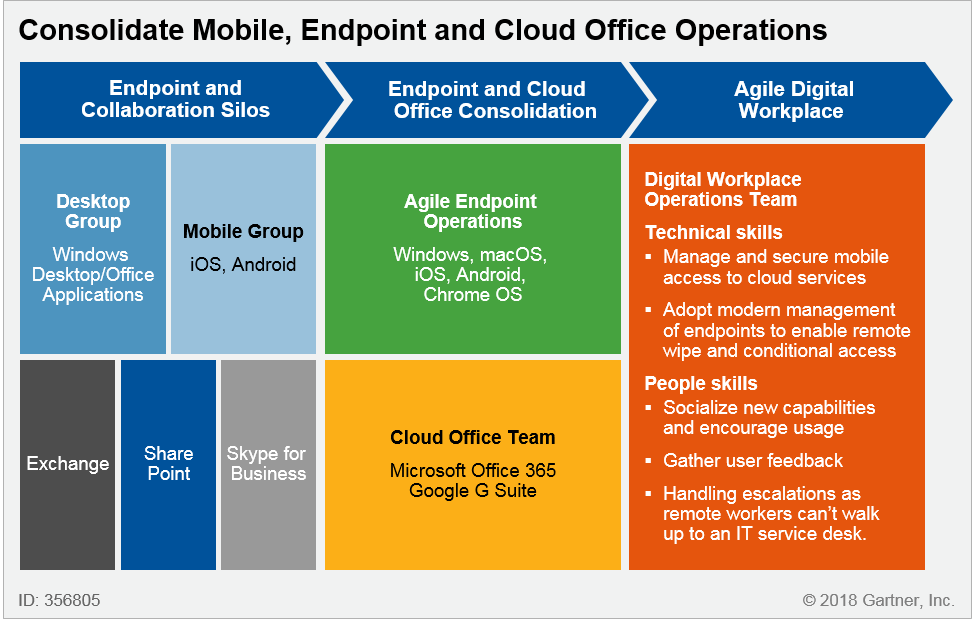
The digital workplace operations team must have a combination of technical skills focused on service delivery and nontechnical skills focused on business enablement. The technical skills enable service availability, administration and application governance, and application compatibility testing.
The people skills are required to foster employee digital dexterity as new technologies bring changes at a rate faster than people's ability to adapt. These "soft" skills are important to scale agile endpoint operations. They include the need to gather feedback about user experience, socialize benefits of new services, formalize a Tier 0 support policy and liaise with vendors.
In the past, Exchange administrators were part of a separate messaging group and the portal team supported SharePoint, and so on. The migration to cloud office creates product and process independencies. For example, Microsoft teams depend on SharePoint Online, OneDrive for Business, Office 365 Groups and Exchange Online to provide full functionality (see Figure 4).
Figure 4. Consolidate Mobile, Endpoint and Cloud Office Operations
Source: Gartner (August 2018)
Step 3. Enhance User Experience With Endpoint-Based Operational Analytics
End-user experience is a key measure of success for any digital workplace initiative, more so in remote work scenarios. IT operations teams lose significant visibility of the availability and performance of SaaS applications, as they control neither the hosting nor the network infrastructure. However, meeting service-level expectations remains an IT responsibility. The endpoint in such cases offers a privileged view into application performance and perceived user experience.
One of the questions that clients ask in Gartner inquiries is:
"How we can better measure user experience when accessing on-premises applications or cloud services? Currently, it is quite reactive – we only react when users complain."
Endpoint-based operational analytics is implemented using digital experience monitoring tools to provide real-time insights into application behavior and performance. This is achieved by instrumenting the application with an analytics SDK, analyzing event logs or placing an agent on the endpoint. These tools gather operational metrics from the user's device and proactively generate an alert to indicate performance bottlenecks due to resource constraints on the endpoint.
Operational analytics allows for creation of a baseline of acceptable experience and continuous benchmarking against it.
Sample vendors with a focus on PCs include Lakeside Software, Nexthink, Dynatrace, Nyansa, ThousandEyes, BMC (TrueSight App Visibility) and Riverbed (SteelCentral Aternity).
Mobile app analytics providers offer reporting on operational analytics that captures app performance, and crash and quality data, as well as potential device and network issues while using the app. Some products support "session replay" to diagnose the root cause of user experience issues by analyzing patterns and anomalies within customers' online sessions. This involves using analytics capabilities to mine large quantities of session data, uncover insights, and detect the experience gap between expected and perceived user experience.
Sample vendors include Appsee, Countly, Clicktale, ContentSquare, Decibel, Heap and Quantum Metric.
In a perimeterless digital workplace, it is important to analyze application response time as perceived by the user as opposed to measuring uptime from an infrastructure perspective. This is because the user experience is subject to multiple factors in addition to the application itself. These factors include network performance and device characteristics, such as CPU, memory and operating system overload due to other processes. These data points, when aggregated and analyzed simultaneously, provide the full context during troubleshooting, which is especially important as mobile workers use different devices and connect from different networks.
Step 4. Deliver Legacy Windows Applications to a Broad Range of Devices
The need to support legacy Windows (or "thick client") applications is a hindrance to mobilizing business workflows. Therefore, a tactical strategy is needed to support these applications until they are refactored or completely redesigned. In some cases, mobile apps can make legacy apps redundant. Hence, rearchitecting apps should not turn into an exercise in re-creating mobile equivalents of existing applications.
There are two options to mobilize legacy Windows applications:
- Replace Windows-only apps with apps that support not only mobile and web interfaces, but also a multichannel experience such as voice and augmented reality – This is good for the long term as these apps pave the way to a post-app era. Modernizing applications will also involve building an API mediation layer as part of a mesh services architecture to decouple back-end complexity from front-end clients.
- Deliver Windows apps remotely through virtualization – Users connect to Win32 applications or desktops from a mobile device and interact with the virtual desktop via a mobile endpoint and remote display protocol. It provides a viable alternative as a short-term approach to mobilize business apps.
Virtualization technologies, if already implemented for other use cases, may provide a faster route to mobilizing legacy applications because there is little to no back-end API development or integration involved. Additionally, they improve endpoint security, as no data resides on the endpoint.
Virtualization Enables Endpoint Agnosticism, but User Experience Remains a Key Challenge
There are three virtualization approaches – SBC, VDI and DaaS. SBC delivers applications by executing them on a server and remotely presenting the interface to a mobile device. SBC is a cost-effective alternative for delivering workspaces to users with simple application requirements and to users with thin-client devices. VDI leverages server virtualization to centrally host desktop virtual machines (VMs) in the data center. The consuming organization owns the entire stack. DaaS refers to virtualized Windows desktop operating systems that are hosted by a cloud computing provider. The consuming organization owns sizing, imaging and entitlement, while the vendor owns the underlying infrastructure and maintenance.
Based on Gartner client interactions, we find user experience remains one of top challenges for virtual desktops. This is due to the lack of offline capabilities, inability to harness device hardware such as GPS, camera and microphone, and difficulty navigating desktop applications because of screen size, resolution, and user input method.
Despite its shortcomings, virtualization presents a pragmatic but tactical approach to delivering Windows applications. Once these applications are delivered centrally, I&O leaders are free to explore Chromebooks, Macs, thin clients or nearly any other option to reduce endpoint cost and enable user flexibility. This allows for complete endpoint agnosticism, as long as the screen size is able to display Windows apps.
Use Workspace Aggregation to Enhance User Experience and Mask Infrastructure Complexity
Beyond virtualization, workspace aggregation technologies have evolved as a way to pull together content across Windows, web and mobile apps. Users access these apps through a unified app store optimized for the device. Workspace aggregators enable unified workspaces by delivering the right application to the right worker and device at the right time based on location, user role and type of endpoint.
Workspace aggregator solutions containerize existing Win32 apps and web apps through a native app on the mobile device. The containerized approach enables the use of mobile platform capabilities such as push notifications, offline caching, and touch-friendly UI and device sensors. IT can still enforce enterprise controls, such as DLP policies, and enable single sign-on. Most vendors position workspace aggregation tools as digital workspaces.
Sample offerings include Awingu Unified Workspace, Citrix Workspace Suite, DronaHQ Unified Workspace, e-Jan Networks CACHATTO, Liquit Workspace, VMware Workspace ONE and Workspot Enterprise.
Evidence
1 "Configure Okta Device Trust for Native Apps and Safari on MDM-Managed Devices." Okta Help Center.
2 "A Path to Achieving Network Security ZEN." Adobe Blog.
Note 1. Note On-Premises to Cloud Services
Cloud office adoption: In the eight months leading up to June 2017, Google and Microsoft both increased their share of the public cloud email market among publicly listed companies, but Microsoft did so faster. Microsoft's share rose from 10.7% to 12.4%; Google increased from 8.0% to 8.6%. In July 2017, Gartner conducted our third Research Circle survey about Office 365. Sixty-one percent of respondents said they are currently using Office 365, up from 54% 18 months earlier (see "Implementing Microsoft Office 365: Gartner Survey Results and Analysis, 2018").
Identity and access management as a service (IDaaS): Gartner estimates that 75% or more of clients based in North America, and approximately 50% in Europe and some countries in Asia/Pacific are seeking IDaaS delivery models for new access management purchases.
By 2022, IDaaS will be the chosen delivery model for more than 80% of new access management purchases globally, up from 50% today (see "Magic Quadrant for Access Management, Worldwide").
