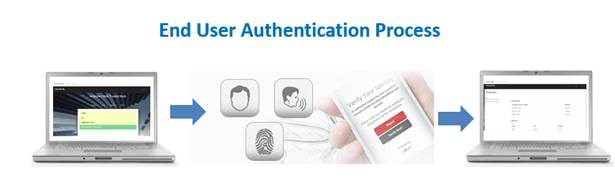
HOW DOES IT WORK? – AN END-USER WORKFLOW
ImageWare's GoVerifyID biometrically authenticates end-users' identities using their choice of face, voice or fingerprint recognition. It allows customers to replace (or augment) their passwords or two-factor authentication (2FA) with biometrics. Rather than typing a password, end-users can take selfies, speak phrases, and/or swipe their fingerprints to gain access.
Take a Selfie (Facial Recognition)
Get access to your account or approve a transaction by taking a selfie. Selfies are popular among people of every age. So as a way to authenticate, they're quick, easy, and well known. Use your phone's camera to take a picture of your face; it's translated into code; your identity is confirmed. Simple.
Speak a Phrase (Voice Recognition)
You might prefer to speak a short phrase to authenticate your identity. Or, in a high-risk transaction, combine both voice and facial recognition. Use the built-in microphone on your mobile device to record a unique 4-second passphrase. Like a fingerprint, your voice characteristics are unique to you.
Touch to Authenticate (Fingerprint ID)
Fingerprint is probably the most common biometric on the market. With built in sensors, many mobile devices are equipped with the technology to authenticate identity by simply touching a fingerprint sensor on your mobile phone or tablet.
End-User Enrollment Process
To enroll, simply download the app from the Apple App Store or Google Play. The app will prompt you to capture a face image, speak a passphrase, or capture your fingerprint on your mobile device. Now you're ready to start using the app for user authentication.
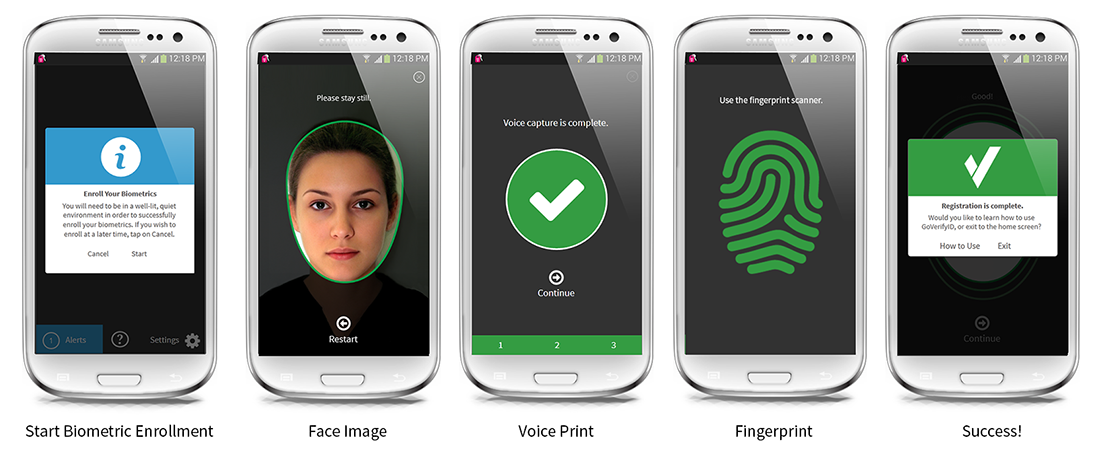
Source: ImageWare Systems
User Authentication Process
Our mobile app will prompt you whenever you need to authenticate. Then you can use the biometric of your choice or as required by your organization to confirm your identity. Simply take a selfie, speak your passphrase, and/or swipe your finger to gain access to the desired system or to confirm your requested transaction.