
Next-Gen Campus Connectivity Must Start by Defining the End-User Experience
Knowing the bandwidth, latency and mobility requirements for all end users and devices is a vital requirement when implementing a next-generation campus network. I&O leaders must use these best practices or risk dissatisfied end users and additional costs to fix.
Key Challenges
- Based on a Gartner survey of wired and wireless LAN customers, 80% of enterprises have non-IT assets such as video surveillance, access security or line-of-business (LOB) assets attached to the network infrastructure that IT has the responsibility to secure and maintain.
- More than 75% of enterprises had their network configuration and applications validated by the vendor, but more than 50% required some kind of Day 1 modifications.
- More than 90% of infrastructure and operations (I&O) leaders surveyed want a high-availability campus network, with 77% wanting more than 99.99 uptime from vendors.
- Resellers and implementers are trained to install specific vendor solutions rather than try to understand the end-user experience that is needed to optimize business application productivity.
Recommendations
I&O leaders responsible for cloud and edge infrastructure on campus networks must:
- Define and document the expected end-user and things experience for all devices and their operating environments by creating a cross-functional team that includes LOB owners and facilities management.
- Hold implementers responsible for test plans and results based on the defined experience.
- Achieve campus network uptime requirement by defining the required service level.
- Validate professional services such as site survey and installation by reviewing the vendor’s stated deliverables.
Strategic Planning Assumptions
By 2023, over 30% of enterprise campus environments will use managed services that will deploy automation and machine learning for campus network management, up from less than 5% in 2019.
By 2023, over 90% of enterprise campus networks will segment network-attached devices into tunnels through role-based policies, up from less than 5% in 2019.
Introduction
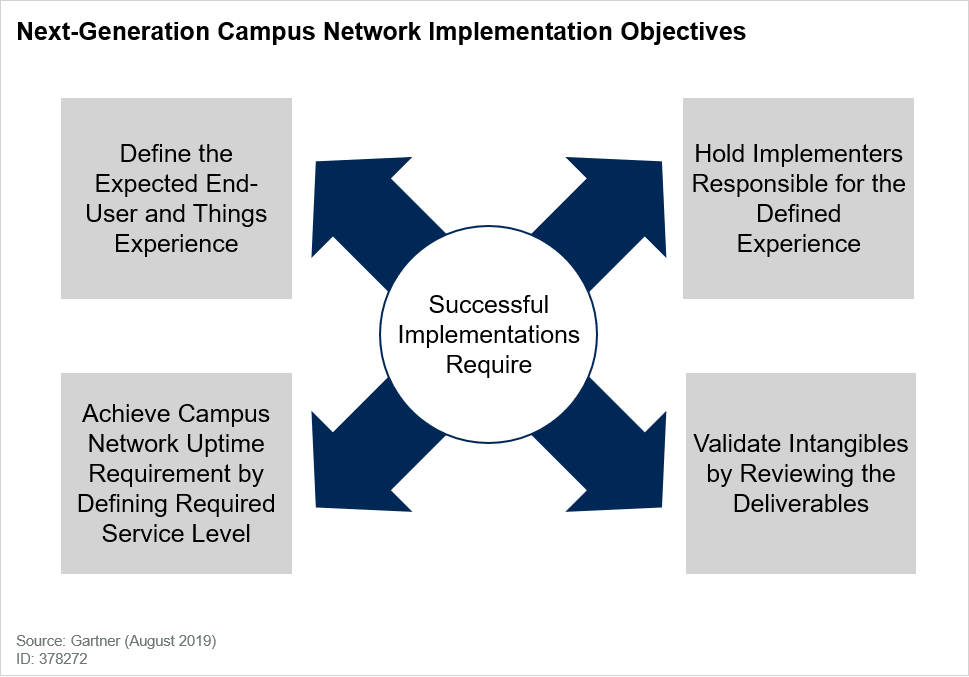
Enterprises have a diverse set of stationary and mobile end users, each with differing applications, bandwidth and reliability requirements that continue to push for a “wireless by default, wired by exception” experience and place larger demands on the campus infrastructure. As IT organizations struggle to address the expanding needs of all end users and devices, Figure 1 identifies the key objectives that must be addressed to deploy, provision, migrate, secure, manage and service next-generations campus networks.
Figure 1. Next-Generation Campus Network Implementation Objectives
Analysis
Define the Expected End-User and Things Experience
With the ability to provide gigabit wired and wireless connectivity, I&O leaders must turn the looking glass around and no longer view campus network communications as IT providing a best-effort capability to a vast number of relatively unknown end users. Campus network connectivity is no longer just about bandwidth and security. It is now also about the overall experience that extends from connectivity to the minimum performance for applications, and the consistent service level needed to meet the business requirements of “every” end user or thing that connects, whether it is wired or wireless.
A significant change that must be rationalized is that the audience is no longer just the corporate knowledge worker; the campus infrastructure must also meet the diverse needs of facilities management and LOB operations teams. Responses to a Gartner survey of wired and wireless LAN vendor customers conducted for the “Magic Quadrant for the Wired and Wireless LAN Access Infrastructure” indicated that 80% of enterprises already have non-IT assets such as video surveillance, access security or LOB assets attached to the campus network infrastructure.
- What groups of users or things will be connecting to the network? This includes everyone from guests, contractors and consultants in the carpeted-space enterprise, to teachers, students and facilities in education, or doctors, nurses or administrators in healthcare. End users may not be just people. They can also include the Internet of Things (IoT), such as sensors, energy management systems, network printers and surveillance cameras, which may be using the network to communicate with business applications.
- What future requirements (performance and latency) of users (people or devices) need to be considered in the planning process?
- Where will end users expect connectivity?
- To which applications will users require access? Are they across Layer 3 boundaries?
- What are the typical traffic requirements (see Table 1) associated with each application?
Define “Minimum” End-User and Device Performance
The next step is to determine the minimum performance required by each type of user (end user or thing) for all the expected devices and applications across the entire enterprise, not just in the office, on one floor or in one building. Too often, the average performance is documented, leaving some applications to underperform and leading to end-user complains. To avoid this, the network design must document the following information:
- What peak, average and concurrent capacity or throughput is needed by each type of user for the user’s expected devices in each application scenario?
- What are the current and potential applications and usage scenarios?
While some users may not have the “minimum” performance that they need, in other situations excess capacity is a key reason campus networks cost more than anticipated. Whether it is too many switch ports in the intermediate distribution frame or wireless access points in the wrong place. We find that many organizations don’t know the aggregate of minimum end-user requirements, and this is evident by the lack of information in RFPs that we review each year.
Even though Gartner bandwidth estimates show, from client inquiries, that most end users will minimally need only 5 Mbps of dedicated access to the infrastructure for the next three to five years, our survey results show that 80% of IT organizations want to give end users more than 5 Mbps.2 The 5 Mbps that Gartner has used to define end-user bandwidth requirements for more than a decade is more than double the needs of a dedicated unicast high-definition (HD) video stream to an end-user laptop. It also addresses the requirements of applications running on other personal devices, such as for downloading email or updating files.
From client inquiries, we also find there are exceptions, but they are not the rule. These include large file transfers that are needed for computer-aided design or graphics designers in certain types of businesses, and often they will require a dedicated wired connection. Whether enterprises choose 5 Mbps or more, today’s technology allows us to meet these requirements, although the aggregate of higher per-user requirements may require additional components and a higher cost.
Additionally, implementers typically only look at corporate-issued laptops, smartphones or tablets to define the wired or wireless connectivity. Without taking a broader look at a connectivity strategy, this may unintentionally ignore the existence of the diversity of IoT devices. As IoT becomes increasingly a part of the enterprise environment, these often “headless” devices (with neither screen nor keyboard) must be documented. We advise clients to consider taking a broader look at the types of clients connecting to the network and build a table similar to Table 1.
Table 1. Sample of Estimated Bandwidth Requirements by Type of User Through 2024
| Client | Applications | Typical WLAN Bandwidth (Mbps) |
|---|---|---|
| Office Staff | Voice, access to client/server and web-based applications, internet and videoconferencing | 5 |
| Conference Rooms | Internet, videoconferencing and streaming applications | 5 for HD content; 25 for 4K Ultra HD |
| Remote Staff From Other Locations | Voice, access to client/server and web-based applications, internet and videoconferencing | 5 |
| Warehouse Staff | Voice and client/server/web-based applications | More than 1 |
| Guests | Internet (html) | 1 to 2 |
| Contractors | Voice, access to web-based applications, internet | 1 to 2 |
| Vendors | Internet (HTML) | 1 to 2 |
| Network Printers | Printing/scanning documents | Up to 20 |
| Building Automation | Sensing and reporting the environment or status | Less than 1 |
| IoT Devices (simple) | Motion detectors, security access, energy management | 1 to 2 |
| IoT Devices (complex) | Surveillance cameras | 1 for standard; 2 to 3 for HD |
| LOB Devices | CAD or MRI with large file transfer requirements, POS, noncritical operational technology | From less than 1 to more than 10 |
Source: Gartner (August 2019)
There are situations where network planners may also want to limit the amount of bandwidth for certain types of users through traffic shaping or role provisioning. Additionally, while wired networks are not typically affected, the backward compatibility of the 802.11 standard can significantly degrade the wireless performance if the network must accommodate lower-speed, older standard devices.
Ask “Why Not Wireless” Before Running Cable
In the past, wireless connectivity was overlay to the network infrastructure required by the need for mobility in the workplace. Today, we advise clients to be “wireless by default, wired by exception.” It should be the first mode of connectivity, especially for “greenfield” environments. There will be limited situations where the answer to a wireless-first question is no, whether it is legacy equipment that cannot support wireless connectivity or regulations such as E911 where wired connectivity is mandatory to determine emergency location information.
Organizations have come to expect wireless connectivity for applications in a conference room or in cubicle areas, but the use of wireless should be ubiquitous and organizations must consider whether coverage is needed in stairwells and/or elevators, which are not typically covered in site surveys.
Hold Implementers Responsible for the Defined Experience
While validating the network design to ensure that it meets the parameters is one of the final objectives of a greenfield or “brownfield” access layer connectivity project, it is also one of the most important. Yet, 23% of clients in our survey did not validate that they received the capabilities that they defined and paid for as part of their campus network connectivity project.3
A validated test plan should be part of the deliverables 100% of the time when a campus project is defined.
Additionally, environments often change from when the network was originally designed and even client inquiries where the network was validated over 50% had some kind of Day 1 issues. As organizations grow, it is important to regularly retest the network to ensure that moving a wall or adding a conference room did not cause a coverage hole for some of the end users. Gartner recommends that enterprises review the validated test plan and randomly select areas to retest each quarter to ensure that the network design continues to deliver the desired results.
Define Transaction Density
For WLANs, I&O leaders must also determine the number of users expected in each access point coverage area, just as the number of users on a switch is limited by the ports. For wireless, the number of users must be multiplied by the estimated bandwidth requirement per user type to determine the maximum transaction density performance needed for the coverage area.
It is important to note that the number of users and devices (see Table 2), combined with the required bandwidth, will mean that the overall performance of the network will not be uniform across the enterprise. A single square foot measurement per access point should not be used to determine the number of access points that should be installed. I&O leaders should look at traffic flow patterns for all users to determine where there could be congestion, and where smaller access point coverage areas may be needed to address the increased need for end-user bandwidth. For example:
- In healthcare, a point of probable congestion is the area surrounding the nurse’s station, where doctors and nurses congregate.
- In carpeted enterprises, conference rooms, auditoriums or anywhere there are “knowledge” workers may have higher transaction density than normal work environments.
Table 2. Sample of Average Number of Concurrent Users/Connections per Coverage Area
| Reception | Conference Rooms | Office Area | Defined Workspace | Manufacturing | Warehouse | |
|---|---|---|---|---|---|---|
| Number of Users | 5-10 | 15-20 | 12-15 | 15 | 5-7 | 3-5 |
Source: Gartner (August 2019)
Additionally, implementers tend to focus only on the performance capabilities of 5 GHz, but defining the transaction density will be important for devices using 2.4 GHz since the wireless capacity is lower. Clients should know where 2.4 GHz will be used and use band steering to push 5 GHz-capable devices to eliminate congestion. We recommend that clients create a policy noting that 2.4 GHz will be used to accommodate legacy devices, as well as build automation devices or IoT devices that only have 2.4 GHz. The policy will avoid congestion and the cost of adding more access points, since many wireless drivers will choose 2.4 GHz if left to their own merits. For the foreseeable future, the 2.4 GHz band is recommended for noncritical applications or designated for devices that do not support dual radios. Clients should also be aware of additional applications that are being used. For example, many vendors have included BLE or Zigbee radios into access points for indoor location solutions, which may require dense access point placement to achieve the necessary granularity for the location applications. In vertical market applications, environmental noise may also require dense placement of access points to achieve the defined end-user performance.
Strategic investments should be made in the 5 GHz band, utilizing band steering and the potential that both radios in the access point may be 5 GHz to meet future user/device requirements. Additionally, the use of MU-MIMO will allow for slower clients with less capabilities to be segmented into a separate communication channel, and for simultaneous access to channels as long as all the devices are using the appropriate standard. Use of multiple standards due to back compatibility of 802.11 can lead to slower overall device performance. Rather than varying the size of coverage areas, I&O leaders can address the requirement for more performance in a single coverage area in additional ways. These options include:
- Layering 5 GHz access points at different channels in the same coverage area
- Utilizing band steering to 5 GHz to increase capacity
- Upgrading a higher-performance access point in that coverage area
- Using MU-MIMO to segment traffic
- Dropping a network cable and providing wired connectivity for clients such as VoIP phones for E911
Define the Number of Devices per User or Workspace
The network design process should include an estimate of the number and types of devices that each end user will carry or use in the workspace to determine overall capacity requirements. Therefore, I&O leaders need to know:
- The types and quantities of wired and wireless devices that each user employs
- The types of devices allowed to connect to the network
Make a list of the different types of devices, because the ability to connect differs among devices.
There are neither design standards for integrating a radio into devices nor standards for what kind of antenna should be used or where it should be located in the product. Because the ability to connect to the wireless infrastructure differs among devices, planners need to record the device, as well as information about the Wi-Fi radio within the device.
It will be the technical least-common denominator regarding receiver sensitivity and transmit power that needs to be accommodated. If the organization does not have a device connectivity policy or understand the types of devices that will connect, Gartner recommends using a 20 mW, single-stream, single-antenna wireless client as the minimum for planning purposes to ensure the end-user experience.
Furthermore, one of the biggest mistakes that we have seen in wireless designs is the laptop used as a site survey tool. Smaller devices such as smartphones, tablets or IoT may have 50% of the power and 50% fewer antennas than laptops used for testing. If this “mistake” is not addressed in the wireless design, then the coverage holes are created as soon as the wireless network is installed.
Define How Upstream Wired Connectivity Will Be Implemented
Starting with IEEE 802.11ac, WLANs have the ability to provide more than 1 Gbps throughput from a single access point and can have multiple access points layered in a single coverage area. What about when three to four high-performance access points are connected to the same 10/100/1,000 Mbps closet switch? This could create over 500 Gbps of upstream data that would find a performance bottleneck at a closet switch with a 1 Gbps upstream connection. This will only get worse as multigigabit-capable 802.11ax devices and access points are added to the network.
Organizations must identify where bottlenecks can occur, and how technology and network design can overcome them. One potential solution is IEEE 802.3bz, which is slowly being integrated into campus switches. This standard allows for 2.5/5 Gbps Ethernet performance to be implemented on existing Category 5e or Category 6 cabling. I&O leaders need to ensure that 802.3bz is implemented in access points and upstream closet switches if the additional performance is needed.
Achieve Campus Network Uptime Requirement by Defining Required Service Level
Historically, campus networks were designed by providing wired ports and wireless coverage everywhere, but service levels today must address latency and reliability as well as bandwidth. Now, I&O leaders must be able to answer questions about the expected end-user or thing experience from those who are doing the activity daily and expect high reliability. More than 90% of I&O leaders surveyed want a high-availability campus network,4 with 77% wanting more than 99.99 uptime from vendors.5
Latency
As campus networks continue to converge with facility management and LOBs, the latency requirements in markets like manufacturing or the needs of high-end audio applications must be addressed. Some non-time-critical elements such as event reporting in manufacturing can already be addressed, but other applications will require more specific requirements that are not met by general wired or wireless standards. Knowing the requirement is the first step and while a separate network may still be needed, network services addressing time-sensitive networks are becoming increasingly available to meet the latency or jitter requirements.
Network Assurance
With all the information that is being collected on the network, vendors can proactively manage the campus infrastructure and provide guidance on issues that are affecting the end-user experience or using policy to dynamically make changes. Using supervised and unsupervised machine learning, vendors are advancing their ability not only to address common (and sometimes complex) issues that affect the campus network, but also to predict when they will occur and to proactively address them. Vendors are now able to create SLAs for campus networking. Organizations that have limited IT staff or do not have IT staff on-site (remote locations) should consider establishing uptime requirements for the minimum performance required by the end-user applications.
Network Analytics
Network analytics is a fairly new focus, although collecting statistics about the network has been around since SNMP. There is much confusion among enterprises on what and how to use the primitives and reporting associated with this functionality. While there may be a lot of information, enterprises are looking primarily for the following end-user analytics: MAC address, dwell time, device, operating system, number of connections and applications accessed. Some vendors collect terabytes of information, and while this may be good, the key is the quality of the data and understanding why it is being collected. In Gartner client inquiries, we also find that analytics is often confused with loyalty application metrics that are associated with location-based services or supplemental beacons.
It is important that enterprises understand what information and reporting they need, and whether their business requirements can be addressed in the vendors’ solutions.
Validate Intangibles by Reviewing the Deliverables
Managed Services
In a wireless-first environment, if there is no IT staff on-site, the location may be a prime candidate for managed services. If there are no hardware services, end-user support or required reporting, then managed service providers (MSPs) can provide these capabilities. More than 85% of clients in our end-user survey noted that managed services were important or very important in their network vendor decision.6 While many offerings leverage cloud-managed services to implement managed services, organizations must be aware that there is more than one implementation option and that MSPs can also manage on-premises-deployed campus infrastructures.
Regulation Reporting
Certain vertical markets – such as retail, whether it is deployed in a mall or university – have reporting that is required by government regulatory agencies (for example, PCI), depending on how the mall or university uses the infrastructure. Organizations need to be aware of whether regulatory reporting functionality is available from the vendors they are considering.
Warranty
As hardware components continue to become commoditized and highly reliable, the mean time between failures (MTBF) continues to rise, and the useful life approaches eight to 10 years (see “Know When It’s Time to Replace Enterprise Network Equipment”). Our research shows that all vendors offer a limited lifetime warranty on their hardware components. This should be considered a “check the box” capability.
For vendors that require software maintenance, we advise clients to understand the number of releases and the planned functionality currently on the vendor’s software feature roadmap. It is important to determine if the functionality included in the warranty price is worthwhile.
Service Plans
We advise clients to look at all service options. With the high MTBF of access points, sparing is a logical option to reduce costs for all components, especially if enterprise personnel must physically replace the defective unit. Because controller architectures are a vendor design consideration and not an enterprise need, redundancy may need to be required. In many configurations, the controller is the highest-failing component, but the burden of this weakest link should not be shouldered by the enterprise, because this is a vendor design decision that is not required of the enterprise.
Any service plan should describe its impacts on the warranty. This is important because we have seen cases in which enterprises had their warranties replaced by a service plan, and the service took effect on the first day after the installation, effectively eliminating the warranty.
Vendor Roadmaps
Technology deployed in campus environments continues to move ahead, and even the number of standards (IEEE 802.11ax, 802.3bz, 802.3bt) or improvements in existing standards (time-sensitive networking) can affect how the network infrastructure will be used. It is important that organizations understand the vendor roadmap for technology and how this may affect the potential for out-of-cycle technology upgrades and the costs of migration to new technology.
Evidence
Gartner takes more than 1,000 WLAN-specific client inquiries annually. The data in Tables 1 and 2 is based on end-user inquiries.
Wired and Wireless LAN Access Infrastructure Magic Quadrant customer survey: As part of Gartner’s 2019 “Magic Quadrant Wired & Wireless LAN Access Infrastructure,” an online customer reference survey was conducted in May through June 2019. During the kickoff of the Magic Quadrant process, all invited vendors were asked to submit references that generally represented the inclusion criteria. The vendors provided the references’ contact information, which was used to invite the references to complete a 20- to 30-minute online survey. A total of 137 customer references from 17 vendors completed the survey. Note: The vendor reference data is not a representative knowledge base of the wired and wireless LAN access infrastructure market.
1 Q-19175: “We have building automation/facilities management devices on the network.”
2 Q-19175: “End users require more than 5 Mbps of wired and wireless access to the network.”
3 Q-19175: “The vendor validated the solution once it was installed.”
4 Q-19175: “We require a high-availability network.”
5 Q-19175: “We require more than 99.99% uptime.”
6 Q-19175: “Ability of the vendor or its partners to deliver the solution as a managed service.”
