
Balance Trust and Agility With Good Authentication Choices for Workforce Local Access
Organizations struggle to choose appropriate authentication methods that deliver the necessary balance of trust and agility for local workforce use cases. IAM and security leaders should use this research to evaluate various cost-effective authentication options available for workforce local access.
Key Challenges
- More than 50% of organizations are unable to extend incumbent authentication methods to support their expanding digital workplace requirements – including access for an increasingly mobile workforce.
- No single authentication method can address the varied trust requirements associated with several local workplace use cases – including access to virtualized desktop and BYOPC environments.
- While Windows 10 introduces native support for integrating biometric authentication methods, significant barriers to adoption remain, as users require specialized hardware components, such as depth-sensing infrared cameras for face and iris recognition.
Recommendations
IAM and security leaders should:
- Choose authentication methods that respect user experience and budget limitations, meet internal assurance and accountability requirements, and offer agility in a rapidly changing local workplace environment.
- Confront the diversity of local access use cases facing the organization by delivering a suitably broad range of authentication methods, offering the flexibility to address the varied requirements of such use cases.
- Advocate for an upgrade to Windows 10 for enabling a more consistent use of biometric authentication methods across the variety of local access profiles backed by a readiness assessment of all kinds of endpoint devices.
Strategic Planning Assumptions
By 2020, 60% of organizations pursuing digital workplace strategies will adopt contextual authentication and adaptive access for improved UX, up from less than 5% today.
By 2019, 40% of organizations will use Windows Hello for Windows 10 login, allowing them to enable consistent authentication methods across the variety of endpoint devices and use cases.
Introduction
This document was revised on 4 April 2016. The document you are viewing is the corrected version. For more information, see the Corrections page on gartner.com.
Organizations must choose and enforce the use of risk-appropriate authentication methods to prevent unauthorized access to local networks, systems and applications, as well as to comply with appropriate regulatory standards. But as digital business allows an organization to advance new interactions, an enterprise's selection of authentication methods becomes influenced by alternate needs. Leaders often work to shape authentication methods to serve user preferences. Workplace trends and technology options also draw attention to how workers engage the technology they use to do their jobs. While maintaining such diverse priorities, organizations struggle to choose authentication methods that not only respect these constraints, but also provide the necessary balance of trust and workforce agility at a justifiable cost.
The consumerization of workplace computing tools is forcing security leaders to restructure their efforts to offer protection against the heightened risks without degrading the user experience (UX) objectives of a digital workplace. Traditional authentication methods, such as legacy password and X.509 smart cards, are no longer viable authentication choices for an employee-friendly workspace that uses "anywhere, anytime" computing models. In this research, Gartner identifies the challenges that organizations face to deliver secure enterprise applications and workspaces to internal employees, contractors and business partners. We also provide best-practice recommendations for good authentication choices that balance, across a heterogeneous environment, the ranging assurance and accountability needs with usability and other UX goals.
Analysis
Evaluate Trust and Accountability When Choosing Authentication Methods
As digital business grows in adoption and competitive significance, identity and access management (IAM) and security leaders need to support a growing number of workforce local access use cases that provide and control access via corporate networks. An evaluation of an authentication method should regard, as paramount qualities, the suitability and flexibility of a method to various use cases. The number of access contexts increases at the pace and ingenuity of IT's progression, and an enterprise faces diverse priorities.
Tables 1 and 2 display the variety of IT assets that users commonly engage today.
Table 1. IT Assets That End Users Commonly Use IT asset user logs on to
IT asset user logs on to |
Hosted in |
Accessible remotely from a corporate-issued PC? |
Accessible from a corporate device other than a PC? |
PC (stand-alone) |
PC |
NA |
Requires other software (e.g., GoToMyPC) |
Windows network (AD) |
DC |
Requires other software (e.g., GoToMyPC) |
Requires prior remote connectivity |
Desktop VM |
PC |
NA |
Requires other software (e.g., GoToMyPC) |
VDI |
DC |
Yes |
Yes |
DaaS |
Cloud |
Yes |
Yes |
Desktop application |
PC |
NA |
Requires other software (e.g., GoToMyPC) |
Legacy application |
DC |
Requires prior remote connectivity |
Requires other software (e.g., GoToMyPC) |
Web application |
DC |
Yes, if Internet-facing; otherwise, requires prior remote connectivity |
Yes, if Internet-facing; otherwise, requires prior remote connectivity |
SaaS |
Cloud |
Yes |
Yes, but might require preinstalled SaaS application natively developed for the device OS |
AD: Active Directory; DaaS: desktop as a service; DC: data center; NA: not applicable; VDI: virtual desktop infrastructure; VM: virtual machine
Source: Gartner (April 2016)
Table 2. Privileged Assets That IT Administrators Commonly Use
IT asset user logs on to |
Hosted within |
Accessible remotely via the Internet (from a PC)? |
Accessible from a device other than a PC? |
Server |
DC |
Requires prior remote connectivity |
NA |
Hypervisor |
DC |
Requires prior remote connectivity |
NA |
IaaS or PaaS |
Cloud |
Yes |
Yes, for Web-based admin consoles; otherwise requires natively developed software for the device OS |
Middleware |
DC |
Requires prior remote connectivity |
Yes, for Web-based admin consoles; otherwise requires natively developed software for the device OS |
Database |
DC |
Requires prior remote connectivity |
Yes, for Web-based admin consoles; otherwise requires natively developed software for the device OS |
Network equipment |
DC |
Requires prior remote connectivity |
Yes, for Web-based admin consoles; otherwise requires natively developed software for the device OS |
PAM |
DC |
Requires prior remote connectivity |
Requires prior remote connectivity |
PAMaaS |
Cloud |
Yes |
Yes, but might require preinstalled SaaS application natively developed for the device OS |
IaaS: infrastructure as a service; PaaS: platform as a service; PAM: privileged access management; PAMaaS: privileged access management as a service
Source: Gartner (April 2016)
Every organization should evaluate and implement the minimum required level of authentication strength (levels of trust and accountability commensurate with the level of risk) for each relevant use case. Traditionally, a good authentication method will provide the required minimum trust dictated by the potential impact of a malicious actor, whether external or internal, successfully gaining access to corporate assets. Such an evaluation should also assess the suitability of the levels of trust and accountability (commensurate with the level of risk) for each case. UX and budget realities are critical considerations as well. With the rapidly changing needs of the enterprise and its UX and budget constraints in full view, IAM and security leaders are advised to evaluate alternative authentication methods that are adaptive to the new interactions and directions of digital business.
The evaluation team should consider not just the raw, potential authentication strength of a prospective method, but also the effectiveness of the existing authentication strength in place.1 Such an evaluation illuminates the threat landscape and reveals the vulnerabilities that are most likely to be exploited successfully by an attacker. For example, office PCs may be easily accessible by any other person within the building, and a malicious co-worker with access to the PC only needs to obtain a user's PIN to successfully masquerade as that user. Therefore, authentication with a public-key software token ("soft-certs") offers little protection against insider attacks over legacy password-based authentication.
Accountability2 is another key criterion that enterprises must seek to continually enhance. It is a critical security and regulatory requirement for organizations to be able to establish, in most local and remote access control scenarios, individual accountability for a user's actions on the network. Password and token-based authentication methods significantly erode accountability by allowing easy sharing of credentials among co-workers.
By comparison, some phone-as-a-token methods, such as out of band (OOB) push, could provide better accountability and meet the minimum levels required for medium-risk local access use cases. Biometric authentication methods also offer superior levels of accountability by requiring details that are biologically inherent to the user and can't be easily shared. Security leaders should therefore consider evaluating biometric authentication methods, such as fingerprint or iris recognition, for high-risk use cases where establishing individual accountability is a key consideration.3
Along with trust and accountability requirements, scalability and total cost of ownership (TCO) constraints are other conditions that vary across use cases.
Leaders must recognize that digital workplace initiatives, such as desktop virtualization and BYOPC, require detailed planning of authentication methods as the on-premises deployment of virtualization technologies increases through 2020.4 Use of Microsoft Windows AD credentials with X.509 tokens, primarily smart cards, has been the most common authentication method for workforce access to the enterprise desktop environment, whether it's the workstation PCs, the VDIs or a hybrid deployment. The out-of-the-box support for interactive smart card login provided by Windows led few organizations to combine it with physical access to implement common access cards (CACs; see Note 1) – severely constraining UX and TCO for integration with the increased mobile and cloud-based delivery in enterprises such as mobile VPN and DaaS implementations.
Recommendations:
- Choose from authentication methods that offer agility in a rapidly changing work environment while respecting UX and budget constraints.
- Consider biometric authentication methods, either alone or in conjunction with other authentication methods, where individual accountability is paramount.
Deliver a Suitably Broad Range of Authentication Methods
Most local access use cases can't be fitted with same authentication methods due to varied trust, accountability and integration requirements. While it is advisable to choose from authentication methods that could offer consistent UX and minimally required trust throughout the enterprise, this intention is complicated by the mix of heterogeneous IT systems that appears in most enterprises. IT teams often end up implementing more than one authentication product to serve the varied requirements of different local access use cases. This introduces additional cost, increased complexity, inconsistent UX, and the inability to correlate authentication events and threats across the organization.
Figure 1 and Figure 2 represent the prevalence and suitability of most common authentication methods for the range of workforce local access use cases identified in this research.
Figure 1. Prevalence and Suitability of Authentication Methods for Workforce End-User Local Access Use Cases
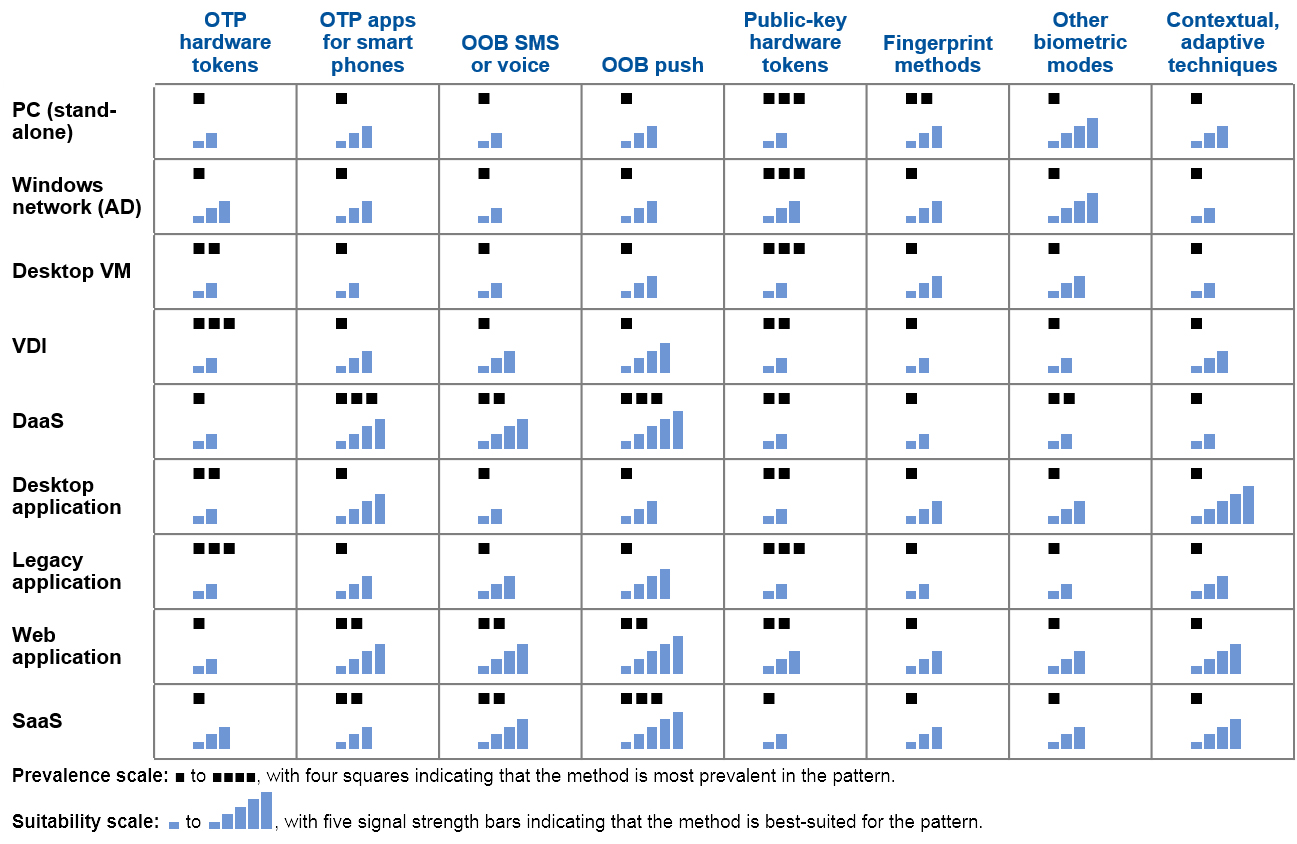
OTP: one-time password
Source: Gartner (April 2016)
Figure 2. Prevalence and Suitability of Authentication Methods for Workforce Privileged User Local Access Use Cases
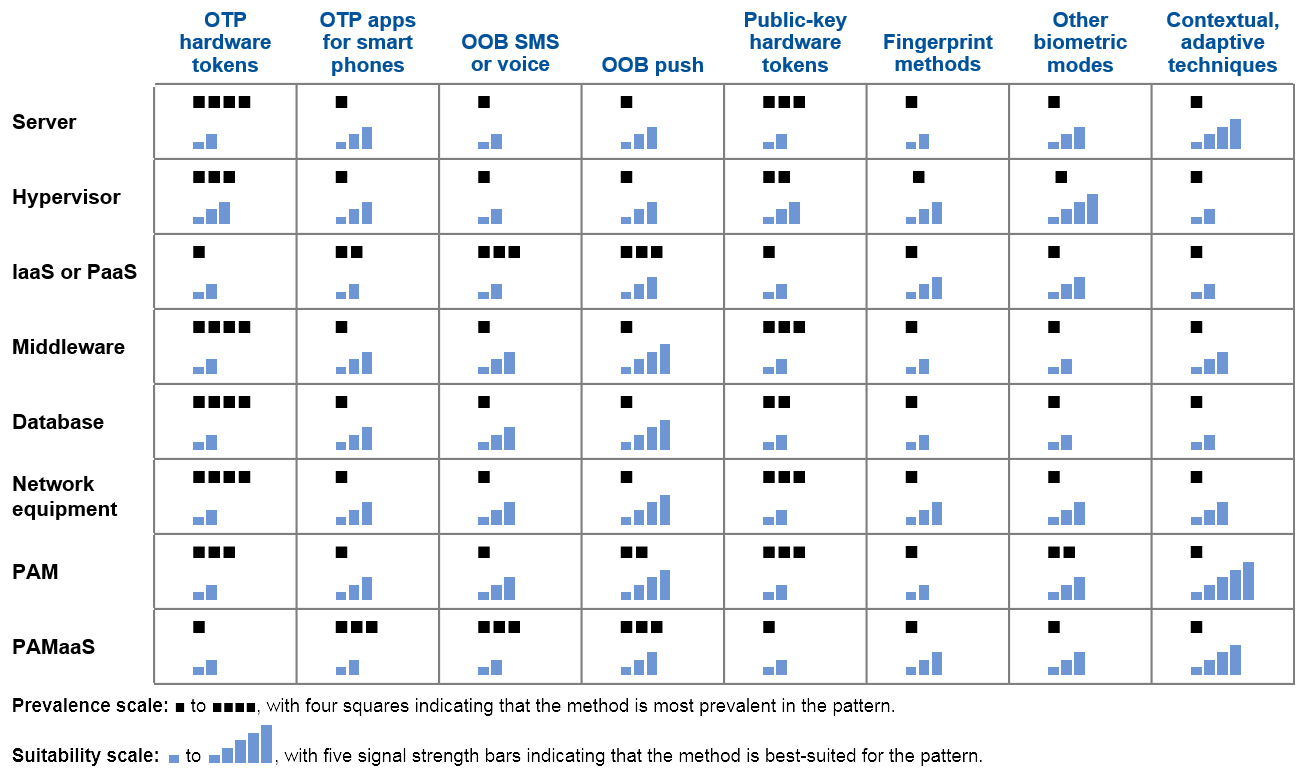
Source: Gartner (April 2016)
Some local data center applications and resources offer native authentication methods for login. These native methods are often inconsistent and do not comply with the enterprise authentication strategy. For applications that don't support standard authentication protocols and can't be easily integrated with the choice of authentication methods, it is advisable to stick with password-based authentication, but ringfence the access to the network at the PC level. This achieves the required level of trust for access to such applications.
For a smaller application base, consider leveraging AD authentication directly via Kerberos for applications that are Kerberos-enabled. The job of making an application Kerberos-ready can be very complex, requiring a considerable amount of customization and integration efforts.
Organizations looking for an alternative to the native authentication methods supported by the applications (including legacy data center apps) should evaluate integration options with third-party authentication products via proprietary software development kits (SDKs) and APIs. IT leaders should ensure that these third-party products support the minimum basic technical requirements for integration with the chosen authentication methods.
Applications may not be easily and directly integrated with an authentication method of choice. The application vendor, however, may support a brokering function that uses a proxy or a standard federation protocol. A Web access management (WAM) tool abstracts authentication away from the application and brokers multiple methods of authentication. Most locally hosted or SaaS-delivered Web-based applications can be integrated with chosen authentication methods using WAM software tools. Most WAM tools today offer a wide range of authentication methods that could partially or entirely replace the need of a stand-alone authentication product for most local access use cases. (Logging in to non-Web-based and some thick-client desktop applications can be achieved through use of enterprise single sign-on [ESSO] components.)
Access to some applications might involve additional trust in the incoming identity of the user. IAM and security leaders should consider using contextual/analytical approaches that evaluate information about the user, the endpoint device and more to elevate trust in the user's claimed identity. This approach also improves UX by evaluating the extracted contextual attributes to elevate trust in the background, thereby reducing additional authentication prompts for and use of higher trust authentication methods.
For certain high-risk local access use cases, such as administrative access to critical systems and databases (most often classified and managed under privileged access management controls), the use of risk-appropriate contextual authentication techniques can significantly increase the levels of trust and accountability. This is accomplished by leveraging context evaluation throughout a user activity session, and not only at the time of session establishment.
It is therefore advisable for IAM and security leaders to identify and use appropriate contextual patterns that can be applied to the local workforce in order to implement a risk-based model for granting access to network resources based on the evaluated risk score.5
In the wake of the 2014 cyberattacks against Sony Pictures, offering a resilient and highly flexible workplace has become a business imperative among mainstream enterprises. Providing fail-safe and secure authentication services to enterprise digital assets is crucial for IT security and IAM leaders in traumatic situations where workforce trust and loyalty may be severely stressed. Organizations should be able to switch to alternate authentication methods in the event of authentication service breakdowns or other emergency situations that impact business-critical infrastructure. Switching to alternate authentication methods can also help to eliminate any existing vulnerabilities arising from compromised credentials.
Since requisite authentication methods may not be available during an emergency situation, IT security and IAM leaders should invest in authentication methods that support emergency service and recovery environments as part of disaster management plans.6 However, it is highly unlikely that this investment will be made only for recovery purposes.
Recommendations:
- Implement risk-appropriate contextual authentication techniques that can significantly increase the UX and levels of trust in high-risk use cases.
- Select authentication methods that make use of contexts and identifiers to enable continuous authentication and to maintain trust throughout the privileged session.
- Establish an emergency preparedness plan for recovery of authentication services during a crisis situation. Participate in disaster recovery exercises to validate resilience and adaptability of authentication methods.
Use Windows 10 Upgrade as an Opportunity to Consolidate Authentication Across the Device Endpoints
The inability of most organizations to implement common authentication methods across multiple device endpoints broadens the inconsistency of a user's login behavior in several use cases. Existing methods that allow for integration of third-party authenticators create portability issues for the range of device endpoints. These issues are especially notable in mobile devices, requiring significant customization to achieve the desired integration or forcing the organizations to choose different authentication methods for different device platforms. All of this contributes to inconsistent UX.
Such customized integrations are fragile and nonstandard, introducing serious performance concerns and requiring review with each new release of device OS platforms. These challenges may result in significant overheads in terms of administration, maintenance and training, adversely impacting the TCO.
Windows 10 introduces Windows Hello and Microsoft Passport features. These are aimed primarily at replacing legacy password authentication with biometric and public-key methods for providing better UX and security. Windows Hello introduces native fingerprint and iris and face recognition capabilities to Windows 10. The native support for fingerprint authentication in Windows 10 will motivate organizations to leverage existing laptop PCs with embedded fingerprint sensors to enable Windows Hello.
While fingerprint authentication works with most fingerprint scanners embedded on devices and external third-party scanners that use the Windows biometric framework,7 iris and face recognition requires specialized infrared (IR) cameras that work in all kinds of lighting conditions and greatly enhance the performance and accuracy by recognizing a user with altered looks (for example, a person with facial hair or cosmetics). As these cameras are not commonly available on desktop PCs and laptops today, device manufacturers are aggressively introducing new devices embedded with such infrared (IR) depth-sensing cameras. Organizations upgrading existing Windows desktop PCs and laptops to Windows 10, and that cannot justify purchasing expensive peripheral cameras (such as Intel RealSense), will lose out on the opportunity to use the native iris and face recognition capabilities of Windows 10.
Microsoft Passport enables extension of Windows Hello biometric authentication capabilities to Azure AD and a number of preintegrated Web services and SaaS cloud applications, such as Concur, Salesforce, ServiceNow and Workday. IT and application developers could use available Passport APIs to integrate Windows Hello authentication with other non-Microsoft applications and services. As Microsoft Passport replaces Credential Service Provider (CSP), which enabled third-party integration of authentication methods in existing Windows OS versions, vendors offering integration with Microsoft Passport will be required to support upcoming Fast IDentity Online (FIDO; see Note 2) 2.0 specifications.
Organizations that have invested heavily in implementing public-key tokens can use existing public-key smart tokens for integrated physical access with Microsoft Passport. Enabling Microsoft Passport for Work requires additional components to be enabled as prerequisites, such as Azure AD for an organizationwide identity provider (IDP) that supports Microsoft Passport. Currently, Microsoft Passport only supports Azure AD deployment; Microsoft has plans to support hybrid and on-premises AD deployments in future releases. For on-premises AD deployments, enabling Microsoft Passport would require the Active Directory Federation Services (ADFS) version included in the Windows Server 2016 Technical Preview domain controllers to support provisioning of Passport credentials to devices.8
Use of Azure AD as an identity provider alongside an on-premises AD deployment facilitates easy rollout of Microsoft Passport for organizations planning a move to the cloud. Gartner recommends beginning preparatory work and planning for Windows 10 immediately, if work has not yet begun, regardless of actual migration schedule.9 IAM and security leaders should therefore perform a readiness assessment of all kinds of in-scope endpoint devices according to the organizations' technology requirements and Windows 10 upgrade strategy.
Recommendations:
- Conduct an in-depth analysis of usability and TCO of installing external depth-sensing cameras that enable face recognition for workforce authentication.
- Use the Windows 10 upgrade as an opportunity to enable consistent use of biometric authentication methods available via Windows Hello across the range of device endpoints for local access use cases.
- Advocate for an early adoption of Windows 10 to best utilize the Windows Hello and Microsoft Passport features that are primarily aimed at providing higher-assurance authentication methods with improved UX.
Evidence
In addition to the citations below, this research is based on a variety of interactions with vendors and end-user organizations.
1 When selecting new authentication methods, Gartner recommends evaluating at least the UX and TCO with authentication strength. Authentication strength is often more formally expressed as "level of assurance." See NIST SP 800-63-2, "Electronic Authentication Guideline" for details on varied assurance levels and threat resistance requirements per assurance level.
2 "Engineering Principles for Information Technology Security (A Baseline for Achieving Security), Revision A" (NIST 800-27 Rev A, June 2004) defines accountability as "the security goal that generates the requirement for actions of an entity to be traced uniquely to that entity. This supports nonrepudiation, deterrence, fault isolation, intrusion detection and prevention, and after-action recovery and legal action."
3 See "Good Authentication Choices: Evaluating Biometric Authentication Methods" for more details on evaluating prospective biometric authentication methods that promise better UX and accountability based on your requirements.
4 Desktop virtualization is vital to organizations migrating to a digital workplace. Gartner recommends that IT leaders plan for adoption of on-premises virtualization technologies to provide a digital workspace on a wider variety of endpoints. See "Desktop Virtualization Will Power the Digital Workplace" for details on multiple virtualization techniques that help to make the end-user computing environment more portable and flexible on the variety of endpoints.
5 See "Predicts 2016: Identity and Access Management" for the near-term prediction on organizations implementing risk-appropriate contextual authentication for privileged access management.
6 Gartner recommends reserving authentication services in the tier for critical infrastructure services that most or all other IT services depend on, and therefore requires these to be configured for resiliency. See "Best Practices for IT Disaster Recovery: Reducing Risks On-Site and in the Cloud" for more information on prioritizing assets and exercising plans to improve DR assurance.
7 See Windows Biometric Framework Overview.
8 See "Implement Microsoft Passport in Your Organization."
9 In "Deciding When to Migrate to Windows 10," Gartner notes that Windows 10 is an inevitable migration for organizations running Windows 10 PCs, and therefore IT planners and support groups should immediately begin the preparatory work to develop a deeper understanding of new OS features and better prepare for the migration. Better planning provides organizations with the opportunity to make adjustments in their environment to better align with Windows 10.
Note 1. Common Access Cards
A common access card (CAC) is a single corporate card or token used for PC and network login (user authentication) and building access. A CAC may also be used as a photo ID card and a stored-value card ("electronic wallet") for vending machines and catering.
For details, please refer to "Technology Insight for Public-Key Tokens."
Note 2. FIDO
FIDO is an industry consortium with an objective to create an interoperability standard across strong authentication devices and techniques providing a standard and consistent experience for the users. It includes a range of technologies, including biometrics, Trusted Platform Modules (TPMs; see Note 3), USB security tokens, embedded Secure Elements (eSE), Near Field Communication (NFC) and smart cards. Of the two proposed protocols based on user experience, the Universal Authentication Framework (UAF) provides a way for local biometric authentication on mobile devices to transition to applications using a standards-based approach. In brief, it proposes standards for a successful on-device authentication that enables the client to authenticate to a specific application via public-key technology. Microsoft Passport is an implementation that has been submitted to the FIDO 2.0-specific workgroup for evaluation and feedback.
Note 3. TPM
Trusted Platform Module (TPM) is an industry standard for securing device hardware by integrating cryptographic keys in the hardware through use of a secure cryptographic processor. Trusted Computing Group (TCG) is the international industry standards group that develops and promotes specifications for use and implementation of TPM as an instantiation of hardware root of trust (HRoT) for interoperable trusted computing platforms. Please refer to About TCG on the group's website for more details on TCG and its functions.
Acronym Key and Glossary Terms
ADFS |
Active Directory Federation Services |
API |
Application program interface |
BYOD |
Bring your own device |
BYOPC |
Bring your own PC |
CAC |
Common access card |
CSP |
Credential Service Provider |
DaaS |
Desktop as a service |
DR |
Disaster recovery |
ESSO |
Enterprise single sign-on |
FIDO |
Fast IDentity Online |
IAM |
Identity and access management |
IDaaS |
IAM as a service |
IDP |
Identity provider |
LDAP |
Lightweight Directory Access Protocol |
NIST |
National Institute of Standards and Technology |
OOB |
Out of band |
OTP |
One-time password |
PKI |
Public-key infrastructure |
SDK |
Software development kit |
TCO |
Total cost of ownership |
TPM |
Trusted Platform Module |
UX |
User experience |
WAM |
Web access management |
